
ProFind 1.38 for Mac

ProFind
Name:ProFind 1.38 [TNT].dmg.torrent (13.56MB)
Hash:6c36642b2ced4f997696abb12bbef22aecc648a2
Review by:
Downloads 193
Rating
4.2 22 Click to rate
Checked
   Download Torrent Download Now

ProFind

An advanced file search utility for macOS that combines natural-language queries, boolean logic, optional disk caching, and content indexing to locate files faster and more precisely than Finder’s built-in search alone.

Typical Mac workflow

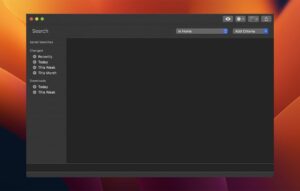
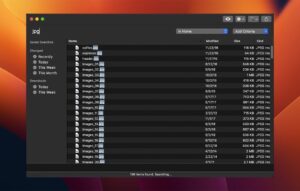
Open ProFind from the menu bar icon or a global hotkey, type a plain-English query such as invoice : modified this month AND bigger than 5mb, and refine with commands for kind, tags, dates, regex, or Spotlight metadata. Results show full paths with difference highlighting; QuickLook, scripts, Shortcuts, and export to CSV follow from the same window. Saved searches and history bring back frequent filters, while favorites and folder groups narrow scope to project directories or disconnected volumes you keep cached offline.

Beyond Spotlight

ProFind can search invisible folders, package contents, network volumes, and external disks without requiring Spotlight for every operation—though metadata queries still use Spotlight indexes when available. Optional disk caches index names, sizes, and dates so repeated searches on slow or offline drives stay responsive. Text content search covers PDFs, Word, RTF, and InDesign files; OCR and on-device image recognition (macOS 12+) extend matching to scanned documents and photos. Version 1.37 added a visual query editor on macOS 14+ for users who prefer building boolean filters with a pencil button instead of typing commands.

Live Directory and version 1.38

Release 1.38 (June 27, 2026) adds Live Directory: type a slash followed by a path in the search field to browse folders directly with live updates as files change. Full AND/OR boolean support expands complex queries documented in the in-app reference. The results table gains optional Tags and Date Last Opened columns you toggle from the list header; selected items show combined size in the status bar. Cache building runs faster, the Activity window reports clearer progress, and a new preference can close the search window automatically after you open a hit.

Licensing and requirements

A 14-day trial is available from the developer site ($6.99 direct) or the Mac App Store, where a one-time in-app purchase unlocks full functionality after the trial. macOS 11 or later is required from 1.38 onward; version 1.37 was the last release supporting macOS 10.15. The free ProFind Remote iOS app searches your Mac over the local network when network searches are enabled in preferences.
 ProFind 1.38 speeds up Mac file search with Live ProFind 1.38 for Mac — Advanced File Search

Pros & Cons Show details

✅ PROS

  • Natural-language and boolean queries let you combine name, date, size, tags, and content filters without memorizing Finder search syntax.
  • Optional disk caches make repeated searches on network or disconnected volumes practical by indexing file metadata locally.
  • Live Directory in 1.38 turns the search field into a browsable path explorer with live file-system updates.
  • Text and OCR content search plus on-device image recognition cover documents and photos Spotlight alone may miss or rank poorly.
  • One-time pricing ($6.99 direct or App Store IAP) avoids subscription fees common among power-user search tools.

❌ CONS

  • macOS 11 is now the floor in 1.38; users on Catalina (10.15) must stay on 1.37 or upgrade the operating system.
  • The visual query editor introduced in 1.37 requires macOS 14, so older supported Macs on Big Sur or Monterey still rely on typed commands.
  • Disk caching and content indexing add setup time and disk use before searches feel faster than a fresh Spotlight query.
  • Full feature breadth has a learning curve; boolean syntax, cache groups, and scripting reward power users more than casual searchers.
  • ProFind Remote and network search are local-network only and need the Mac app running with explicit permission enabled.
✅ What's New in 1.38 Show details
  1. Live Directory — version 1.38 lets you type / plus a path in the search field to browse folders directly with live updates as files change.
  2. Full AND/OR logic — boolean queries now support complete AND/OR combinations documented in the Help reference for complex filters.
  3. Tags and Date Last Opened columns — the results table adds both fields; show or hide any column via right-click on the list header.
  4. Auto-close preference — a new setting closes the search window automatically after you open a result, reducing clutter for quick lookups.
  5. Selected size in status bar — 1.38 displays the combined byte size of all selected items in the status bar for batch size checks.
  6. Faster cache builds — disk cache indexing runs substantially faster in this release, shortening initial setup on large volumes.
  7. Activity window — search and cache-update progress is clearer in the improved Activity window during long operations.
  8. Bug fixes — general stability and minor UI improvements close the 1.38 changelog alongside the feature additions.

Older Versions

Version Publication date
ProFind v1.38 Latest Current
ProFind v1.36
ProFind 1.35 (13503) v1.35.13503
ProFind v1.35
ProFind v1.34
ProFind v1.33
ProFind v1.32
ProFind v1.31
ProFind v1.30
ProFind v1.29
ProFind v1.28
ProFind v1.25
ProFind v1.24
ProFind v1.22
ProFind v1.21.3
ProFind v1.21.2
ProFind v1.21.1
ProFind v1.20.0
ProFind v1.19.0
ProFind v1.18.0
ProFind v1.17.0
ProFind v1.15.0
ProFind v1.14.0
ProFind v1.11.0
ProFind v1.10.0
ProFind v1.9.5
ProFind v1.9.4
ProFind v1.9.3
ProFind v1.9.2
ProFind v1.9.0
ProFind v1.8.10
ProFind v1.8.9
ProFind v1.8.8
ProFind v1.8.7
ProFind v1.8.6
ProFind v1.8.5
ProFind v1.8.4
ProFind v1.8.3
ProFind v1.8.2
ProFind v1.8.1
ProFind v1.8.0
ProFind v1.7.2
ProFind v1.6.7
ProFind v1.6.6
ProFind v1.6.3

Installation & Troubleshooting FAQ

8 questions

Common issues when installing macOS apps

Alternatives

Join the Conversation

Your email address will not be published. Required fields are marked *