
Path Finder 26.1.7 for Mac

path-finder
Name: Path Finder 26.1.7 [TNT].dmg.torrent (27.65MB)
Version: 2617
Operating System: macOS
Program license: Free
Developer: Cocoatech
Interface language: English
Review by:
Downloads 109
Rating
4.5 30 Click to rate
Checked
   Download Torrent Download Now

Path Finder

An advanced macOS file manager from Cocoatech that extends beyond Finder with dual panes, modular shelves, temporary Drop Stack staging, folder compare/sync, and deeper file operations in one browser window.

Everyday file work on Mac

You open Path Finder instead of—or alongside—Finder when you need denser navigation: dual-pane layouts for moving files between disks, a path navigator for typing locations, bookmarks, and shelves that hold tools such as Preview, Info, Terminal, Attributes, and Drop Stack. Drop Stack is a temporary holding area for items you gather before copying, moving, or archiving. Modules can be shown, hidden, and rearranged so power users keep permissions, metadata, and previews visible without opening separate windows for every task. Hidden files can be revealed from the View menu; batch copy, delete, and sync workflows are part of the product’s long-standing focus.

Version 26 rebuilt the browser UI: fuller-height shelves, a cleaner toolbar and path bar, faster icon/list/column rendering, and rewritten Preview, Sidebar, Drop Stack, Info, and Terminal modules. The Terminal can sync its working directory with the browser. Folder comparison and finding duplicates inside selected folders were added in that overhaul. Later 26.1 builds refine visuals (including custom background colors per view type and a redesigned Icons View in 26.1.5), improve Preview editing for text/RTF, and adjust AirDrop support—Apple platform changes removed the dedicated AirDrop view, while Share menu/toolbar AirDrop remains available according to vendor notes.

Licensing, requirements, and fit

Current downloads list macOS 13.0 or later. Licensing is typically a renewable annual subscription (commonly about $29.95), timed license keys (1 / 2 / 5 years), or Setapp; major version 26 is a paid upgrade for older licenses unless your purchase is still within the first-year window. Path Finder suits Mac users who outgrow Finder for dual-pane work, cloud/FTP-style transfers where supported, and modular inspection—but expect a learning curve and ongoing license cost. Version 26.1.7 is the current stable Sparkle build; Cocoatech’s public updates page documents the 26.1 feature set rather than a separate itemized changelog for this patch alone.
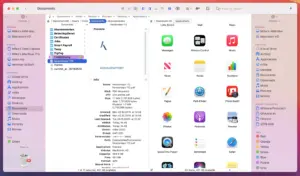

Path Finder 26.1.7 for Mac — Finder Alternative

Pros & Cons Show details

✅ PROS

  • Dual-pane browsing and Drop Stack make multi-folder copy/move workflows faster than single-window Finder for many power users.
  • Modular shelves (Preview, Info, Terminal, and more) keep metadata and tools beside the file list without constant window juggling.
  • Version 26’s redesign improves view performance and resource use for inactive panes compared with older layouts, per the vendor.
  • Folder compare, duplicate finding, and optional cloud/remote upload helpers extend Path Finder beyond basic file browsing.

❌ CONS

  • Access is paid—subscription, timed license keys, or Setapp—rather than a free perpetual Finder replacement.
  • Version 26 is a paid upgrade for many existing licenses, and some legacy settings were dropped in the redesign.
  • The dedicated AirDrop browser view was removed due to Apple OS changes; AirDrop sharing remains only via Share actions.
  • Dense modular UI and keyboard habits differ from Finder, so occasional users may find the learning curve steep.
✅ What's New in 2617 Show details
  1. [Custom view backgrounds] — 26.1 adds custom background colors for Icons, List, and Columns views.
  2. [Services & Open With] — Contextual Services are on by default; Open With reliability and text-file default-editor opening were improved/fixed in 26.1.
  3. [Icons View redesign] — 26.1.5 completely redesigned Icons View; 26.1.6 followed with small cosmetic fixes (TidBITS).
  4. [Preview editing & media] — 26.1.4 enables editing text-based files (including RTF) in Preview and adds media playback controls in the column-view preview.
  5. [AirDrop view removed] — Dedicated AirDrop view dropped due to Apple OS changes; Share menu/toolbar AirDrop remains.
  6. [Browser polish] — Recent 26.1.x work covers Default Browser window/tab locations, Reveal in Finder behavior, Columns/preview improvements, Goto Folder, and folder-icon copy fixes.
  7. [Stability pass] — Ongoing 26.1.x releases emphasize stability, performance, and UI glitch fixes across icon and list views.

Older Versions

Version Publication date
Path Finder v2617 Latest Current
Path Finder v2211
Path Finder v2204
Path Finder v2202
Path Finder v2200
Path Finder v2197
Path Finder v2191
Path Finder v2189
Path Finder v2188
Path Finder v2186
Path Finder v2185
Path Finder v2184
Path Finder v2181
Path Finder v2180
Path Finder v2178
Path Finder v2176
Path Finder v2175
Path Finder v2174
Path Finder v2173
Path Finder v2172
Path Finder v2170
Path Finder v2168
Path Finder v2166
Path Finder v2165
Path Finder v2164
Path Finder v2161
Path Finder v2159
Path Finder v2154
Path Finder v2153
Path Finder v2152
Path Finder v2151
Path Finder v2150
Path Finder v2149
Path Finder v2148
Path Finder v2147
Path Finder v2146
Path Finder v2142
Path Finder v2138
Path Finder v2136
Path Finder v2135
Path Finder v2134
Path Finder v2133
Path Finder v2131
Path Finder v2130
Path Finder v2129
Path Finder v2128
Path Finder v2127
Path Finder v2126
Path Finder v2125
Path Finder v2124
Path Finder v2123
Path Finder v2121
Path Finder v11.2
Path Finder v11.1
Path Finder v11.0
Path Finder 10.0b12 v10 0b12
Path Finder 10.0b11 v10 0b11
Path Finder v10.2
Path Finder v10.1.2
Path Finder v10.1.1
Path Finder v10.1
Path Finder v10.0.4
Path Finder v10.0.3
Path Finder v10.0.2
Path Finder v10.0.1
Path Finder v10.0
Path Finder v9.4
Path Finder v9.3.5
Path Finder v9.3.4
Path Finder v9.3.2
Path Finder v9.3.1
Path Finder v9.3
Path Finder v9.0.5
Path Finder v9.0.2
Path Finder v9.0.1
Path Finder v8.6
Path Finder v8.5.2
Path Finder v8.5.1
Path Finder v8.5

Installation & Troubleshooting FAQ

8 questions

Common issues when installing macOS apps

Alternatives

Join the Conversation

Your email address will not be published. Required fields are marked *