
Oka Unarchiver PRO 2.1.13 for Mac

Oka Unarchiver Pro
Name:Oka Unarchiver 2 2.1.13 MAS [TNT].dmg.torrent (27.72MB)
Hash:6f922f3bc6d47eb403b1eefe22ffb50946c573e8
Review by:
Downloads 91
Rating
4.3 34 Click to rate
Checked
   Download Torrent Download Now

Oka Unarchiver PRO

A macOS archive manager from ChengHao Wu (Oka Apps) that compresses and extracts ZIP, RAR, 7Z, and many legacy formats when the built-in Archive Utility is not enough—especially for RAR and multi-part archives.

Typical Mac workflow

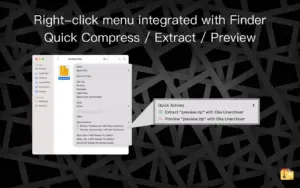
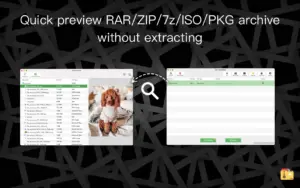
Drop archives onto the app window or Dock icon for batch extraction, or use the Finder extension to compress, extract, or Quick Look preview files inside an archive without fully expanding it first. Oka Unarchiver supports password-protected archives, multi-volume ZIP and 7Z sets, and selective extraction by dragging individual files from the archive list into Finder. Compression output is primarily ZIP, with optional password protection on supported builds.

The developer sells two Mac App Store paths: Oka Unarchiver Pro as a one-time $7.99 purchase with full features upfront, and a free download with optional VIP upgrades (lifetime, monthly, or yearly) for ad removal, volume compression, and password tools. Both lines share the same core format list—7Z, ZIP, RAR, TAR, GZIP, BZIP2, XZ, LZIP, ACE, ISO, CAB, PAX, JAR, AR, CPIO, and more—and run on Intel and Apple Silicon Macs with macOS 10.13 or later.

Licensing and version 2.1.13

Version 2.1.13 is a maintenance build on the current App Store release track (listed as “Unzip Pro 2” in some storefronts). The Mac App Store “What’s New” text for 2.1.13 documents only general bug fixes; the separate Oka Unarchiver Pro paid listing may still show an older build number until Apple propagates the update. Oka Apps positions the app as the only Mac App Store option advertising multi-volume ZIP support, though split-archive workflows may require adding all parts manually due to sandbox permissions.
Oka Unarchiver PRO 2.1.13 extracts and creates ZIP, RAR, 7Z Oka Unarchiver PRO 2.1.13 — Archive Utility for Mac

Pros & Cons Show details

✅ PROS

  • Opens RAR and 7Z alongside ZIP and many legacy formats that macOS Archive Utility cannot handle natively.
  • Finder Quick Action extension lets you compress, extract, or preview archives from the right-click menu without opening the main window.
  • Batch extraction and drag-and-drop workflows suit folders of downloads or multi-file release archives.
  • One-time Pro purchase around $8 avoids recurring subscription fees common among premium Mac utilities.
  • Universal binary support covers both Intel and Apple Silicon Macs on macOS 10.13 High Sierra or later.

❌ CONS

  • Version 2.1.13 publishes only “Bug Fixes” in App Store release notes, so the changelog is not detailed.
  • The free app shows ads unless you buy Pro or upgrade to VIP; two storefront listings can confuse which build is current.
  • Mac App Store sandbox limits automatic discovery of multi-volume archive parts in the same folder per the developer FAQ.
  • Compression is mainly ZIP; 7Z creation and advanced archive editing are more limited than dedicated tools like Keka or BetterZip.
  • The developer collects diagnostics and usage data (not linked to identity per the privacy label), which privacy-focused users may still dislike.
✅ What's New in 2.1.13 Show details
  1. Bug fixes (2.1.13) — Mac App Store release notes for version 2.1.13 document general bug fixes only.
  2. Maintenance release — Version 2.1.13 is a patch in the 2.1.x line with no new formats or features advertised.
  3. Prior user-reported fixes (2.1.10) — Version 2.1.10 addressed issues reported by users per Mac App Store version history tracked by MacUpdater.
  4. Prior UI fix (2.1.9) — Version 2.1.9 (April 2024) fixed a UI issue in the 2.1.x series.
  5. Storefront rename — Some App Store regions now list the free/VIP app as “Unzip Pro 2” while retaining the same Oka Unarchiver codebase.
  6. Core capabilities unchanged — RAR extraction, Finder extension, batch unzip, password archives, and multi-part ZIP support remain as documented; 2.1.13 does not extend the format list.

Older Versions

Version Publication date
Oka Unarchiver PRO v2.1.13 Latest Current
Oka Unarchiver PRO v2.1.4
Oka Unarchiver PRO v2.1.2
Oka Unarchiver Pro v2.0.7
Oka Unarchiver Pro v2.0.2

Installation & Troubleshooting FAQ

8 questions

Common issues when installing macOS apps

Alternatives

Join the Conversation

Your email address will not be published. Required fields are marked *