Noir
A Safari web extension for macOS by indie developer Jeffrey Kuiken that analyzes each page you load and applies a tailored dark stylesheet so bright sites are easier on your eyes at night.
How it works in Safari on Mac
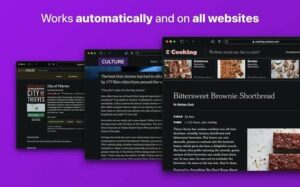
After you enable the Noir extension in Safari settings, it runs automatically on every page load. Noir reads the site’s existing colors and generates a dark variant that keeps contrast and highlights readable rather than applying a flat invert filter. You can pick from more than twenty built-in themes or build your own, and set rules per website—enable Noir only on selected domains, disable it on others, or tie activation to macOS Dark Mode so pages stay light during the day.
Settings sync through iCloud to iPhone, iPad, and other Macs where you use Noir. Shortcuts, Focus Filters, and widgets let you toggle behavior from system automation without opening the companion app each time. If a site renders poorly, the in-app report flow feeds fixes into frequent updates like build 2026.1.7.
Privacy and licensing
Noir needs permission to read page styles to inject its dark theme, but the developer states it does not collect browsing data—only settings stored on your device and iCloud. It is a one-time Mac App Store purchase (about $4 in the U.S.) with no subscription or ads. Version 2026.1.7 (June 2026) ships website compatibility fixes, including restored loading on nytimes.com and a workaround for unwanted YouTube autoplay when Safari blocks autoplay.