Mp3tag 1.13.0 for Mac

Mp3tag
Name:Mp3tag 1.13.0 [TNT].dmg.torrent (13.43MB)
Hash:bfa098d3cb5dadfd2fb4eaf0ce1ffdb7bbf4388d
Review by:
Downloads 128
Rating
4.4 34 Click to rate
Checked
   Download Torrent Download Now

What Mp3tag does on Mac

Mp3tag is a native macOS metadata editor that lets musicians, DJs, podcasters, and collectors batch-edit tags, embed cover art, rename files, and pull data from online databases across dozens of audio formats.

Developed by Florian Heidenreich, Mp3tag for Mac mirrors the long-running Windows utility in a Mac-native interface. You select one file or thousands, edit ID3v1/v2, MP4, Vorbis, APE, and RIFF fields in a spreadsheet-style file list, download artwork from Discogs or MusicBrainz, and apply reusable action groups for repetitive cleanup tasks such as case conversion, field formatting, or cover resizing.

Typical Mac workflow

Most users drag a folder of tracks into Mp3tag, run a Tag Source lookup to fill artist, album, year, and genre, adjust embedded covers, then rename files with a format such as %artist% – %title%. Action groups automate recurring steps so a podcast archive or DJ library stays consistent. Export templates can generate HTML or CSV reports, and converters import tags from filenames when rips arrive with messy naming.

Version 1.13.0

Released June 20, 2026, build 1.13.0 expands format support and tightens save behavior. RF64 WAV files larger than 4 GB are now supported, a new action removes macOS Where From extended attributes, and a file_xattr_where_froms information field exposes that provenance data inside Mp3tag. Fixes address Tag Panel cover loss when switching to Extended Tags, unsaved edits before Cover Search or Tag Sources, MP4 BPM decimal handling, empty MP4 atom edits, and text-only toolbar items.

Licensing and requirements

Mp3tag requires macOS 10.14 or later and is available on the Mac App Store for $24.99 or as a standalone download from mp3tag.app with a 7-day trial that counts only days you actually use the app. The developer does not collect user data according to the App Store privacy label. Windows users need the separate build from mp3tag.de; licenses are not cross-platform.
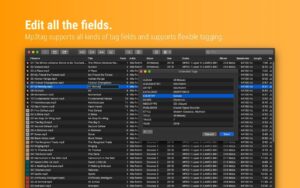

Mp3tag 1.13.0 for Mac — Audio Tag Editor

Pros & Cons Show details

✅ PROS

  • Mp3tag edits tags for MP3, FLAC, MP4, OGG, OPUS, WAV, DSF, MPC, and video containers like M4V and MKV from one unified Mac interface.
  • Built-in Discogs and MusicBrainz lookups reduce manual typing when rebuilding large music or podcast libraries.
  • Action groups let you chain formatting, renaming, cover resizing, and field cleanup into reusable one-click workflows.
  • Version 1.13.0 adds RF64 WAV support for files above 4 GB, which matters for long live recordings and archival WAV masters.
  • The app ships in 16 languages, collects no data per the developer privacy label, and offers Family Sharing on the Mac App Store.

❌ CONS

  • Mp3tag for Mac is a paid app ($24.99 on the App Store) with a limited trial rather than a permanently free tag editor.
  • Mac and Windows builds are separate products with separate licenses, so one purchase does not cover both platforms.
  • Version 1.13.0 focuses on RF64 WAV, Where From attributes, and save-flow fixes rather than major new Tag Source providers.
  • Advanced MP4 and server compatibility sometimes needs obscure Advanced settings, which can confuse casual users.
  • The Mac App Store sandbox can limit certain filesystem workflows compared with the standalone build from the developer website.
✅ What's New in 1.13.0 Show details
  1. [RF64 WAV support] — Mp3tag now opens and tags RF64 WAV files larger than 4 GB, extending support beyond standard WAV size limits.
  2. [Remove Where From action] — A new action type strips macOS Where From extended filesystem attributes from files when you want cleaner archives.
  3. [file_xattr_where_froms field] — A new information field exposes Where From extended attribute data so you can inspect download provenance inside Mp3tag.
  4. [Action groups toolbar state] — The action groups toolbar segment is disabled when no action groups exist, avoiding a confusing empty menu.
  5. [Tag Panel cover save fix] — Cover edits in the Tag Panel are no longer discarded if you open Extended Tags before saving.
  6. [Unsaved Tag Panel guard] — Unsaved Tag Panel changes are preserved when you run Cover Search, Tag Sources, Converters, Auto-Numbering, or Actions before saving.
  7. [MP4 BPM write fix] — Decimal BPM values are truncated to integers again when writing MP4 tags, preventing an unwanted user-defined TEMPO field.
  8. [Empty MP4 atom editing] — MP4 atoms with empty content can now be modified or removed instead of blocking edits.
  9. [Text-only toolbar fix] — Text-only toolbar items now behave as expected after a regression in the previous build.

Older Versions

Version Publication date
Mp3tag v1.13.0 Latest Current
Mp3tag v1.12.2 fix
Mp3tag v1.12.1
Mp3tag v1.12.0
Mp3tag v1.11.0
Mp3tag v1.10.3
Mp3tag v1.10.2
Mp3tag v1.10.1
Mp3tag v1.10.0
Mp3tag v1.9.13
Mp3tag v1.9.12
Mp3tag v1.9.12
Mp3tag v1.9.10
Mp3tag v1.8.26
Mp3tag v1.8.25
Mp3tag v1.8.24
Mp3tag v1.8.23
Mp3tag v1.8.22
Mp3tag v1.8.21
Mp3tag v1.8.20
Mp3tag v1.8.19
Mp3tag v1.8.18
Mp3tag v1.8.17
Mp3tag v1.8.16
Mp3tag v1.8.15
Mp3tag v1.8.14
Mp3tag v1.8.13
Mp3tag v1.8.12
Mp3tag v1.8.11
Mp3tag v1.7.8
Mp3tag v1.7.6
Mp3tag v1.7.5
Mp3tag v1.7.4
Mp3tag v1.7.2
Mp3tag v1.7.1
Mp3tag v1.7.0
Mp3tag v1.6.7
Mp3tag v1.6.6
Mp3tag v1.6.5
Mp3tag v1.6.4
Mp3tag v1.6.3
Mp3tag v1.6.2
Mp3tag v1.6.0
Mp3tag v1.5.2
Mp3tag v1.2.2
Mp3tag v1.2.1
Mp3tag v1.2.0
Mp3tag v1.1.4
Mp3tag v1.1.2
Mp3tag v1.1.1
Mp3tag v1.1.0

Installation & Troubleshooting FAQ

8 questions

Common issues when installing macOS apps

Alternatives

Join the Conversation

Your email address will not be published. Required fields are marked *