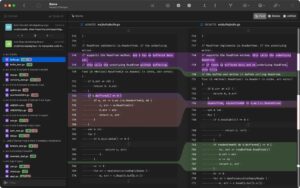
What Gitfox does on Mac
Gitfox is a native macOS Git client that puts repositories, diffs, commit history, and hosted service accounts in one keyboard-friendly app for everyday and advanced Git work.
Developed by Erik Aigner, Gitfox targets developers who want more than basic staging but less clutter than a full IDE. You manage local and remote repos, review inline diffs with line-level staging, search history by message, author, file, or full text, and run workflows such as interactive rebase, Git Flow, bisect, cherry-pick, and submodule or worktree management from a Mac-native interface.
Typical Mac workflow
Most users open a repository, inspect changes in the diff view, stage hunks or individual lines, and commit with syntax-aware message editing. From the log you compare branches, open blame, recover work through reflogs and stashes, and push to GitHub, GitLab, Bitbucket, or Gitea accounts configured inside the app. Quick Actions, customizable shortcuts, and arrow-key navigation between panes keep common tasks fast without reaching for Terminal.
Version 4.4.0
Build 4.4.0 adds a diff setting to disable line wrapping and TeX equation rendering in Markdown READMEs. Improvements cover commit avatar fallbacks, sanitized branch and tag names, softer generated avatar colors, smarter repository outline search and branch grouping, and retries for transient network failures. Fixes address nested worktree labeling, background fetch error sheets, non-contiguous squash and fixup selections, stale large-diff formatting, and a Markdown rendering crash.
Licensing and requirements
Gitfox 4.4.0 on the Mac App Store is free with optional subscriptions ($7.99 monthly or $49.99 yearly) and requires macOS 26.0 or later. The sandboxed App Store build does not support external diff or merge tools or command-line integration; the direct download from gitfox.app offers those features with perpetual or yearly licensing. The developer collects diagnostics not linked to your identity per the privacy label.