Folder Icon Maker 1.6 for Mac

Folder Icon Maker
Name:Folder Icon Maker 1.6 MAS [TNT].dmg.torrent (4.4MB)
Hash:d8e36a9bd412d4b988549e82ad36d8d5eb134e09
Review by:
Downloads 268
Rating
4.5 20 Click to rate
Checked
   Download Torrent Download Now

Folder Icon Maker

A lightweight Mac App Store utility that composites a PNG, app icon, or short text onto a macOS folder template so Finder folders are easier to recognize at a glance.

Default blue folders blur together when you keep many project directories on the desktop or in Documents. Folder Icon Maker (CokeSoft / seller 方成 印) is built for a two-step workflow: drag a transparent PNG—or an existing application icon—into the preview, then drag the target folder onto the app to apply the result. You can reposition the overlay with the mouse, scale it with the scroll wheel or trackpad, and optionally add text on top of the folder artwork. Several folder color styles and effect options are offered so the badge sits on a light or tinted folder base.

How people use it day to day

Typical uses include labeling client folders with logos, marking archive directories with year badges, or giving media libraries distinct pictograms without renaming paths. Transparent PNGs work best; opaque images tend to look boxed. The app does not replace full icon editors such as Icon Composer or Image2icon—there is no deep .icns layer editing, batch library manager, or Tahoe-style symbol picker—but for quick Finder personalization it stays out of the way. Family Sharing covers up to six members on the same purchase.

Version 1.6 requires macOS 11.0 or later, installs at about 1.1 MB, and ships in English plus nine other languages (French, German, Italian, Japanese, Korean, Portuguese, Simplified and Traditional Chinese, Spanish). Pricing is a one-time $1.99 on the Mac App Store. The privacy label states that no data is collected from the app.

Version 1.6

The Mac App Store What’s New for 1.6 lists only a bug fix, with no detailed feature changelog. Treat this build as a maintenance release on the existing drag-and-drop icon workflow rather than a redesign. If you already rely on PNG overlays and text badges, install 1.6 for stability; newcomers get the same core path—drop image, adjust, drop folder—without expecting new templates or Tahoe-native folder-symbol tools in this update.
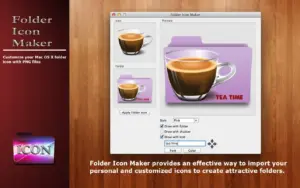

Folder Icon Maker 1.6 for Mac — Custom Folder Icons

Pros & Cons Show details

✅ PROS

  • Drag-and-drop PNG or app-icon overlay applies a custom look to a real Finder folder in two steps.
  • Mouse drag and scroll/trackpad scaling make badge position and size easy to fine-tune.
  • Optional text on icons helps label years, clients, or project codes without renaming folders.
  • Multiple folder color styles give a bit of variety beyond the default blue template.
  • One-time $1.99 price with Family Sharing keeps the cost low for a single-purpose tool.
  • Tiny ~1.1 MB install and a no-data-collected privacy label suit users who want a minimal utility.

❌ CONS

  • Mac App Store What’s New for 1.6 says only “bug fix”—no verified list of what was repaired.
  • No advanced .icns authoring, batch processing, or Tahoe custom-symbol/emoji folder tools.
  • Best results need transparent PNGs; opaque images often look crude on the folder base.
  • Requires macOS 11 or later, so older Catalina/Mojave Macs cannot run this store build.
  • English-centric older CokeSoft docs; support is mainly email 1, not a rich help site.
  • Overlaps with free Get Info paste-icon workflows—paid value is mainly the compositing UI, not unique Finder APIs.
✅ What's New in 1.6 Show details
  1. [Bug fix] — The developer’s only stated change for 1.6 is an unspecified bug fix.
  2. [Version 1.6 release] — Listed on the Mac App Store as the current build (about two days before this card was written).
  3. [Maintenance scope] — No new folder styles, text tools, or export formats are advertised for this version.
  4. [macOS 11 requirement] — Store compatibility requires macOS 11.0 or later on this listing.
  5. [Core workflow unchanged] — Drag PNG/app icon, adjust, drop folder remains the documented usage path.
  6. [Pricing unchanged] — Remains a $1.99 one-time purchase with Family Sharing.
  7. [Privacy unchanged] — App Store privacy label still reports that no data is collected.

Installation & Troubleshooting FAQ

8 questions

Common issues when installing macOS apps

Alternatives

Join the Conversation

Your email address will not be published. Required fields are marked *