Flacbox 7.4 for Mac

Flacbox
Name:Flacbox 7.4.dmg.torrent (99.36MB)
Hash:5a7992d5b545d9897d1b626eeda0ad11d6838917
Review by:
Downloads 117
Rating
4.3 15 Click to rate
Checked
   Download Torrent Download Now

Flacbox is a hi-res music player for Mac, iPhone, and iPad from Everappz (EVERAPPZ SL) that plays FLAC, DSD, ALAC, WAV, and 120+ formats natively while streaming libraries from cloud storage, NAS shares, and self-hosted media servers.

How Mac users listen

On Apple Silicon Macs, you add sources—local folders, iCloud Drive, Dropbox, SMB/WebDAV/DLNA, or in 7.4 Plex, Jellyfin, Emby, Subsonic, Navidrome, Internxt, Proton Drive, QNAP, Nextcloud, Amazon S3, FTP, SFTP, and NFS. Flacbox indexes metadata, builds playlists, and plays gapless with a 10-band equalizer, lyrics, AirPlay, and Chromecast. Offline caching lets you download albums for flights or commutes without re-encoding lossless files. A built-in tag editor and M3U/CUE playlist support suit large personal libraries moved off Apple Music.

Free vs Premium

Flacbox is free to download with optional Premium ($2.99/month, $19.99/year, or $69.99 lifetime per the US App Store). Premium removes usage limits such as connection caps and ads. Purchases sync between iOS and Mac via iCloud when signed into the same Apple ID. The app does not include music or servers—you connect your own storage and accounts.

Version 7.4

Build 7.4 is a major Everappz release: CarPlay rebuilt with fast sorting, color themes, queue view, and letter index; 10+ new connection types including Plex, Jellyfin, Navidrome, SFTP, and Proton Drive; Liquid Glass UI refresh on macOS 26; stronger network libraries; redesigned Home Screen widgets; and playback fixes on some self-hosted servers. Requires macOS 12.0 or later and a Mac with Apple M1 or later.
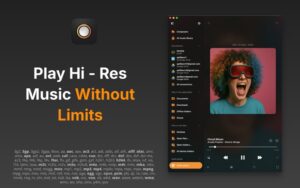

Flacbox 7.4 for Mac — Hi-Res Music Player

Pros & Cons Show details

✅ PROS

  • Flacbox plays FLAC, DSD, ALAC, and other lossless formats natively on Mac—something Apple Music and many players still avoid without conversion.
  • Version 7.4 adds Plex, Jellyfin, Emby, Subsonic, Navidrome, SFTP, and privacy clouds so one app can reach NAS, home-lab, and encrypted storage libraries.
  • Streaming plus offline download keeps hi-res collections off the internal SSD while still allowing airplane-mode playback after caching.
  • The rebuilt CarPlay experience (also relevant when using iPhone as a Mac companion) improves large-library navigation with letter index and faster sorting.
  • A free base update for 7.4’s new connectors and Liquid Glass UI lowers the barrier before deciding on Premium.

❌ CONS

  • The Mac App Store build requires Apple M1 or later—Intel Mac users cannot install the current universal Mac app listing.
  • Flacbox provides no music or servers; you must configure Plex, NAS, cloud accounts, or SFTP endpoints yourself.
  • Advanced unlimited connections and ad removal sit behind Premium IAP ($2.99/month to $69.99 lifetime).
  • App Store privacy labels list tracking and linked data (identifiers, usage data), which may concern listeners expecting a fully private audiophile tool.
  • App Store What’s New has moved to 7.5; users on the latest store build see stability fixes rather than the 7.4 feature changelog unless they match that version.
✅ What's New in 7.4 Show details
  1. [CarPlay rebuild] — CarPlay is redesigned with fast sorting, color themes, a new Now Playing screen, full queue view, and letter index for huge lossless libraries.
  2. [Plex, Jellyfin, Emby, Subsonic, Navidrome] — Native media-server clients stream full hi-res libraries with metadata and artwork from popular self-hosted servers.
  3. [Internxt and Proton Drive] — Privacy-focused encrypted cloud storage joins Flacbox as direct music sources without manual sync.
  4. [QNAP, Nextcloud, Amazon S3] — Personal server and object-storage connections expand beyond traditional SMB and WebDAV setups.
  5. [FTP, SFTP, NFS] — Classic network protocols let Mac users stream from home labs, VPS hosts, and generic NAS boxes; SFTP suits secure remote access.
  6. [Liquid Glass UI] — Library, Now Playing, equalizer, and settings adopt Apple’s Liquid Glass aesthetic on macOS 26 and iOS 26.
  7. [Network library refresh] — Updated connection stacks improve reliability for WebDAV, SMB, DLNA, and major cloud providers on slower links.
  8. [Home Screen widgets] — Redesigned Now Playing, queue, and Recently Played widgets refresh more reliably with less battery drain.
  9. [Server playback fixes] — Seeking stalls and slow starts on large FLAC/DSD files from some self-hosted servers are addressed in 7.4.

Older Versions

Version Publication date
Flacbox v7.4 Latest Current
Flacbox v6.8

Installation & Troubleshooting FAQ

8 questions

Common issues when installing macOS apps

Alternatives

1 Comment

  1. Run the downloaded image and drag the application to the Applications folder shortcut.

    Once the copy is complete, you can launch the application from Launchpad.

    Compatibility
    macOS 12 and later

    Architecture
    ARM, x86 (64-bit)

Join the Conversation

Your email address will not be published. Required fields are marked *