Final Cut Pro 12.3 for Mac

Final Cut Pro
Name:Final Cut Pro 12.3.dmg.torrent (5.97GB)
Review by:
Downloads 223
Rating
4.3 27 Click to rate
Checked
Download Now

Final Cut Pro

Apple’s professional nonlinear video editor for macOS built around the Magnetic Timeline, deep ProRes support, integrated color and audio tools, and on-device intelligence features for faster finishing.

Typical Mac workflow

You import footage into a library, keyword and rate clips in the browser, then assemble edits on the Magnetic Timeline where connected clips stay in sync as you trim and rearrange. Roles separate dialogue, music, and effects for mixing; built-in color wheels, curves, and HDR tone mapping handle grading without leaving the app. Object Tracker, Magnetic Mask, Smart Conform, and Beat Detection speed up common finishing tasks, while Compressor and Motion extend export encoding and motion graphics when bundled through Apple Creator Studio.

Version 12.3 expands that stack with Generate Captions for on-device subtitle creation, Auto Mask for isolating subjects without manual rotoscoping, a rebuilt Match Color tool for cross-camera consistency, and Edit Detection that splits rendered footage at shot changes. Editing refinements include a persistent two-up display during Precision Editor trims, one-click frame export to Pixelmator Pro, HEVC-based proxy media, and bulk subtitle inspector controls. Export paths cover ProRes and HEVC masters, social presets, and XML handoff to external color or sound workflows.

Licensing and version 12.3

Final Cut Pro sells for $299.99 as a one-time Mac App Store purchase that continues to receive updates, or it is included in Apple Creator Studio at about $12.99 per month or $129 per year. The app requires macOS 15.6 or later, 8 GB of RAM (16 GB recommended), a Metal-capable GPU on Intel Macs, and 7.2 GB of free disk space. Generate Captions needs Apple silicon and is U.S. English only; other 12.3 intelligence features also lean on Apple silicon hardware according to Apple.
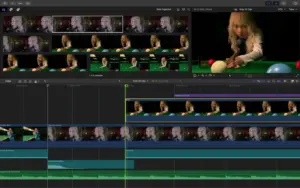
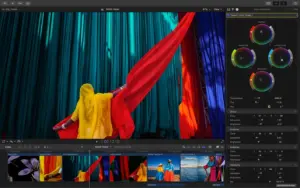
Final Cut Pro 12.3 — Pro Video Editor for Mac Final Cut Pro 12.3 adds Generate Captions

Pros & Cons Show details

✅ PROS

  • Magnetic Timeline and Clip Connections keep complex edits in sync without traditional track management overhead.
  • Tight Apple silicon optimization and native ProRes/ProRes RAW support deliver fast playback on current Mac hardware.
  • Version 12.3 adds practical AI tools — captions, Auto Mask, Match Color, and Edit Detection — inside the main editing workflow.
  • Integrated color, audio, and role-based mixing reduce round-trips to separate grading or DAW apps for many projects.
  • One-time $299.99 purchase remains available alongside Creator Studio for users who prefer not to subscribe.

❌ CONS

  • Requires macOS 15.6 or later, which excludes Macs stuck on older Sonoma or Ventura builds.
  • Generate Captions is limited to U.S. English and Apple silicon Macs, leaving Intel users and other languages out.
  • Full Creator Studio premium content and companion apps need a subscription beyond the standalone FCP license.
  • Demanding projects benefit from 16 GB RAM or more; proxy and render workflows still consume significant disk space.
  • Mac App Store distribution only; there is no Windows or Linux version for cross-platform post houses.
✅ What's New in 12.3 Show details
  1. Generate Captions — On-device AI creates customizable subtitles from spoken audio for social and platform delivery (Apple silicon, U.S. English only).
  2. Auto Mask — Isolates recognized objects such as skin, sky, or clothing for color work without manual tracking.
  3. Match Color — Rebuilt tool matches color across cameras, lighting setups, and cinematic styles within a timeline.
  4. Edit Detection — Analyzes rendered video, reveals shot changes, and splits footage into separate clips automatically.
  5. Persistent two-up display — Stays visible while trimming with keyboard shortcuts or the Precision Editor.
  6. HEVC proxies — Proxy media now uses HEVC instead of H.264 for better compression efficiency and HDR proxy support.
  7. RAW and export fixes — Resolves segmented RAW open failures, log-proxy color tinting, multi-project export crashes, and browser date-sorting bugs.

Older Versions

Version Publication date
Final Cut Pro v12.3 Latest Current
Final Cut Pro v12.2
Final Cut Pro v12.0
Final Cut Pro v11.2.0
Final Cut Pro v11.1.1
Final Cut Pro v11.1.0
Final Cut Pro v11.0.1
Final Cut Pro v11.0.0
Final Cut Pro v10.8.1
Final Cut Pro v10.8.0
Final Cut Pro v10.7.1
Final Cut Pro v10.7.0
Final Cut Pro v10.6.10
Final Cut Pro v10.6.9
Final Cut Pro v10.6.8
Final Cut Pro v10.6.7
Final Cut Pro v10.6.6
Final Cut Pro v10.6.5
Final Cut Pro v10.6.4
Final Cut Pro v10.6.3
Final Cut Pro v10.6.2
Final Cut Pro v10.6.1
Final Cut Pro v10.6.0
Final Cut Pro v10.5.4
Final Cut Pro v10.5.3
Final Cut Pro v10.5.2
Final Cut Pro v10.5.1
Final Cut Pro v10.5
Final Cut Pro v10.4.10
Final Cut Pro v10.4.9
Final Cut Pro v10.4.6
Final Cut Pro v10.4.5
Final Cut Pro v7.0.3

Installation & Troubleshooting FAQ

7 questions

Common issues when installing macOS apps

Alternatives

Join the Conversation

Your email address will not be published. Required fields are marked *