
File List Export 3.0 for Mac

File List Export
Name:File List Export 3.0 MAS [TNT](2).dmg.torrent (24.61MB)
Hash:63163976b78aa08ab3c427d6419d65ed9859d922
Review by:
Downloads 277
Rating
4.4 30 Click to rate
Checked
   Download Torrent Download Now

File List Export

A focused macOS utility from Georgios Trigonakis (formerly File list to Excel) that scans directories and builds editable tables of file names, paths, and metadata you can filter before saving to a spreadsheet or document format.

Typical Mac workflow

You select a folder or drag files into the app, choose whether to recurse into subfolders, and wait while it indexes the contents. The preview grid supports search, sorting, and filtering by kind, so you can list only photos, videos, audio, or PDFs from a large tree. Pick which of 36 or more columns to show—basics such as size and dates, audio tags, image dimensions, video codecs, MD5 and SHA-256 checksums, and photo EXIF including GPS—and rename column headers if you need custom labels in the export.

When the list looks right, export to Excel (.xlsx or .xls) with optional image thumbnails for a visual photo index, or save as CSV, TSV, PDF, HTML, JSON, or Markdown. You can also copy the table to the clipboard for pasting into Numbers or Google Sheets. Version 3.0 adds PDF output for printable inventories, an HTML catalog with live search and clickable paths, and parallel metadata reads across CPU cores for faster scans of big media libraries. Processing stays local on your Mac; the developer states the app collects no data.

Licensing and version 3.0

File List Export sells for $8.99 as a one-time Mac App Store purchase with Family Sharing. Version 3.0 raises the minimum OS to macOS 11.0 or later and ships a refreshed interface alongside the new export formats and performance work. English is the listed App Store language; the app targets photographers, archivists, IT staff, and anyone who needs a documented file inventory without scripting Finder or Terminal.
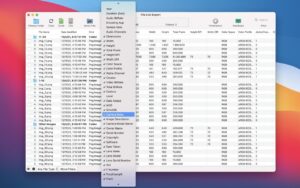

File List Export 3.0 — Folder Lists for Mac

Pros & Cons Show details

✅ PROS

  • Exports to Excel, PDF, HTML, JSON, Markdown, CSV, and TSV from one scan, which covers spreadsheets, printouts, web catalogs, and automation workflows.
  • Rich metadata columns span EXIF, audio tags, video codecs, and checksums, useful for photo archives and integrity checks.
  • Parallel metadata reading in version 3.0 speeds up large folder scans on multi-core Macs compared with earlier releases.
  • Preview, search, filter, and editable column sets let you refine a list before export instead of dumping raw directory dumps.
  • Local-only processing with no data collection stated in the privacy label suits users who inventory sensitive client or legal folders.

❌ CONS

  • Version 3.0 requires macOS 11 or later, so Macs stuck on Catalina or earlier cannot run this build.
  • The app is Mac App Store only at $8.99 with no stated Windows or cross-platform edition for mixed environments.
  • English is the primary listed language; localized column headers or UI may be limited for non-English teams.
  • It inventories and exports metadata but does not replace a full digital asset manager for tagging, versioning, or collaborative review.
  • Very large network volumes or millions of files may still take noticeable time despite parallel scanning improvements.
✅ What's New in 3.0 Show details
  1. PDF export — Version 3.0 adds export to a clean, paginated, printable PDF table per Mac App Store release notes.
  2. HTML catalog — You can export a searchable HTML catalog with sortable columns and clickable file links for browser-based browsing.
  3. JSON and Markdown — New export targets join CSV and TSV for developer workflows, documentation, and automation pipelines.
  4. Parallel metadata scanning — Image, audio, and video metadata is read in parallel across CPU cores so large folders finish sooner.
  5. Refreshed interface — Version 3.0 includes a UI refresh alongside the new export and performance changes.
  6. macOS 11 requirement — The 3.0 App Store listing raises the minimum compatible macOS version to 11.0 or later.

Older Versions

Version Publication date
File List Export v3.0 Latest Current
File List Export v2.9.6
File List Export v2.9.5
File List Export v2.9.4
File List Export v2.9.3
File List Export v2.9.2
File List Export v2.9.1
File List Export v2.9.0
File List Export v2.8.9
File List Export v2.8.7
File List Export v2.8.5
File List Export v2.8.4
File List Export v2.8.1
File List Export v2.7.8
File List Export v2.7.7
File List Export v2.7.3
File List Export v2.7.2
File List Export v2.7.1
File List Export v2.7.0
File List Export v2.6.9
File List Export v2.6.8
File List Export v2.6.7
File List Export v2.6.6
File List Export v2.6.4
File List Export v2.6.3
File List Export v2.6.1
File List Export v2.5.1
File List Export v2.5.0
File List Export v2.4.6
File List Export v2.4.5
File List Export v2.4.4
File List Export v2.4.3
File List Export v2.4.0
File List Export v2.3.0

Installation & Troubleshooting FAQ

7 questions

Common issues when installing macOS apps

Alternatives

Join the Conversation

Your email address will not be published. Required fields are marked *