
File List Export 2.9.6 for Mac

File List Export
Name:File List Export 2.9.6 MAS [TNT].dmg.torrent (24.49MB)
Hash:83272f155c38f375bfdae11dec766738a8cd31c9
Review by:
Downloads 161
Rating
4.2 20 Click to rate
Checked
   Download Torrent Download Now

Turn any folder into a searchable spreadsheet

File List Export is a macOS utility by Georgios Trigonakis that scans directories and exports file names, paths, and metadata to Excel or CSV for inventory, audit, and media-management workflows.

How scanning and export work

Select a folder or drag files into the app, optionally include subfolders, and preview the results before saving. Filter by file kind—photos, audio, PDFs, or everything—and search or sort columns such as name, size, dates, tags, and path before export.

  • Photographers: export Exif columns including camera, lens, ISO, GPS, and capture date alongside thumbnails in Excel.
  • Music libraries: list audio metadata such as artist, album, bitrate, sample rate, and duration from large collections.
  • IT and archives: generate MD5 or SHA256 checksums and folder inventories for compliance or cleanup projects.

Metadata depth and customization

The app exposes dozens of columns covering images, video, audio, documents, and general file attributes. Saved column sets let you switch layouts quickly, and version 2.9.5 added custom column header names that carry through to exported spreadsheets.

File List Export 2.9.6

Version 2.9.6 requires macOS 10.13 or later and adds drag-out support: move items from the list into Finder, Mail, Pages, and other apps with copy-only behavior so originals stay in place. Available on the Mac App Store for a one-time purchase.
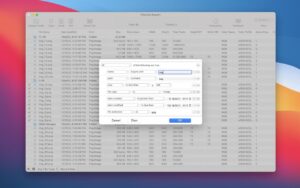
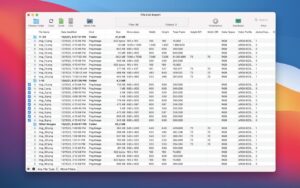
File List Export 2.9.6 scans folders on Mac File List Export 2.9.6 for Mac — File Catalog

Pros & Cons Show details

✅ PROS

  • File List Export turns folder scans into Excel or CSV spreadsheets with paths, sizes, dates, and dozens of optional metadata columns in one step.
  • Exif, audio, and video fields—including thumbnails in Excel—make it useful for photo and media libraries beyond a plain filename list.
  • Preview, search, filter, and editable lists let you refine results before export instead of re-scanning the folder.
  • Saved column sets and custom header names (from 2.9.5) help repeat the same export layout for recurring inventory tasks.
  • Version 2.9.6 adds drag-out to Finder, Mail, Pages, and other apps while copying files so originals are never moved accidentally.
  • The developer states no app data is collected, and processing stays local on your Mac.

❌ CONS

  • File List Export is Mac-only and sold through the App Store, with no documented standalone changelog page beyond Apple’s version history.
  • Scanning very large folders with full metadata can take a long time and produce dense spreadsheets that need careful UI handling.
  • Some users report the interface feels non-native or confusing in places, such as checkbox behavior and destructive actions near window controls.
  • Advanced DAM or database workflows may still need custom scripts or dedicated catalog tools after export.
  • Version 2.9.6 focuses on drag-out workflow rather than adding new metadata fields or export formats.
  • English-only app localization may limit teams that need localized column labels or UI text.
✅ What's New in 2.9.6 Show details
  1. Drag out to other apps — Version 2.9.6 lets you drag any item from the file list into Finder, Mail, Pages, and other Mac apps.
  2. Image drop workflow — Dropping an image from the list into a target app inserts it directly without a separate export step.
  3. Copy-only safety — Dragged files are always copied, never moved, so originals remain in their source locations.
  4. Native app integration — The feature bridges catalog results with everyday Mac apps instead of requiring a spreadsheet round-trip.
  5. Focused feature update — Version 2.9.6 builds on recent releases such as custom column renaming (2.9.5) and audio bit-depth metadata (2.9.4).

Older Versions

Version Publication date
File List Export v2.9.6 Latest Current
File List Export v2.9.5
File List Export v2.9.4
File List Export v2.9.3
File List Export v2.9.2
File List Export v2.9.1
File List Export v2.9.0
File List Export v2.8.9
File List Export v2.8.7
File List Export v2.8.5
File List Export v2.8.4
File List Export v2.8.1
File List Export v2.7.8
File List Export v2.7.7
File List Export v2.7.3
File List Export v2.7.2
File List Export v2.7.1
File List Export v2.7.0
File List Export v2.6.9
File List Export v2.6.8
File List Export v2.6.7
File List Export v2.6.6
File List Export v2.6.4
File List Export v2.6.3
File List Export v2.6.1
File List Export v2.5.1
File List Export v2.5.0
File List Export v2.4.6
File List Export v2.4.5
File List Export v2.4.4
File List Export v2.4.3
File List Export v2.4.0
File List Export v2.3.0

Installation & Troubleshooting FAQ

8 questions

Common issues when installing macOS apps

Alternatives

Join the Conversation

Your email address will not be published. Required fields are marked *