

ACDSee Photo Studio for Mac
An all-in-one photo manager and RAW/non-RAW editor for macOS that catalogs large libraries, applies AI-assisted search and cleanup, and finishes images in a non-destructive Develop mode—without forcing an import step before you start working.
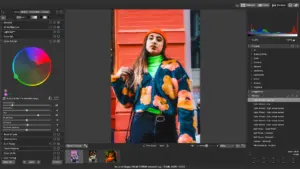
ACDSee Photo Studio for Mac 26 targets photographers and studios who outgrow the Photos app or folder chaos. On launch it surfaces connected drives, network shares, and cataloged folders in Manage mode, where you rate, label, keyword, and batch-process files. Version 26 added AI Keywords for automatic searchable tags, AI Denoise and batch denoise, Group By sorting (camera, date, size, rating, and more), and new AI Develop presets for background, portrait, sky, and subject masking. Face detection and People mode help name and merge faces; the Indexer can process keywords and faces while the Mac is idle. Develop mode adds AI masking, super-resolution, Light EQ, curves, LUTs, and repair tools on top of a database-driven workflow with saved searches, duplicate finder, and optional Lightroom metadata import.
Typical Mac workflow
Catalog key shoot folders, let the Indexer run AI Keywords and face detection overnight, then filter by person, keyword, or saved search to cull and rate. Open selects in Develop for AI Denoise on noisy high-ISO frames, apply an AI preset across a wedding set, or fine-tune exposure with masks and gradients. Export or send via integrated sharing; iCloud drive access in Manage mode supports backup workflows. Power users rely on batch rename, batch convert, multiple databases for clients, and external editor handoff. The app is a universal binary for Apple silicon and Intel Macs with Metal GPU support.
Licensing is a one-time purchase from ACD Systems (listed around $59.95 USD during current promotions, full price $99.99) with a 30-day money-back guarantee—not a subscription for the desktop license. Activation and some AI features need an internet connection and acdID account. System requirements list macOS Sonoma 14, Sequoia 15, or Tahoe 26, with 4 GB RAM minimum (8 GB recommended). Known limitations include Find Duplicates not working with iCloud Drive and several metadata edge cases documented in the v26 release notes.
Version 26.0.3
Build 26.0.3.3479 (May 26, 2026) is a stability and metadata maintenance release. Official notes fix crashes when adding keywords or categories, editing that did not end when clicking away from a new keyword or category, inaccurate RAW file rating reads in some cases, incorrect renaming of sibling keywords when collapsing a parent while creating a child, and an iCloud integration issue. No major new features are listed for 26.0.3; the AI and Group By capabilities belong to the broader Photo Studio 26 line from 26.0.0 onward.





Mount the image and launch Open Gatekeeper Friendly.
Press Enter to bypass Gatekeeper in the Terminal window.
Drag the application to the Applications folder.
The application is ready to use.
Compatibility
macOS 14 and later
Architecture
ARM, x86 (64-bit)