
BatchPhoto Pro 5.1.1 for Mac

BatchPhoto Pro
Name:BatchPhoto 5.1.1 [TNT].dmg.torrent (132.51MB)
Hash:9bf1a3ec8e4ed19a8c1b357a691c40885d5d9af6
Review by:
Downloads 216
Rating
4.8 24 Click to rate
Checked
   Download Torrent Download Now

What BatchPhoto Pro does on Mac

BatchPhoto Pro is a bulk photo processing app for macOS from Bits&Coffee that applies resize, convert, annotate, and filter steps to hundreds or thousands of images in one automated run.

The Pro edition targets photographers, e-commerce teams, and anyone who repeats the same edits on large folders. Instead of opening each file in a general editor, you define a workflow once and replay it across a batch. The app reads RAW files from major DSLR brands, supports well over 170 input and output formats, and uses multi-core CPUs to process large sets in a single session.

Three-step workflow

BatchPhoto organizes work in a simple wizard:

  • Add photos from folders or drag them into the app
  • Choose filters, conversions, renaming rules, and output settings
  • Export to disk, email, or upload via SFTP and FTP in the same session

Pro-only capabilities

Compared with the Home edition, Pro adds features aimed at professional batches:

  • Text and logo watermarking
  • RAW development from Canon, Nikon, Sony, Fuji, and other camera formats
  • Advanced touch-up filters including Levels and Hue/Saturation
  • Secure SFTP and FTP upload after processing
  • Scripting and command-line automation for repeatable jobs

Typical Mac use cases

  • Resize a wedding or event archive for client delivery
  • Stamp date and time from EXIF across a folder of scans
  • Convert HEIF, WEBP, or AVIF exports to JPEG or PDF albums
  • Auto-crop product shots to 1:1 or 16:9 aspect ratios
  • Watermark proofs before upload to a remote server

Version 5.1.1 and the 5.1 line

Version 5.1.1, released December 19, 2025 on the Mac App Store, is a maintenance update whose public notes list only bug fixes. The preceding 5.1 release marked BatchPhoto’s 20th anniversary with a new light theme, OS-matched appearance, redesigned toolbar icons, lossless WEBP, HEIF, and AVIF output, multi-page WEBP support, optional original-format retention on SFTP and FTP uploads, and user-selectable file extensions such as JPG versus JPEG. The Mac build is a universal, Apple-notarized app for macOS 12.0 and later.

Licensing on Mac

BatchPhoto Pro is a paid one-time purchase (about $49.99 on the Mac App Store). A standard license covers one Mac per activation code according to Bits&Coffee support documentation. Family Sharing is supported on the App Store listing. The developer reports no data collection in App Store privacy labels.
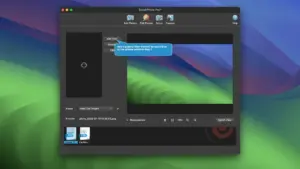
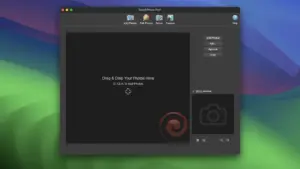
BatchPhoto Pro 5.1.1 batch-resizes, converts, watermarks, and uploads photos on Mac. Build 5.1.1 is a bug-fix release after BatchPhoto Pro 5.1.1 for Mac — Bulk Photo Editor

Pros & Cons Show details

✅ PROS

  • BatchPhoto Pro applies the same resize, convert, watermark, and filter chain to thousands of images in one session, which saves hours compared with manual editing in a general photo app.
  • RAW support and advanced filters such as Levels and Hue/Saturation make Pro suitable for DSLR workflows, not just JPEG housekeeping tasks.
  • Built-in SFTP and FTP upload lets Mac users process and publish images in a single pipeline without a separate transfer client.
  • Version 5.1 added lossless WEBP, HEIF, and AVIF output plus extension control, which helps modern web and mobile delivery from a legacy batch tool.
  • Multi-core batch processing and saved profiles suit repeatable studio, catalog, and archive jobs on Apple silicon and Intel Macs.

❌ CONS

  • Version 5.1.1 only documents unspecified bug fixes, so it is a patch release without new features beyond the 5.1 update.
  • One license activates on one computer, which limits teams that need BatchPhoto Pro on several Macs without buying extra seats.
  • BatchPhoto focuses on repeatable bulk actions and is not a substitute for selective retouching in Lightroom, Capture One, or Photoshop.
  • Folder auto-watch and server deployment require the Enterprise edition, not Pro, for fully unattended ingestion.
  • The Mac App Store build is English-only in its listing, and the interface is wizard-driven rather than a flexible node-based workflow some power users prefer.
✅ What's New in 5.1.1 Show details
  1. [Bug fixes maintenance release] — Version 5.1.1 addresses unspecified bugs according to official App Store release notes, with no new features documented for this build.
  2. [Post-5.1 stability patch] — This update follows BatchPhoto 5.1 from December 17, 2025, and targets reliability after the anniversary UI and format changes.
  3. [Light app theme retained] — The 5.1 line introduced a light theme with automatic matching to macOS light and dark mode, which remains available in 5.1.1.
  4. [Lossless modern formats retained] — Build 5.1 added lossless WEBP, HEIF, and AVIF export plus multi-page WEBP; 5.1.1 keeps that format stack on Mac.
  5. [SFTP and FTP format control retained] — The 5.1 option to keep the original image format on SFTP and FTP uploads and to choose extensions such as JPG or JPEG remains part of the Pro workflow in 5.1.1.

Older Versions

Version Publication date
BatchPhoto Pro v5.1.1 Latest Current
BatchPhoto Pro v5.1
BatchPhoto Pro v5.0.1
BatchPhoto Pro v4.4

Installation & Troubleshooting FAQ

8 questions

Common issues when installing macOS apps

Alternatives

Join the Conversation

Your email address will not be published. Required fields are marked *