Uplock
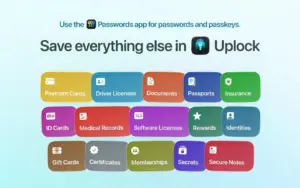
A native Apple-ecosystem vault for sensitive personal data that does not belong in the Passwords app—passports, payment cards, licenses, insurance, secure notes, and attachments—synced through iCloud without a vendor account or external servers.
Uplock (formerly Access) is built by a small independent team in Montreal as a companion to Apple Passwords: use Passwords for logins and passkeys, and Uplock for everything else you would otherwise scatter across locked Notes, photos, or a heavyweight password manager. Items sync across iPhone, iPad, Mac, Apple Watch, and Vision Pro via iCloud; with Advanced Data Protection enabled, the vendor states data is end-to-end encrypted and keys are not held by the developer. There is no sign-up, email, analytics, or third-party SDKs—only Apple’s platforms and review process.
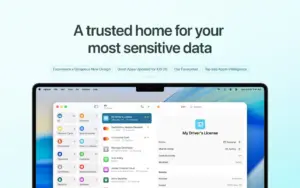
Typical Mac workflow
On macOS 15 or later, save a driver license scan, credit card details, or software license in structured item types, attach PDFs or photos, and open them from the main app or the menu bar companion. The Safari extension and AutoFill fill saved fields on websites with one click. Shared Groups let families or teams collaborate on selected items with view or edit rights. Reminders nudge you before card or ID expirations; Smart Fill (on supported devices) can turn a screenshot or PDF into an item using on-device Apple Intelligence. Import from CSV or from exports of Bitwarden, 1Password, LastPass, and other managers (expanded in the 3.2 line) eases migration. Export to plain text or CSV remains available anytime.
The free tier allows a limited number of entries; Uplock+ removes the cap (about $14.99/year individual or $24.99/year family via the App Store). If a subscription lapses, you can still view and export existing items but not add or edit new ones. Authentication uses Face ID, Touch ID, Optic ID, or device passcode, with app locking when you step away.
Version 3.2.5
Release 3.2.5 focuses on speed, polish, and reliability across devices. The Mac App Store notes a smoother, faster unlock flow; clearer prompts when device authentication or passcode setup is required; more reliable Apple Watch sync; better shared-group and attachment navigation; refined sidebar, list, and detail layouts; improved menu bar window behavior on Mac; and a fix on macOS 27 Golden Gate where the search bar could appear above the locked screen. This is an experience update rather than a major feature launch.