Bookshelf – Library
A visual file index for macOS that keeps shortcuts to your documents, folders, and images on a digital shelf—so you can open what you use often without cluttering the desktop.
Despite the name, Bookshelf – Library is not an e-book reader or a cloud textbook service. The developer describes it as File Shelf Pro: a lightweight utility that stores references to items already on your Mac. When you add a PDF, project folder, or image, the app remembers where it lives on disk. It does not duplicate or back up the file. If you delete the original in Finder, the entry on the shelf will break—treat the shelf as an organized launch pad, not storage.
How the shelf works day to day
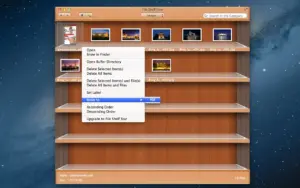
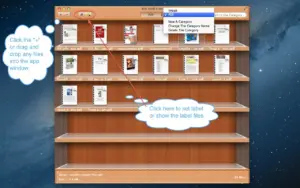
You build one or more categories—reading lists, client work, wallpapers, reference PDFs—and drag files or folders into them. Search works within the active category or across everything you have indexed. Sort ascending or descending, apply labels for quicker scanning, and move items between categories when your workflow changes. A buffer area lets you park files temporarily while you tidy the desktop or reshuffle groups. Images can be set as the desktop picture straight from the shelf, which is handy when you rotate wallpapers from a curated collection.
The interface is deliberately simple: a shelf metaphor instead of another nested Finder window. People who juggle many loose files—research papers, invoices, design exports—often use it as a second layer of organization on top of existing folder structures. It pairs well with a clean desktop: originals stay where you put them; the shelf is where you browse and open.
Free tier, Unlock, and system requirements
Bookshelf – Library is free on the Mac App Store with an in-app Unlock purchase (listed at $3.99) that raises limits such as how many categories you can create. The app requires macOS 10.13 or later and is a small download (about 5–6 MB). Language support is English. Privacy notes on the store indicate the developer does not collect data from the app.
Version 6.4.0
Release 6.4.0 is a maintenance update: the Mac App Store What’s New text cites performance improvements only, with no detailed feature changelog. If you already rely on path-based indexing, categories, and search, 6.4.0 is worth installing for a snappier shelf; newcomers get the same core workflow—index, categorize, label, search—without expecting new reader or sync features in this build.