Shredo 1.2.8.6 for Mac

Shredo 1
Name: Shredo 1.2.8.6 [TNT].dmg.torrent (13.21MB)
Version: 1.2.8.6
Operating System: macOS
Program license: Free
Developer: MyMixApps
Interface language: English
Review by:
Downloads 450
Rating
4.2 16 Click to rate
Checked
   Download Torrent Download Now

What Shredo does on Mac

Shredo is a macOS utility from MyMixApps that permanently deletes files, folders, and external volume contents by overwriting data so it cannot be recovered through normal means.

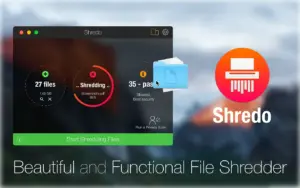
Apple removed Secure Empty Trash from macOS years ago, which left a gap for users who need to destroy sensitive documents before selling a Mac or handing off a drive. Shredo fills that role with a drag-and-drop interface: drop items onto one of three shredding circles, confirm, and the app bypasses the Trash while overwriting file data.

Three shredding methods

  • 1-pass — fastest; deletes file access information and writes random bytes once
  • 7-pass — slower; overwrites data seven times using DoD 5220-20 M–style algorithms
  • 35-pass — slowest; applies the Gutmann method with 35 overwrite passes for maximum effort on traditional drives

Beyond single files

Shredo also supports:

  • Shredding entire folders and batches added via the plus button
  • Secure Empty Trash using any of the three methods
  • External volumes and flash drives, with runtime depending on capacity and pass count
  • Privacy Scan to remove browser cookies, history, and related traces from Safari, Chrome, Firefox, Opera, Vivaldi, and Brave

Typical Mac workflow

Most users keep Shredo in the Applications folder and open it when discarding tax records, client contracts, or exported database dumps. Drag files onto the 1-pass circle for routine cleanup or choose 7-pass when the data is more sensitive. Run Privacy Scan separately when preparing a Mac for resale or after heavy browser use on a shared machine. Pairing Shredo with FileVault disk encryption covers both at-rest protection and deliberate file destruction.

Version 1.2.8.6

Build 1.2.8.6 shipped around June 2026 according to third-party download catalogs, but MyMixApps does not publish per-version release notes on its website. The vendor’s product page still describes the current 1.2.x feature set without listing changes specific to 1.2.8.6. Recent documented fixes in the 1.2.8 line include shredding reliability for very large file lists, keyboard layout support, privacy-scan browser ordering, and title bar adjustments on newer macOS releases.

Requirements and licensing

Shredo requires macOS 11 or later according to the current MyMixApps product page. The app runs on Apple silicon and Intel Macs as a universal build. It sells directly from the developer with a 14-day free trial; list prices on review and catalog sites range from about $5 to $8. Shredo is not a substitute for full-disk erasure when decommissioning SSD-based Macs, where encryption and factory reset may be more appropriate than multi-pass overwrites.
Shredo 1.2.8.6 for Mac — Secure File Shredder

Pros & Cons Show details

✅ PROS

  • Shredo restores secure file deletion on Mac after Apple removed Secure Empty Trash, with a simple drag-and-drop workflow instead of Terminal commands.
  • Three pass levels let you balance speed and thoroughness, from quick 1-pass cleanup to slower 7-pass and 35-pass options for sensitive material on HDDs.
  • Built-in Privacy Scan clears cookies and browsing history across major Mac browsers without installing separate cleaner apps.
  • Secure Empty Trash and external volume support extend shredding beyond individual files to whole Trash contents and USB drives.
  • A 14-day trial and compact interface with dark mode and vertical or horizontal layout make it easy to evaluate before purchase.

❌ CONS

  • MyMixApps publishes no public release notes for version 1.2.8.6, so the exact changes in this build are undocumented.
  • Multi-pass overwriting is largely ineffective on modern SSDs and flash storage because controllers remap blocks, so Shredo suits HDDs and selective file deletion more than SSD secure erase.
  • The 35-pass Gutmann option is very slow and security researchers note it offers little benefit over random overwrites on current drives.
  • Shredo is sold outside the Mac App Store from the developer site, which some users prefer to avoid for updates and purchase protection.
  • The app focuses on file shredding and browser cleanup only; it does not replace full-disk wiping, firmware tools, or enterprise data-destruction policies.
✅ What's New in 1.2.8.6 Show details
  1. [Undocumented maintenance build] — Version 1.2.8.6 appears in download catalogs around June 2026, but the vendor website lists no specific changes for this build.
  2. [Large batch shredding fix inherited] — Version 1.2.8 fixed failures when shredding lists with more than 4,000 files, which remains relevant in current 1.2.8.x builds.
  3. [Keyboard layout support inherited] — The 1.2.8 line added Dvorak and QWERTZ keyboard layout support for interface shortcuts and navigation.
  4. [Privacy Scan browser ordering inherited] — A 1.2.8 improvement reorders the Privacy Scan browser list to show installed browsers first for faster cleanup.
  5. [macOS UI compatibility inherited] — Recent 1.2.8.x updates adjusted title bar height and Esc-key behavior for overlay windows on newer macOS releases.

Older Versions

Version Publication date
Shredo v1.2.8.6 Latest Current
Shredo v1.2.8.5
Shredo v1.2.8.4
Shredo v1.2.8.3
Shredo v1.2.8.2
Shredo v1.2.8.1
Shredo v1.2.8

Installation & Troubleshooting FAQ

8 questions

Common issues when installing macOS apps

Alternatives

Join the Conversation

Your email address will not be published. Required fields are marked *