ExactScan
A professional document-scanning app for macOS that drives office scanners many vendors no longer support natively—turning paper stacks into clean PDFs and images with minimal manual cropping.
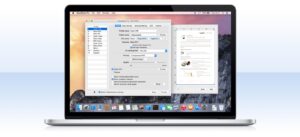
ExactScan from ExactCODE GmbH ships more than 500 built-in drivers for document scanners from Avision, Canon, Fujitsu, HP, Kodak, Oki, Panasonic, Visioneer, Xerox, and others, plus TWAIN and ImageCapture paths where applicable. That matters on Mac because several “PC-only” models would otherwise be unusable. The app targets offices, archives, and freelancers who scan daily: batch jobs from an automatic document feeder, flatbed mixed-size pages, blank-page detection, skew correction, and automatic paper-size cropping to keep files small and straight.
Typical Mac workflow
Connect a supported scanner, pick or create a profile (resolution, color or black-and-white, destination format), and scan to PDF, TIFF, JPEG, PNG, or other export types. One-click profiles can send output straight to a folder or trigger AppleScript automation. ExactScan Pro adds on-the-fly OCR for searchable PDFs, auto-rotation, barcode-based naming and splitting, content de-skew, batch processing of existing images, and an imprinter for watermarks or dates. ExactScan Enterprise extends that for high-speed scanners, PDF/A archival output, and 2D barcode recognition. Spotlight indexing works with searchable PDFs so archived invoices or contracts are easier to find later.
The vendor lists macOS 11 through macOS 26 among supported systems on the current download page; Windows builds exist too. ExactScan is sold in tiers—standard ExactScan (about €80), Pro (about €100 with OCR), and Enterprise for volume and PDF/A—with a 14-day fully functional trial. Licenses include at least two years of free updates; later major versions may require a paid upgrade. The interface is available in multiple languages including English, German, French, Spanish, and Japanese.
Version 26.6.20
Build 26.6.20 sits in the 26.6 maintenance line (Homebrew and other catalogs track 26.6 from June 2026). ExactCODE does not publish separate release notes for each 26.6.x build; the vendor documents changes at the ExactScan 26 product-line level. That line adds macOS 26 Tahoe support, new scanner models, faster scans on certain hardware, and improved auto-crop and de-skew accuracy and performance. ExactScan Pro 26 additionally cites better OCR accuracy, stability, and handling of very large PDF conversions. Treat 26.6.20 as a current stability and compatibility update within v26 rather than a feature launch with its own changelog.