DirEqual 7.6.2 for Mac

DirEqual
Name:DirEqual 7.6.2.dmg.torrent (9.81MB)
Hash:683e3e694d14819c9931f3fd9f817ac0e2fc49e5
Review by:
Downloads 114
Rating
4.8 34 Click to rate
Checked
   Download Torrent Download Now

DirEqual on Mac

DirEqual is a macOS utility for comparing two folders side by side, highlighting differences by size, modification date, or file content, then copying, deleting, or mirroring items to bring directories back in sync.

Typical workflow

Drop or browse to a left and right folder, run compare, and review an expandable tree with color-coded icons for missing, changed, or identical items. You can compare by filename template, ignore extensions, diff text files at line and character level, or run a slower content check on binaries when metadata alone is not enough. Snapshots let you save a folder state and compare it later, and you can export results to CSV for audits or reports.

Sync and control

Instead of blind folder copies, you mark actions per item or use Synchronize for mirror-style updates. Include and exclude rules (from the 7.6 line) support wildcards, regex, and path patterns so large trees stay manageable. The app is lightweight, runs natively on Intel and Apple Silicon Macs, and keeps compared folder pairs for quick reload.

Version 7.6.2

Build 7.6.2 focuses on merge reliability: an updated merge module, smarter skipping of identical files inside subfolders during copy, and correct propagation of Finder tags and modification dates even when content is skipped. Naarak Studio requires macOS 10.13 or later on direct downloads; the Mac App Store build lists macOS 10.15+. A 14-day trial is available from the vendor site, with subscription or one-time licenses afterward.
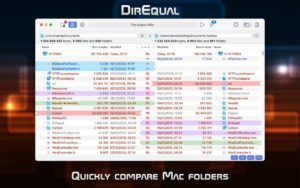
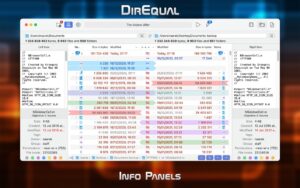
DirEqual 7.6.2 for Mac: compare and sync folders by size DirEqual 7.6.2 — Folder Compare for Mac

Pros & Cons Show details

✅ PROS

  • Side-by-side tree comparison with color-coded difference types makes it easy to spot missing or changed files without opening each folder manually.
  • Content-level text and binary comparison plus snapshots support backup verification and change tracking beyond simple date and size checks.
  • Per-item actions and mirror synchronization give fine-grained control over what gets copied or deleted compared with blind drag-and-drop sync.
  • Version 7.6.2 improves the merge module and subfolder copy logic, which matters when synchronizing large directory trees with many unchanged nested files.
  • Native Intel and Apple Silicon builds with a small footprint suit everyday Mac maintenance without the overhead of full backup suites.
  • Flexible licensing includes a time-limited trial plus subscription or perpetual purchase options from the vendor and Mac App Store.

❌ CONS

  • Full functionality requires a paid subscription or license after the trial, unlike free command-line tools such as rsync or diff.
  • Content comparison on large binary trees can be slow, so big media or archive folders need patience or narrower include rules.
  • Version 7.6.2 is a maintenance release with merge and copy fixes rather than major new features, which may not motivate upgrades from 7.6.0.
  • The app is Mac-only for the polished GUI workflow, so mixed Windows and Mac teams need separate tools or the separate Windows build.
  • App Store and direct-download tiers use different trial lengths and prices, which can confuse buyers comparing purchase channels.
  • Mirror synchronization can delete extra files on the target side, so careless one-click sync without review risks data loss.
✅ What's New in 7.6.2 Show details
  1. [Merge module update] — The merge engine was revised for more reliable folder synchronization when reconciling left and right directories.
  2. [Skip identical subfolder items] — Copy operations can now skip identical items inside subfolders, reducing redundant writes during sync.
  3. [Tags and dates on skip] — Finder tags and modification dates copy from the source even when identical file content is skipped, keeping metadata aligned.
  4. [Performance improvements] — General performance tuning ships in 7.6.2 alongside the merge and copy workflow changes.
  5. [Bug fixes] — Additional stability fixes are included in this build per the vendor-facing 7.6.2 release notes.

Older Versions

Version Publication date
DirEqual v7.6.2 Latest Current
DirEqual 5.8.5 (58521) v5.8.5.58521
DirEqual 5.8.5 (58501) v5.8.5.58501
DirEqual 5.8.4 (58402) v5.8.4.58402
DirEqual 5.8.3 (58305) v5.8.3.58305
DirEqual v5.8.3
DirEqual v5.8.2
DirEqual v5.8.1
DirEqual 5.8.0 (58005) v5.8.0.58005
DirEqual v5.8
DirEqual v5.7.5
DirEqual v5.7.4
DirEqual v5.7
DirEqual 5.6 (56005) v5.6.56005
DirEqual v5.6.1
DirEqual 5.5 (55005) v5.5.55005
DirEqual 5.4 (54014) v5.4.54014
DirEqual 5.4 (54005) v5.4.54005
DirEqual 5.4 (54001) v5.4.54001
DirEqual 5.3 (53001) v5.3.53001
DirEqual 5.2 (52001) v5.2.52001
DirEqual 5.0 (50014) v5.0.50014
DirEqual 5.0 (50010) v5.0.50010
DirEqual 5.0 (50006) v5.0.50006
DirEqual 5.0 (50002) v5.0.50002
DirEqual 5.0.1 (50103) v5.0.1.50103
DirEqual 4.6 (46012) v4.6.46012
DirEqual 4.6 (46005) v4.6.46005
DirEqual 4.5 (45010) v4.5.45010
DirEqual 4.5 (45002) v4.5.45002
DirEqual 4.4.7 (44702) v4.4.7.44702
DirEqual 4.4.6 (44610) v4.4.6.44610
DirEqual 4.4.6 (44608) v4.4.6.44608
DirEqual 4.4.5 (44503) v4.4.5.44503
DirEqual 4.4.3 (44305) v4.4.3.44305
DirEqual v4.4.2
DirEqual v4.4.1
DirEqual 4.3 (43001) v4.3.43001
DirEqual 4.2 (42017) v4.2.42017
DirEqual 4.2 (42002) v4.2.42002
DirEqual 4.0 (40009) v4.0.40009
DirEqual 4.0 (40005) v4.0.40005
DirEqual v4.0
DirEqual 3.8 (38005) v3.8.38005
DirEqual v3.8.3
DirEqual v3.8.1
DirEqual 3.7 (37010) v3.7.37010
DirEqual 3.7 (37002) v3.7.37002
DirEqual 3.6.1 (136120) v3.6.1.136120
DirEqual v3.6.1
DirEqual 3.5 (35001) v3.5.35001
DirEqual 3.4 (34001) v3.4.34001
DirEqual 3.4.2 (34202) v3.4.2.34202
DirEqual v3.4.2
DirEqual 3.3 (33006) v3.3.33006
DirEqual v3.3.33005
DirEqual 3.3 (33002) v3.3.33002
DirEqual 3.3.2 (33211) v3.3.2.33211
DirEqual 3.3.2 (33202) v3.3.2.33202
DirEqual 3.3.1 (33110) v3.3.1.33110
DirEqual 3.3.1 (33104) v3.3.1.33104
DirEqual 3.3.1 (33102) v3.3.1.33102
DirEqual v3.2.32012
DirEqual v3.2

Installation & Troubleshooting FAQ

8 questions

Common issues when installing macOS apps

Alternatives

Join the Conversation

Your email address will not be published. Required fields are marked *