Expenses: Spending Tracker 4.0.9 for Mac

Name:Expenses 4.0.9 [EDiSO].dmg.torrent (10.02MB)
Hash:f791813db26db30ef9a1052cd5089745c8c7943a
Review by:
Downloads 173
Rating
4.7 30 Click to rate
Checked
   Download Torrent Download Now

Expenses: Spending Tracker is a Mac App Store finance app by Blue Comet Labs for logging income and spending manually—without linking bank accounts or creating a vendor account.

What it does on Mac

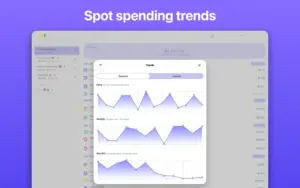
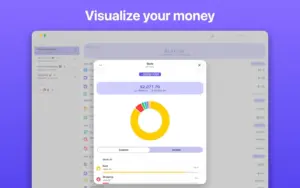
You work in sheets (personal budgets, trips, or shared household lists), add expenses and income in any supported currency, assign categories and merchants, and review Stats and Trends over time. iCloud keeps sheets in sync across iPhone, iPad, Mac, and Apple Vision Pro; you can invite others to collaborate on a shared sheet. Receipt capture uses on-device scanning and autofill to reduce typing. Data stays on your device or in your iCloud; the developer states the app collects no personal data and requires no sign-up.

Typical workflow

Most Mac users open a sheet, log transactions as they happen (or batch them weekly), then use filters and charts to see category or merchant breakdowns. CSV import and export help migration from spreadsheets or other trackers. Widgets, Shortcuts, Dark Mode, VoiceOver, and keyboard shortcuts support quick entry on desktop. The base app is free; Expenses Pro unlocks advanced capabilities via in-app purchase (Lifetime $39.99, Monthly $1.99, or Yearly $14.99 on the US App Store—regional prices may differ). Setapp also distributes Expenses as an alternative to direct purchase.

Version 4.0.9

Build 4.0.9 adds global search across your expense data—a headline addition for Mac users with large sheet histories. The update also carries forward 4.0.x improvements: category suggestions, filters by image, recurrence, and currency, plus clearer views for upcoming, recurring, and pending items. Requires macOS 13.0 or later.
Expenses 4.0.9 on Mac: global search Expenses: Spending Tracker 4.0.9 for Mac — Finance

Pros & Cons Show details

✅ PROS

  • Expenses keeps tracking simple and private: no bank connections, no mandatory account, and no developer-side personal data collection per App Store privacy labels and the developer site.
  • Multi-currency support with automatic rate updates suits travel and expat budgeting without a separate conversion app on Mac.
  • iCloud sync and shared sheets let couples or trip groups collaborate on one expense list across Apple devices.
  • Version 4.0.9 global search helps you find past transactions, merchants, or notes quickly instead of scrolling long sheet histories.
  • Receipt scanning with autofill, merchant tracking, Stats, Trends, and CSV import/export cover manual tracking workflows without subscription finance aggregators.

❌ CONS

  • Expenses is manual-entry first; it does not auto-import transactions from banks like Mint-style or Rocket Money–style apps.
  • Advanced features sit behind Expenses Pro IAP (or Setapp); the free tier may feel limited for heavy users after trial periods.
  • It is Apple-ecosystem only (Mac App Store / Setapp); there is no Windows or Android client for the same data set.
  • Global search in 4.0.9 is new; early builds may still need polish for edge cases across very large multi-sheet libraries.
  • Power budgeters who want envelope budgeting, running account balances across complex rules, or merged multi-year analytics may find the sheet model simpler than dedicated budgeting suites.
✅ What's New in 4.0.9 Show details
  1. [Global search] — Search across your expense data from one place instead of hunting through individual sheets on Mac.
  2. [Category suggestions] — New category suggestions speed up labeling after receipt scans or manual entry.
  3. [Content filters] — Filter sheet content by image attachment, recurrence, currency, and related criteria for faster review.
  4. [Upcoming and pending items] — Check upcoming charges, next recurrence dates, and pending entries so subscriptions and scheduled costs stay visible.
  5. [4.0.x receipt and merchant line] — Earlier 4.0.x builds added receipt autofill with currency detection, merchant support in stats and CSV, and a hide-merchants sheet option; 4.0.9 ships on that foundation.

Older Versions

Version Publication date
Expenses: Spending Tracker v4.0.9 Latest Current
Expenses: Spending Tracker v4.0.8

Installation & Troubleshooting FAQ

8 questions

Common issues when installing macOS apps

Alternatives

Join the Conversation

Your email address will not be published. Required fields are marked *