
OmniOutliner Pro 6.2 for Mac

omnioutliner-pro
Name:OmniOutliner 6.2 [EDiSO].dmg.torrent (60.36MB)
Hash:d51ffeb1ebfe8c7ff8287c1714c2884fadc3b87f
Review by:
Downloads 213
Rating
4.8 8 Click to rate
Checked
   Download Torrent Download Now

OmniOutliner Pro

A professional outlining app from The Omni Group that turns nested rows, notes, and typed columns into structured documents for writing, planning, research, and meeting work on Mac.

Typical Mac workflow

You build an outline with unlimited hierarchy levels, drag rows to reorder or nest them, and add per-row notes when a headline needs more context. Status checkboxes turn sections into checklists; Pro adds multi-column layouts with pop-up lists, numbers, dates, durations, and checkboxes so a single document can track status, deadlines, and metadata beside each topic. Saved filters in the sidebar focus on one branch or rule set without duplicating the file.

Pro styling goes deeper than Essentials: structural and named styles, row numbering, attachments, and export options suit long-form scripts, legal briefs, or product specs. OmniOutliner 6 brought Liquid Glass visuals on recent macOS releases, Dynamic Themes that adapt to Dark Mode, Omni Links to point at documents or rows, multiple windows on one file, and Omni Automation plug-ins that can call Apple Intelligence on supported hardware. A universal license covers Mac, iPad, iPhone, and Apple Vision Pro after you sign into an Omni Account.

Licensing and version 6.2

OmniOutliner Pro sells for about $99.99 as a one-time purchase on the Mac App Store (Essentials is about $24.99), with a 14-day trial and free updates for existing customers. Mac requires macOS 15.0 or later. Version 6.2, released 10 June 2026, adds ten interface localizations, fixes a color-picker hang, improves Pro style handling, and addresses a multi-column paste crash, alongside smaller Mac fixes for templates, links, and licensing UI.
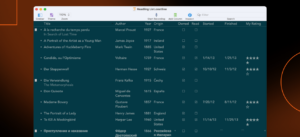

OmniOutliner Pro 6.2 — Outlining App for Mac

Pros & Cons Show details

✅ PROS

  • Hierarchical outlines with notes, checkboxes, and Pro column types fit writers, students, attorneys, and planners who outgrow plain text lists.
  • Saved filters, named styles, and multi-window editing help large outlines stay navigable without splitting projects across files.
  • Omni Links and cross-platform sync through a universal purchase let the same outline move between Mac, iPad, iPhone, and Vision Pro.
  • Omni Automation with Apple Intelligence support on capable devices enables custom plug-ins beyond manual formatting.
  • One-time Pro licensing around $99.99 with free updates suits users who prefer ownership over subscription-only outlining tools.

❌ CONS

  • Pro at roughly $99.99 costs far more than Essentials or simpler outliners if you only need basic nested lists.
  • Version 6.2 is chiefly localization and stability work; major features such as Dynamic Themes and Omni Links arrived in OmniOutliner 6.0.
  • macOS 15 or later is required on Mac, and the newest Liquid Glass polish targets macOS 26 / iOS 26-class releases.
  • Outlines that use Dynamic Themes or enhanced filters may lose those extras when opened in older OmniOutliner versions.
  • The learning curve rises in Pro mode because columns, styles, filters, and automation reward setup time before they feel effortless.
✅ What's New in 6.2 Show details
  1. Ten new localizations — Version 6.2 adds Dutch, French, German, Italian, Japanese, Korean, Portuguese (Brazil), Russian, Simplified Chinese, and Spanish interface translations.
  2. Color picker hang fix — Both editions fix a hang that could occur when using the system color picker to set a color.
  3. Pro style improvements — OmniOutliner Pro 6.2 includes refinements to Styles, including correct named-style font colors when text runs are edited.
  4. Multi-column paste crash — Pro fixes a crash that could occur when pasted text parsed into multiple columns.
  5. Mac template and UI fixes — Release notes list fixes for Save as Template connected folders, Theme Picker window targeting, trial-alert click-through, and invalid URL crashes.
  6. Release 10 June 2026 — Apple and The Omni Group list OmniOutliner 6.2 with a 10 June 2026 release date as a universal update across supported platforms.

Older Versions

Version Publication date
OmniOutliner Pro v6.2 Latest Current
OmniOutliner Pro v5.15.0
OmniOutliner Pro v5.14.3
OmniOutliner Pro v5.14.2
OmniOutliner Pro v5.14.1
OmniOutliner Pro v5.14
OmniOutliner Pro v5.13.1
OmniOutliner Pro v5.13
OmniOutliner Pro v5.11.1
OmniOutliner Pro v5.10
OmniOutliner Pro v5.9.2
OmniOutliner Pro v5.8.5
OmniOutliner Pro v5.8.4
OmniOutliner Pro v5.8.3
OmniOutliner Pro v5.8.2
OmniOutliner Pro v5.8.1
OmniOutliner Pro v5.8
OmniOutliner Pro v5.7.1
OmniOutliner Pro v5.7
OmniOutliner Pro v4.6.1
OmniOutliner Pro v4.6

Installation & Troubleshooting FAQ

8 questions

Common issues when installing macOS apps

Alternatives

Join the Conversation

Your email address will not be published. Required fields are marked *