
Gitfox 4.3.1 fix for Mac

Gitfox
Name:Gitfox 4.3.1 [EDiSO].dmg.torrent (36.9MB)
Hash:9f3766a5d430bb423d246e16f9af241c2d41977f
Review by:
Downloads 88
Rating
4.5 19 Click to rate
Checked
   Download Torrent Download Now

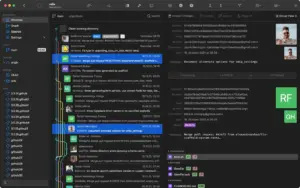
Gitfox is a native macOS Git client that puts repositories, history, staging, commits, and hosted service accounts in one AppKit-style app instead of juggling terminal commands and browser tabs.

What it does on Mac

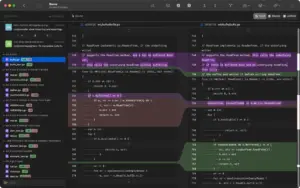
You manage local and remote repos from a repository manager, review inline diffs with line-level staging, resolve conflicts in the diff view, and commit with syntax-aware messages and multiple identities. History views cover branch logs, graphs, tags, stashes, reflogs, blame, bisect, interactive rebase, and Git Flow actions. Gitfox integrates with GitHub, GitLab (cloud and self-managed), Bitbucket, and Gitea for cloning and account management, and supports external diff/merge tools when you use builds outside the Mac App Store sandbox limits.

Typical workflow

A common Mac flow opens a repo, scans changes in the sidebar, stages hunks or lines, writes a commit, and pushes from the same window—or uses Quick Actions (⌘P) and keyboard navigation to stay off the mouse. Notifications can alert you to new commits on tracked remotes. The App Store build is free with optional Gitfox Pro subscriptions (about $7.99/month or $49.99/year on the listing); Setapp also distributes Gitfox on some plans. The current App Store release requires macOS 26.0 or later.

Version 4.3.1 (fix)

Build 4.3.1 is a maintenance release in the 4.3 line. Apple’s What’s New text adds a small blame-view enhancement (open the blamed commit from the line popover) and focuses on fixes: selection double-click crashes, ISO8601 timestamp parsing crashes, stray text selection in the editor, changes-view flicker, SIGPIPE crashes, excessive refresh churn from filesystem events, and branch outline refs clearing after a failed refresh. Larger 4.2.x features such as whitespace diff controls are documented in earlier App Store notes, not re-listed here.
 

Pros & Cons Show details

✅ PROS

  • Gitfox is built specifically for macOS with native windows, tabs, Quick Actions, and keyboard-first navigation rather than a cross-platform Electron shell.
  • Inline diffs, line staging, image diffs, conflict resolution, and interactive rebase cover most daily Git work without leaving the app.
  • Hosted service support for GitHub, GitLab, Bitbucket, and Gitea keeps cloning and credentials inside one repository manager.
  • Version 4.3.1 addresses real stability pain points—crashes on selection, timestamp parsing, SIGPIPE, and runaway refreshes—that interrupt long review sessions on Mac.
  • The blame popover can now jump straight to the commit behind a line, which speeds up archaeology when tracing regressions.

❌ CONS

  • The Mac App Store build explicitly omits external diff-tool integration and command-line gitfox handoff that the direct edition advertises on gitfox.app.
  • Version 4.3.1 is a fix build with one minor blame UI tweak, not a feature release; upgraders on a stable 4.3.0 build mainly gain reliability.
  • Pro features require a subscription ($7.99/month or $49.99/year on the App Store listing) after the free tier.
  • The app now lists macOS 26.0 as the minimum, which excludes users on older Sonoma or Ventura Macs still on earlier Gitfox builds.
  • Gitfox competes in a crowded Mac Git client space (Fork, Tower, Sublime Merge); teams standardized on another GUI may not switch for incremental fix releases alone.
✅ What's New in 4.3.1 fix Show details
  1. [Blame view] — Gitfox 4.3.1 adds an updated blame view with quicker access to per-line commit context in the Mac UI.
  2. [Open commit from blame popover] — The blame commit popover now includes a button to open the commit for the selected line directly.
  3. [Double-click selection crash fix] — Double-clicking a text selection no longer crashes the app in the scenario called out in release notes.
  4. [ISO8601 timestamp parsing] — Strict ISO8601 Git timestamp timezone parsing no longer triggers a crash on edge-case commits.
  5. [Changes view flicker fix] — The changes view stops popping open instantly when the working tree briefly reports empty and non-empty states in succession.
  6. [SIGPIPE crash fix] — A SIGPIPE-related crash path documented in 4.3.1 is resolved for more stable long sessions.
  7. [Refresh and branch outline reliability] — Redundant repository refreshes from bursts of Git metadata filesystem events are reduced, and failed refreshes no longer wipe existing refs from the branch outline.

Installation & Troubleshooting FAQ

8 questions

Common issues when installing macOS apps

Alternatives

1 Comment

  1. Run the downloaded image and drag the application to the Applications folder shortcut.

    Once the copy is complete, you can launch the application from Launchpad.

    Compatibility
    macOS 26 and later

    Architecture
    ARM, x86 (64-bit)

Join the Conversation

Your email address will not be published. Required fields are marked *