

iDownerGo 10.15.0 for Mac
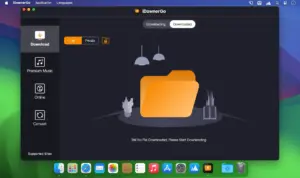
iDownerGo is a desktop video downloader and music converter for macOS. You paste a link or browse inside the app, pick format and quality, and save files locally for offline viewing or listening—mainly from social and open web platforms, not from replacing a paid streaming subscription.
What you use it for
- Archiving tutorials, lectures, or creator uploads you are allowed to keep offline
- Pulling audio tracks from video pages as MP3 or other formats
- Downloading whole playlists or channels in one batch instead of one file at a time
- Recording live streams while they air so you can watch later without buffering
How a typical download works
The vendor describes a simple three-step flow: copy the page URL (or find the video in the built-in browser), choose output format and resolution, then start the job from the paste/download control. A built-in browser lets you open supported sites inside iDownerGo and grab media without switching to Safari for every clip.
- Copy the video or playlist link from the site
- Set format (MP4, MOV, MKV, etc.) and quality (720p through 8K where offered)
- Run the download and open the file in your player or editor
Video capabilities
- Claims support for 10,000+ video and music sites (YouTube, Facebook, Instagram, TikTok, Vimeo, Dailymotion, Bilibili, and others on the vendor list)
- Resolutions from 720p and 1080p up to 4K and 8K when the source provides them
- Playlist, channel, and bulk multi-video downloads
- Live stream capture from platforms such as Twitch, YouTube, and Facebook (per vendor marketing)
- Watermark-free saves according to the product page; ad-free in-app experience
Music and conversion
- Music downloader positioning for Spotify, Apple Music, Tidal, Deezer, SoundCloud, and similar services (subject to each platform’s terms and technical limits)
- Audio up to about 320 kbps where available
- ID3 tag retention for title, artist, track ID, and artwork when supported
- Export to MP3, AAC, M4A, and multiple video containers (MP4, MOV, AVI, MKV, and more on paid tiers)
Extra tools in the app
- Adjustable download speed (vendor advertises up to 10× acceleration)
- Private mode with password protection for saved downloads
- Multi-language interface
- One-click audio extraction from a video URL
Licensing and version 10.15.0
iDownerGo for Mac is commercial software: free trial from the official site, then subscription or lifetime plans (1‑month, 1‑year, lifetime, and family options on the store page). Requires macOS 10.12 or later. Build 10.15.0 is the catalog version here; the developer does not publish detailed per-build release notes on the main site, so treat 10.15.0 as part of the current 10.15.x maintenance line.
Only download content you have the right to save. DRM-protected streams and many paid services may not work reliably or may violate site terms—check local law and each platform’s rules before use.




Mount the image and launch Open Gatekeeper Friendly.
Press Enter to bypass Gatekeeper in the Terminal window.
Drag the application to the Applications folder.
The application is ready to use.
Compatibility
OS X 10.10 and later