DynamicLake Pro 1.8 for Mac

DynamicLake Pro
Name:DynamicLakePro 1.8.dmg.torrent (124 MB)
Hash:15127ea8a12f446edfb16227172c86d368d94ca0
Review by:
Downloads 163
Rating
4.7 24 Click to rate
Checked
   Download Torrent Download Now

DynamicLake Pro

A macOS utility that turns the area around your MacBook notch—or a software notch on other displays—into an interactive Dynamic Island-style hub for music, notifications, calls, and quick file actions.

What it does on your Mac

Apple’s Mac notch mostly hides the camera; DynamicLake Pro animates that space (or a slim bar on non-notched and external screens) so you can glance at playback, incoming messages, timers, AirDrop progress, and system HUDs without jumping between apps. The interface follows a Liquid Glass look that aims to feel close to recent Apple design language while adding third-party integrations Apple does not ship out of the box.

Core modules work together: DynaMusix controls Apple Music, Spotify, and other players from the notch; DynaGlance surfaces calendar and weather; DynaClip holds clipboard items and live activities; DynaDrop accepts dragged files for on-the-fly conversion; and expanded notification support covers messaging apps with replies, badges, and keyboard shortcuts. Volume, brightness, Bluetooth status, meeting calls, and BetterDisplay feedback can also appear in the same glanceable strip depending on your settings.

Setup and daily use

After purchase through the official Gumroad link, you grant accessibility and notification permissions so DynamicLake can read media and alert state. Most interaction is hover, click, or swipe on the notch region; a menu-bar timer and optional miniLake slim player reduce footprint when you want fewer pixels used. The vendor supports notched MacBooks, Macs without a hardware notch, and external monitors, with ongoing tuning for high-resolution and multi-display setups.

Licensing and version notes

DynamicLake Pro is a one-time purchase distributed only from dynamiclake.com (not the Mac App Store), with a 14-day refund policy stated on the vendor site. Changelog entries from the 1.7 line note macOS 14.0 as a minimum requirement; version 1.8 (March 2026) adds full macOS 26.3 support and a large notifications rebuild—later 1.8.x point releases extend Slack, calls, and localization, but 1.8 is the milestone release for the new notification stack and multi-file DynaDrop workflow.
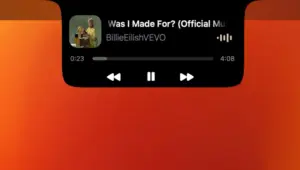
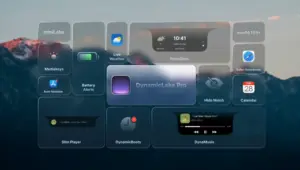
DynamicLake Pro 1.8 adds Dynamic Island-style DynamicLake Pro 1.8 — Dynamic Island for Mac

Pros & Cons Show details

✅ PROS

  • Turns the idle notch area into a practical control surface for music, alerts, calls, and file drops without leaving your current app.
  • Works on notched MacBooks, software-notch mode on older machines, and external displays with miniLake for a smaller footprint.
  • Bundles DynaMusix, DynaGlance, DynaClip, and DynaDrop so common glance-and-act tasks stay in one utility instead of several menu-bar apps.
  • Liquid Glass styling and smooth animations aim for a native macOS feel rather than a generic overlay.
  • Active changelog cadence and macOS 26.x compatibility show the developer is still shipping meaningful updates after purchase.

❌ CONS

  • Sold only via Gumroad on the official site, so there is no Mac App Store install path or Apple-mediated updates.
  • Full functionality depends on accessibility, notification, and related macOS permissions that privacy-conscious users may hesitate to grant.
  • Vendor changelog documents macOS 14.0+ as the requirement floor, excluding older Macs still on Ventura or Monterey for current builds.
  • The wide feature set (music, messaging, conversion, calls, HUDs) means a busy settings surface and a learning curve before everything feels natural.
  • Third-party messaging and music integrations can break when those services or macOS APIs change, requiring wait times for vendor patches.
✅ What's New in 1.8 Show details
  1. Notifications rebuild — Version 1.8 replaces the entire notifications UI, UX, and backend with multi-message, multi-chat, badge counts, multi-line replies, swipe-to-dismiss, emoji quick reply, and keyboard shortcuts.
  2. WhatsApp voice messages — Messaging alerts now handle WhatsApp voice notes inside the notch notification flow.
  3. Focus filter support — DynamicLake hooks into macOS Focus filters so alerts can respect your current concentration mode.
  4. DynaClip live activities — Multiple live activities run at once, with Finder right-click to add files, a Clear All option, and performance refinements.
  5. DynaDrop batch convert — Drag several files into DynaDrop and convert them in one pass instead of one-by-one processing.
  6. macOS 26.3 support — Vendor lists full compatibility with macOS 26.3, including HUD behavior and Apple Music artwork fixes on recent macOS releases.
  7. DynaGlance calendar view — When DynaGlance is the only widget, the notch can show a fuller calendar layout for schedule-at-a-glance use.

Older Versions

Version Publication date
DynamicLake Pro v1.8 Latest Current
DynamicLake Pro v1.6.9.2

Installation & Troubleshooting FAQ

8 questions

Common issues when installing macOS apps

Alternatives

Join the Conversation

Your email address will not be published. Required fields are marked *