
Snagit v2026.2.0 for Mac

Image and Video Screen Capture
Name:Snagit 2026.2.0 [TNT].dmg.torrent (196.21MB)
Review by:
Downloads 1,057
Rating
4.7 18 Click to rate
Checked
   Download Torrent Download Now

Snagit 2026.2.0 for Mac

Snagit (branded Camtasia Snagit in recent releases) is TechSmith’s screen capture and recording app for macOS. It goes beyond basic screenshots with markup, scrolling capture, video recording, AI-assisted tools, and sharing integrations across the Camtasia product suite.

What Snagit does

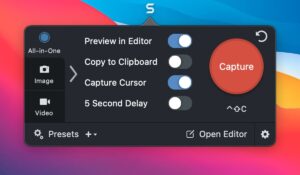
Snagit lets you capture regions, windows, full screens, or scrolling pages, then annotate with arrows, callouts, highlights, step numbers, and text. You can record screen and webcam video, create GIFs, extract and edit text from images (Grab Text), redact sensitive content (Smart Redact), and build step-by-step guides with Step Capture.

Recent Snagit 2026 releases on Mac added window-specific capture, sharing videos to Camtasia Online, in-app Assets browsing, scheduled and interval image capture, Step Capture export to PowerPoint/Keynote, and tighter integration with Camtasia Editor for video workflows. Captures can be shared to email, Slack, Teams, cloud services, or sent into Camtasia for further editing.

Who it is for

It suits support teams, trainers, developers, and anyone who needs clear visual communication—documentation, feedback, how-to guides, and async updates—without switching between multiple tools.

Version 2026.2.0 on Mac

According to TechSmith’s Mac release notes, version 2026.2.0 shipped on 28 May 2026 with a focused licensing update: Camtasia Editor subscription customers can now activate Snagit when it is included in their plan. This is a small maintenance release on macOS; larger feature additions in the 2026.2.x line appeared earlier on Mac (for example Camtasia Online sharing in 2026.1.0) or on Windows in 2026.2.0 (30 April 2026), so do not assume every Windows 2026.2.0 changelog item applies to the Mac build.

Licensing and requirements

Snagit uses a subscription model with a 15-day fully functional trial. A license typically covers both Windows and macOS. Snagit 2026 requires macOS 15 Sequoia or later per TechSmith’s 2026 release guidance (Sonoma support ended with the 2025 line). Snagit is now distributed without a year number in the app name for subscribed users who receive ongoing updates.

Pros & Cons Show details

✅ PROS

  • Industry-standard capture and annotation workflow trusted by enterprise teams worldwide.
  • Step Capture and AI tools (Smart Redact, scrolling capture) speed up documentation and training material creation.
  • Deep Camtasia integration (Editor, Online) supports a capture-to-polished-video pipeline on Mac.
  • Searchable library with tags keeps screenshots and recordings organized across projects.
  • One license covers Mac and Windows, useful for mixed-environment teams.

❌ CONS

  • Mac 2026.2.0 changelog is minimal—mostly a licensing fix, not a feature release.
  • Subscription-only model with no perpetual license may not suit occasional users.
  • macOS 15+ requirement excludes users still on Sonoma or older systems from the 2026 line.
  • Some newest features roll out on Windows first; Mac and Windows changelogs can diverge by version.
  • Full Camtasia Editor and Online workflows may require additional subscriptions beyond base Snagit.
✅ What's New in 2026 2.0 Show details
  1. [Camtasia Editor licensing] — Updated licensing and activation so Camtasia Editor customers can activate Snagit when it is included as part of their subscription.
  2. [Release scope] — Mac 2026.2.0 is a maintenance/licensing patch, not a major feature drop on macOS.
  3. [Release date] — Listed on TechSmith support as 28 May 2026 for the Mac build.
  4. [Platform note] — Windows 2026.2.0 (30 April 2026) included additional items such as Share Videos to Camtasia Online and Fill tool updates; those are documented separately and are not listed in the Mac 2026.2.0 notes.
  5. [2026 line context] — Mac users on 2026.1.0 or later already have Camtasia Online video sharing, Assets browsing, and scheduled capture from earlier 2026.x Mac releases documented by TechSmith.

Older Versions

Version Publication date
Snagit v2026 2.0 Latest Current
Snagit v2026 1.0
Snagit v2022 2.0
Snagit v2018 1.0
Snagit v4.0.6

Installation & Troubleshooting FAQ

8 questions

Common issues when installing macOS apps

Alternatives

1 Comment

  1. Mount the image and launch Open Gatekeeper Friendly.

    Press Enter to bypass Gatekeeper in the Terminal window.

    Drag the application to the Applications folder.

    The application is ready to use.

Join the Conversation

Your email address will not be published. Required fields are marked *