
Vibe Island 1.0.39 for Mac

Vibe Island
Name:Vibe Island 1.0.39 [LOVE].dmg.torrent (29.21MB)
Hash:8307bd48325fda1173d8ee14a59e7f37e94c7fc6
Review by:
Downloads 162
Rating
4.8 15 Click to rate
Checked
   Download Torrent Download Now

Vibe Island

A native macOS utility that turns the MacBook notch (or a floating top bar on external displays) into a live control panel for AI coding agents running in your terminals and IDEs.

Typical Mac workflow

Install via direct download or brew install --cask vibe-island, launch once, and the app auto-configures local hooks for Claude Code, Codex, Gemini CLI, Cursor, and many other CLIs without cloud accounts or API keys. While you edit in VS Code or another app, colored session cards in the notch show whether each agent is idle, thinking, waiting for permission, or finished. When Claude Code requests a tool run, Allow and Deny buttons appear in the panel; AskUserQuestion prompts become clickable choices. Click a card to jump to the exact terminal tab, split pane, tmux session, or IDE integrated terminal where that agent runs.

Multi-agent and remote sessions

Vibe Island tracks unlimited parallel sessions across repos and tools in one view—useful when one tab runs Claude Code on a frontend fix while another runs Codex on a backend task. SSH Remote deploys hooks to remote servers so remote agent sessions appear beside local ones; version 1.0.39 improves reconnect after sleep and adds passphrase-protected key support. Usage meters for Claude, Codex, Kimi, and other providers can surface quota limits without opening each CLI separately.

Privacy and licensing

According to the developer, session metadata stays on your Mac with no telemetry cloud. A two-day full-feature trial precedes a one-time $19.99 license (1–3 Mac tiers) with free updates; core monitoring may remain in free mode after trial per terms. The app is native Swift—not Electron—with under 50 MB RAM and near-zero idle CPU on Apple Silicon Macs. macOS 14 or later is required.

Version 1.0.39

Released June 22, 2026, build 1.0.39 adds six agent integrations (Oh My Pi, ZCode, Trae, MiMoCode, Kimi Code, Mistral Vibe), Git branch indicators on session cards, optional model names, and a Glance completion mode that signals finished tasks with a green dot instead of auto-expanding the panel. Precise jump now covers VS Code’s native Claude extension and remote Codex App threads over SSH. Codex auto-approve detection, simplified approval settings, license recovery, and fixes for VS Code/Cursor completion cards round out the release.
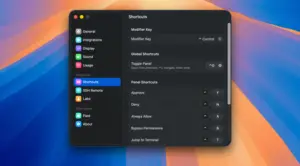
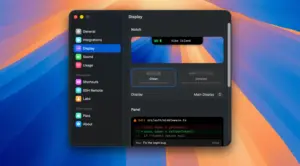
Vibe Island 1.0.39 for Mac — AI Agent Notch Panel  Vibe Island 1.0.39 monitors Claude Code, Codex, and 20+ agents

Pros & Cons Show details

✅ PROS

  • One notch view consolidates Claude Code, Codex, Gemini CLI, Cursor, and many other agents instead of alt-tabbing through terminal windows.
  • GUI Allow/Deny and one-click AskUserQuestion answers cut context switches when agents need permissions mid-task.
  • Precise jump targets the correct tab, split, tmux pane, or IDE terminal across 18+ terminal apps documented on the site.
  • Local-only processing with no cloud accounts aligns with privacy-conscious development on sensitive codebases.
  • Native Swift footprint (under 50 MB RAM) is lighter than Electron-based monitoring alternatives for all-day agent workflows.

❌ CONS

  • macOS 14+ is required, and the experience is optimized for notched MacBooks; external monitors fall back to a floating bar that may feel less integrated.
  • The utility depends on third-party CLI hook behavior—when Claude Code, Codex, or an IDE changes APIs, Vibe Island may need an update before features work again.
  • One-time pricing still applies after a short trial; heavy multi-Mac setups need 2- or 3-Mac license tiers rather than a single-seat unlock.
  • Some terminals and apps (per compatibility docs) lack full precise-jump or monitoring support compared with iTerm2, Ghostty, or Warp.
  • Agent fan-out and subagent panels add UI complexity when many parallel sessions run, though 1.0.39 adds controls to tame crowded views.
✅ What's New in 1.0.39 Show details
  1. Six new agent integrations — version 1.0.39 adds Oh My Pi, ZCode (ZhipuAI), Trae, MiMoCode, Kimi Code, and Mistral Vibe to the auto-configured agent lineup.
  2. Git branch indicator — session cards now show the active Git worktree or branch so parallel repo work is easier to tell apart in the notch.
  3. Glance completion mode — finished tasks can leave the panel collapsed with a subtle green dot instead of forcing an auto-expand on every completion.
  4. VS Code Claude extension jump — clicking a notification focuses the exact integrated terminal tab used by VS Code’s native Claude extension, not just the window.
  5. Remote Codex App jump — SSH-hosted Codex App sessions support precise jump to the correct remote thread when you click a notification.
  6. SSH reconnect and keys — remote monitoring automatically reconnects after network changes or sleep and now supports passphrase-protected SSH keys.
  7. Codex approval cleanup — auto-review (Auto Approve) requests are filtered correctly, and approval settings simplify to Approve here, Remind me, or Hide.
  8. VS Code completion cards fix — completion cards again appear for VS Code and Cursor native extension sessions, with improved CLI plugin detection.

Older Versions

Version Publication date
Vibe Island v1.0.39 Latest Current
Vibe Island v1.0.37

Installation & Troubleshooting FAQ

8 questions

Common issues when installing macOS apps

Alternatives

Join the Conversation

Your email address will not be published. Required fields are marked *