USB Connection Information
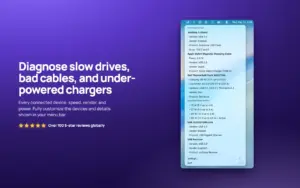
A lightweight macOS menu-bar monitor for USB and Thunderbolt links that shows the speed your Mac actually negotiated—not the marketing number printed on the cable or dock.
How you use it on Mac
After install, the app sits in the menu bar and updates as you plug devices in. You can show an icon only, a device count, live charger wattage, or connection speed, then open the menu for vendor/product IDs, serial numbers, power draw, and related details you can copy. Finder integration can badge drive icons with connection speed and expose device info from a drive’s contextual menu. Desktop widgets (small, medium, large) keep the same status visible without opening the menu. Speed alerts can warn when a device lands slower than expected—often a cable or hub problem rather than the drive itself.
On MacBooks, live charger insights cover wattage, voltage, USB Power Delivery version, and supported power profiles so you can sort bricks and docks without a separate PD meter. The product is native SwiftUI, local-only (no telemetry/cloud sync per the vendor), and aimed at IT, creators, and anyone debugging slow externals. Technical notes from the listing: macOS reports negotiated USB speeds reliably, but Thunderbolt 4/USB4-only or heavily tunneled docks/RAID setups may not appear if they do not present on the USB bus.
Licensing, requirements, and 26.34
Distribution is primarily the Mac App Store as a one-time purchase (commonly about $9.99; also sold as a standalone Setapp-listed app). Current requirements are macOS 14.0 or later on Apple Silicon and Intel. Version 26.34 (around mid-June 2026 in catalog listings) is described as a larger feature drop: new AVS detection, device pinning, improved charger support, Shortcuts and App Intents, optional plug-in/unplug automations and sounds, plus minor bug fixes and performance work. It fits users who need instant cable/dock truth; it will not replace System Information for every bus topology edge case.