

Stringed v2.30 [MAS] for Mac
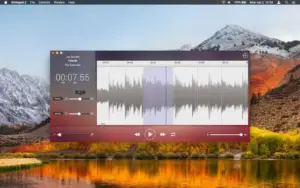
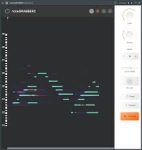
Stringed 2 is a compact Mac music-practice utility for slowing down and re-pitching audio so you can learn solos, bass lines, and arrangements without fighting the original tempo or retuning your instrument.
The [MAS] label means this build comes from the Mac App Store (standard updates, Family Sharing where enabled, and Apple’s privacy disclosure flow).
What Stringed does
Tempo control: adjust playback from ¼ of the original speed up to 1.75×—ideal for dissecting fast passages and speeding up slow sections when you are ready.
Pitch shifting: shift pitch by up to 12 semitones up or down, independently of tempo, so you can match the track to your tuning.
Looping: select a region, enable loop, and repeat a phrase until it sits under your fingers.
EQ & balance: use a multi-band equalizer and a balance slider to bring out the part you want to hear in a busy mix.
Export: when you have the right pitch/tempo, export for practice elsewhere (formats listed on the store page include common audio exports alongside supported import types).
Supported imports (per listing): opens AIFF, WAV, MP4, MP3.
What’s new in v2.30
According to the App Store “What’s New” text for version 2.30 (Apr 30): performance and stability improvements, with thanks to users for ongoing support.
Technical snapshot
- Version: 2.30
- Channel: Mac App Store (MAS)
- Developer: Jorge Perez
- Requires: macOS 11.0 or later
- Category: Music
Exact UI labels may vary slightly by locale; pricing is shown on the store in your region.

Mount the image and launch Open Gatekeeper Friendly.
Press Enter to bypass Gatekeeper in the Terminal window.
Drag the application to the Applications folder.
The application is ready to use.
Architecture
ARM, x86 (64-bit)