SoundSource 6.0.6 for Mac

SoundSource 4
Name:SoundSource 6.0.6 [EDiSO].dmg.torrent (45.9MB)
Review by:
Downloads 2,300
Rating
4.4 24 Click to rate
Checked
   Download Torrent Download Now

SoundSource 6.0.6 for Mac

SoundSource is a menu-bar audio utility from Rogue Amoeba that extends macOS beyond the limited system volume controls. Version 6.0.6 (16 April 2026) is a maintenance and compatibility update on the SoundSource 6 line, which requires macOS 15 or later and supports macOS through version 26 per the developer site.

What SoundSource does

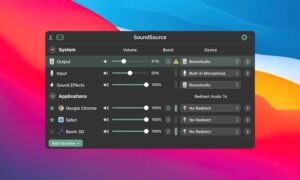
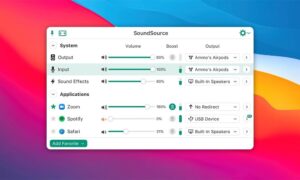
From the menu bar you can adjust output, input, and sound-effects devices, set per-application volume, send individual apps to different outputs, and apply built-in or Audio Unit effects per app or system-wide. Features documented on the official site include Super Volume Keys for outputs that ignore Mac keyboard volume buttons, headphone EQ and enhancement tools, AirPlay routing, output groups for multi-device playback, and Shortcuts integration for automation.

SoundSource 6 added output groups, expanded AirPlay support, a redesigned devices window, and other routing improvements described on Rogue Amoeba’s “What’s New in Version 6” page. The app is aimed at anyone who juggles calls, music, and system sounds and wants finer control than macOS provides by default.

Typical use cases

Common scenarios include lowering a conferencing app independently of notification sounds, routing music to speakers while keeping meeting audio on headphones, applying EQ to a quiet laptop’s built-in speakers, and locking input levels so VoIP software does not change the mic gain unexpectedly.

Version 6.0.6

This release focuses on AirPods and Beats headphones, the volume overlay, conferencing reliability, Bluetooth behavior, and interface polish. It updates the internal ARK audio plugin to 13.1.2 and fixes a crash when switching Settings tabs on macOS 15 Sequoia. It is a free update for licensed SoundSource 6 owners; new licenses are sold on rogueamoeba.com (pricing varies by promotion).

Requirements

SoundSource 6 requires macOS 15 or higher. Older Macs can use legacy SoundSource 5 downloads from Rogue Amoeba’s site. The installer acts as both trial and full version until you enter a license key.
Pros & Cons Show details

✅ PROS

  • Per-application volume and output routing solve everyday Mac pain points that built-in Sound settings do not address cleanly.
  • Built-in 10-band EQ, Magic Boost, Headphone EQ, and Audio Unit support let you improve call or media quality without a full DAW.
  • Output groups and AirPlay routing are useful for multi-room or multi-device listening from a single menu-bar app.
  • Rogue Amoeba documents active maintenance; 6.0.6 addresses real AirPods head-tracking and Zoom sharing issues tied to macOS behavior.
  • Shortcuts support allows power users to automate audio changes as part of broader workflows.
  • The menu-bar design keeps controls one click away without running a heavy background suite.

❌ CONS

  • SoundSource 6 does not support macOS versions below 15; users on older systems must stay on SoundSource 5 or upgrade the OS.
  • It is paid software after trial (list price around $49 on Rogue Amoeba’s store); macOS does not include equivalent per-app routing for free.
  • Running audio processing on Bluetooth headphones can interact with macOS spatial audio; 6.0.6 mitigates head-tracking issues but adds complexity users must understand.
  • Deep features (Audio Units, output groups, device locking) take time to configure; casual users may only need a subset of the app.
  • As a low-level audio tool, it can conflict with other menu-bar managers or unusual driver setups until preferences are tuned.
  • Some fixes in 6.0.6 are narrow (Settings tab crash on macOS 15); users on newer macOS versions should still verify behavior on their hardware.
✅ What's New in 6.0.6 Show details
  1. [AirPods head tracking] — Temporarily disables head-tracked spatial audio when routing to AirPods or supported Beats headphones to avoid macOS quality issues documented by Rogue Amoeba.
  2. [Preferred device order] — Better preserves your custom Preferred Device Order when AirPods or Beats connect, with guidance to turn off macOS Automatic connection when it fights your settings.
  3. [Volume overlay] — Overlay centers on screen over full-screen apps, adds a close button, improves contrast, and fixes inconsistent show/hide when using keyboard volume keys.
  4. [Zoom audio sharing] — Sharing audio on Zoom calls should work reliably after this update.
  5. [ARK plugin 13.1.2] — Internal audio engine update includes fixes, including cases that could block system sleep.
  6. [Bluetooth and stability] — Improved Bluetooth battery reporting below 20%, Bluetooth clock sync fixes, output-group sync, Settings tab crash fix on macOS 15, faster menu-bar icon at launch, and assorted UI fixes listed in the full release notes.

Older Versions

Version Publication date
SoundSource v6.0.6 Latest Current
SoundSource v6.0.5
SoundSource v6.0.4
SoundSource v6.0.3
SoundSource v6.0.2
SoundSource v6.0.1
SoundSource v5.8.11
SoundSource v5.8.10
SoundSource v5.8.9
SoundSource v5.8.8
SoundSource v5.8.7
SoundSource v5.8.6
SoundSource v5.8.5
SoundSource v5.8.4
SoundSource v5.8.1
SoundSource v5.8.0
SoundSource v5.7.5
SoundSource v5.7.3
SoundSource v5.7.2
SoundSource v5.7.1
SoundSource v5.6.2
SoundSource v5.5.9
SoundSource v5.5.8
SoundSource v5.5.7
SoundSource v5.5.7
SoundSource v5.5.6
SoundSource v5.5.5
SoundSource v5.5.4
SoundSource v5.5.1
SoundSource v5.5.0
SoundSource v5.3.11
SoundSource v5.3.9
SoundSource v5.3.8
SoundSource v5.3.7
SoundSource v5.3.5
SoundSource v5.3.4
SoundSource v5.3.3
SoundSource v5.3.2
SoundSource v5.3.1
SoundSource v5.3.0
SoundSource v5.2.1
SoundSource v5.2.0
SoundSource v5.1.4
SoundSource v5.1.3
SoundSource v5.1.2
SoundSource v4.2.5
SoundSource v4.2.1
SoundSource v4.1.4
SoundSource v4.1.0

Installation & Troubleshooting FAQ

8 questions

Common issues when installing macOS apps

Alternatives

3 Comments

  1. Run the downloaded image and drag the application to the Applications folder shortcut.

    Once the copy is complete, you can launch the application from Launchpad.

Join the Conversation

Your email address will not be published. Required fields are marked *