
Rectangle Pro 3.80 for Mac

Rectangle Pro
Name:Rectangle Pro 3.80 [TNT].dmg.torrent (11.05MB)
Review by:
Downloads 266
Rating
4.2 33 Click to rate
Checked
   Download Torrent Download Now    Download Link

Rectangle Pro 3.80 for Mac

Rectangle Pro is a paid window manager for macOS built on top of the open-source Rectangle app (formerly marketed as Hookshot). It adds cursor-based window throw, custom snap zones, multi-window layouts, edge stash, and deeper shortcut control—while keeping Rectangle’s keyboard shortcuts and drag-to-edge snapping.

Window throw and snapping

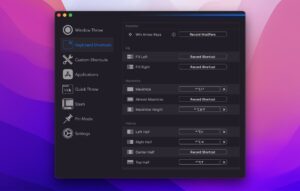
Hold a modifier and drag from a small on-screen anchor to place the active window into one of 16 common sizes and positions—even if that window is not focused. Repeat the same gesture to cycle sizes where configured. Drag windows to screen edges for classic snap areas, or define custom snap targets and use a configurable snap panel for one-click placement.

  • Modifier + cursor move and resize without grabbing window chrome
  • Custom window sizes with per-shortcut repeat behavior
  • Quick throw and workspace commands to arrange several apps at once
  • Layouts that can trigger when displays are connected or disconnected

Pro-only workflow tools

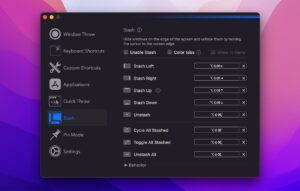
Stash hides windows along screen edges until the pointer touches the edge—handy for reference panels. Pin one app to a side, use an enhanced todo mode, and fully customize the menu bar command list. Import shortcut sets from free Rectangle; sync preferences over iCloud across Macs.

Free Rectangle vs Pro

Rectangle (free, open source) covers solid keyboard and snap-area window management. Pro is a separate commercial build (bundle ID com.knollsoft.Hookshot) with the full Rectangle engine plus Pro features. Not on the Mac App Store—sold via the developer site with a 10-day trial and one-time Paddle license. Requires macOS 10.15+; older macOS builds are archived on the versions page (for example 3.79 for macOS 12–13.4).

Version 3.80

3.80 is the current direct-download release on the official Pro homepage. Cultured Code does not publish a public web changelog per build—release details appear in the in-app Sparkle update prompt. Install 3.80 for the latest stability and macOS compatibility fixes on the 3.8 maintenance line.
Pros & Cons Show details

✅ PROS

  • Window throw cuts memorization: one modifier gesture maps to 16 positions without learning dozens of shortcuts.
  • Includes the entire free Rectangle feature set—easy upgrade path with shortcut import and familiar snap behavior.
  • Custom snap targets, app layouts, and display-aware triggers suit multi-monitor and dock/undock workflows.
  • Stash, pin, and quick throw add power-user patterns beyond basic half/quarter snapping.
  • Lightweight compared with heavy touch-gesture managers; keyboard + cursor paths are tuned for low overhead.

❌ CONS

  • Paid, closed-source app—no Mac App Store listing; license and updates go through the developer’s direct channel.
  • No itemized public release notes for 3.80 on the website—you rely on in-app update text or community issue threads.
  • Requires Accessibility permissions; conflicts with other accessibility tools or macOS quirks can break snap or throw until reset.
  • Not cross-platform—Windows/Linux users need a different window manager.
  • Feature depth has a learning curve; misconfigured snap areas or layouts can cause unexpected behavior until settings are tuned.
✅ What's New in 3.80 Show details
  1. [Current stable 3.80] — Official Pro site offers Rectangle Pro 3.80.dmg as the latest direct download for current macOS versions.
  2. [Archived 3.79 for older macOS] — Users on macOS 12 through 13.4 can still download 3.79 from the versions archive while 3.80 targets newer systems.
  3. [In-app release notes only] — Per-build changes are shown via Sparkle inside the app; there is no public 3.80 bullet list on rectangleapp.com.
  4. [Stash settings on small screens] — Maintainer made Stash behavior sections collapsible so all options are reachable on 13″ MacBooks (community issue #858, June 2026).
  5. [Firefox modifier-move performance] — Reduced lag when moving Firefox windows with modifier + cursor (reported fixed in a late-May 2026 release, issue #865).
  6. [Empty top snap zone crash] — Dragging to an unassigned top snap area no longer quits the app (fixed from 3.76 onward, issue #876).

Older Versions

Version Publication date
Rectangle Pro v3.80 Latest Current
Rectangle Pro v3.78
Rectangle Pro v3.74
Rectangle Pro v3.73
Rectangle Pro v3.72
Rectangle Pro v3.70
Rectangle Pro v3.69
Rectangle Pro v3.68
Rectangle Pro v3.64
Rectangle Pro v3.63
Rectangle Pro v3.0.62
Rectangle Pro v3.0.59
Rectangle Pro v3.0.57
Rectangle Pro v3.0.55
Rectangle Pro v3.0.53
Rectangle Pro v3.0.51
Rectangle Pro v3.0.50
Rectangle Pro v3.0.48
Rectangle Pro v3.0.47
Rectangle Pro v3.0.45
Rectangle Pro v3.0.43
Rectangle Pro v3.0.42
Rectangle Pro v3.0.41
Rectangle Pro v3.0.37
Rectangle Pro v3.0.36
Rectangle Pro v3.0.35
Rectangle Pro v3.0.31
Rectangle Pro v3.0.30
Rectangle Pro v3.0.28
Rectangle Pro v3.0.26
Rectangle Pro v3.0.25
Rectangle Pro v3.0.24
Rectangle Pro v3.0.22
Rectangle Pro v3.0.21
Rectangle Pro v3.0.20
Rectangle Pro v3.0.19
Rectangle Pro v3.0.18
Rectangle Pro v3.0.16
Rectangle Pro v3.0.14
Rectangle Pro v3.0.2
Rectangle Pro v3.0
Rectangle Pro v2.7.9
Rectangle Pro v2.7.7
Rectangle Pro v2.7.6
Rectangle Pro v2.7

Installation & Troubleshooting FAQ

8 questions

Common issues when installing macOS apps

Alternatives

Join the Conversation

Your email address will not be published. Required fields are marked *