
Quiver 3.3 for Mac

Quiver - take better notes
Name:Quiver 3.3 MAS [TNT].dmg.torrent (10.87MB)
Hash:c44b76d7467bb74af0948d1de55ff72be4ba2e1d
Review by:
Downloads 125
Rating
4.2 12 Click to rate
Checked
   Download Torrent Download Now

A notebook built for code and documentation

Quiver is a macOS note app for programmers that organizes each document into cells—text, code, Markdown, LaTeX, or diagrams—so technical notes stay structured instead of living in plain text files.

Cell-based notes on Mac

Combine prose, syntax-highlighted code in 120+ languages via the ACE editor, Markdown with live preview, and MathJax LaTeX in one note. Drag in images and files, link notes together, and tag entries across notebooks for snippets, API docs, and learning notes.

  • Developers: keep reusable code samples with language-specific highlighting per cell.
  • Students and researchers: write Markdown and equations side by side for coursework.
  • Teams: share notebooks through Dropbox, iCloud Drive, or other file-sync folders.

Search, export, and ownership

Full-text search uses macOS SearchKit for fast lookup across large libraries. Notes save as plain JSON on disk, export to HTML or PDF, and support backup, version control, and presentation mode for walkthroughs.

Quiver 3.3

Version 3.3 requires macOS 10.13 or later and adds Apple Silicon support plus a new app icon according to Mac App Store release notes—the first listed update after 3.2.7 from 2019. Quiver sells for a one-time App Store purchase with no subscription.
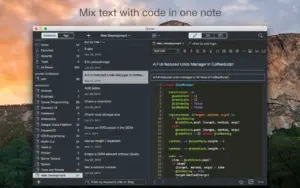
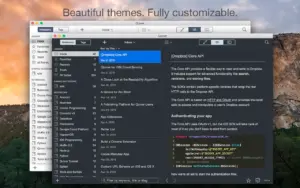
Quiver 3.3 is a Mac notebook for developers Quiver 3.3 for Mac — Programmer's Notebook

Pros & Cons Show details

✅ PROS

  • Cell-based notes let you mix code, Markdown, LaTeX, text, and diagrams in one document—a workflow many general note apps do not match.
  • ACE integration provides syntax highlighting for 120+ languages with themes and indentation suited to daily coding notes.
  • Plain JSON storage, HTML/PDF export, and cloud-folder sync keep your library portable and scriptable without vendor lock-in.
  • SearchKit-powered full-text search, tags, linked notes, and presentation mode help large technical libraries stay usable over time.
  • Version 3.3 adds Apple Silicon support, improving compatibility and performance on current Mac hardware after a long quiet period.
  • One-time purchase pricing avoids subscription costs for a focused programmer notebook tool.

❌ CONS

  • Version 3.3’s public release notes only mention Apple Silicon support and a new icon, with no detailed changelog for other fixes or features.
  • The app had no Mac App Store updates between 3.2.7 (2019) and 3.3, which may concern buyers about long-term maintenance pace.
  • Quiver is Mac-focused for this release narrative; cross-platform real-time sync and mobile parity are limited compared with modern note ecosystems.
  • Team collaboration relies on shared folders or version control rather than live multi-user editing inside the app.
  • MathJax support covers math-mode LaTeX only, not a full LaTeX document environment for complex papers.
  • Some users report minor bugs in older builds (such as tagging issues); whether 3.3 resolves them is not documented in official What’s New text.
✅ What's New in 3.3 Show details
  1. Apple Silicon support — Version 3.3 is updated for Apple Silicon Macs per the Mac App Store What’s New section.
  2. New app icon — Quiver 3.3 ships with refreshed icon artwork alongside the platform update.
  3. Return to active updates — 3.3 is the first App Store release listed after version 3.2.7 from September 2019.
  4. Intel and Apple Silicon Macs — The universal App Store build targets macOS 10.13 or later on both chip architectures.
  5. Focused maintenance release — Official notes do not list new cell types or editor features; core Quiver workflows remain cell-based code and Markdown notes.

Older Versions

Version Publication date
Quiver v3.3 Latest Current
Quiver - take better notes v3.2.7

Installation & Troubleshooting FAQ

8 questions

Common issues when installing macOS apps

Alternatives

Join the Conversation

Your email address will not be published. Required fields are marked *