Pro Audio Converter 1.11.1 for Mac

Pro Audio Converter
Name:Pro Audio Converter 1.11.1 [TNT].dmg.torrent (19.37MB)
Review by:
Downloads 205
Rating
4.8 16 Click to rate
Checked
   Download Torrent Download Now

Batch audio conversion built for macOS

Pro Audio Converter is a native Mac app for converting large audio libraries between formats in one pass, with full control over encoding settings and metadata.

How batch conversion works

Drop files or folders into the queue, enable one or more output formats, and Pro Audio Converter encodes across CPU cores in parallel. A single batch can produce FLAC, MP3, AAC, Apple Lossless, WAV, Opus, and other targets at once—useful when you need lossless archives plus compressed copies for portable players.

  • Music libraries: reorganize collections with metadata-based output paths such as artist, album, and track number.
  • Podcast and post-production: convert stems or masters while preserving tags and artwork.
  • Legacy archives: import headerless PCM, recovered Sound Designer II files, and mislabeled audio detected by content.

Metadata and encoding control

The built-in tag editor lets you change metadata without re-encoding, and conversion preserves extended tags including MusicBrainz IDs, ReplayGain, and sort-order fields mapped across formats. Settings for sample-rate conversion quality and bit-depth dithering help tune output for mastering or fast everyday jobs.

Music app integration

Converted files can export directly to the Apple Music library, with optional playlist creation from track metadata. Drag-and-drop to the Dock icon works even when the app is not running.

Pro Audio Converter 1.11.1

Version 1.11.1 requires macOS 11.0 or later, runs natively on Apple Silicon, and focuses on conversion reliability—clear errors for damaged files, safer overwrite behavior, and cleanup of interrupted jobs. Available on the Mac App Store for a one-time purchase; DRM-protected files are not supported.
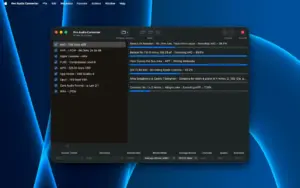
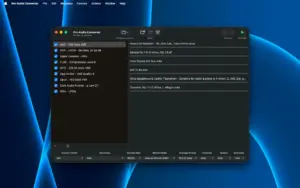
Pro Audio Converter 1.11.1 batch-converts audio on Mac Pro Audio Converter 1.11.1 for Mac — Batch Audio

Pros & Cons Show details

✅ PROS

  • Multi-threaded batch conversion to several output formats in one pass saves time when archiving or preparing multiple deliverables from the same source files.
  • Broad read/write format support—including FLAC, MP3, AAC, ALAC, WAV, Opus, and CAF—covers most everyday and professional Mac audio workflows.
  • Metadata editing without re-encoding and custom output paths based on tags make library organization practical without quality loss.
  • Configurable sample-rate conversion and dithering give more control over quality than basic drag-and-drop converters on macOS.
  • Native Apple Silicon support and content-based file detection help the app handle modern Mac hardware and mislabeled or extensionless audio files.
  • Version 1.11.1 improves error handling and file safety so failed or interrupted conversions are less likely to leave corrupt or empty outputs.

❌ CONS

  • Pro Audio Converter is Mac-only, so it cannot serve Windows or Linux users in a mixed-platform studio.
  • DRM-protected files of any kind are not supported, which limits use with some purchased or subscription audio sources.
  • WMA and several niche formats are read-only or have limitations, so not every legacy file type can be converted to all outputs.
  • The app is not designed as a full CD ripper, so users who need dedicated ripping workflows may still want specialized software.
  • Advanced encoding options and metadata mapping add complexity compared with simpler one-format converters aimed at casual users.
  • Version 1.11.1 is primarily a stability and compatibility update rather than a release with major new conversion features.
✅ What's New in 1.11.1 Show details
  1. Recovered SD2F recognition — Pro Audio Converter now recognizes recovered Sound Designer II files that use the .sd2f extension.
  2. Standard WAV headers — WAV output now uses a standard header that older hardware samplers can read reliably.
  3. Clear errors for damaged files — Damaged or partially downloaded inputs stop with an explicit error instead of producing a near-empty output file.
  4. Safer failed saves — A failed save no longer deletes the existing destination file when no replacement was written successfully.
  5. Reliable Trash on overwrite — When a save replaces an existing file, the previous version now goes to the Trash even when the filename contains spaces.
  6. Temp file cleanup — Interrupted conversions no longer leave large temporary files behind, and leftovers from earlier crashes are cleared at next launch.
  7. MP3 encoding on older macOS — Fixed an issue where certain files could fail to encode to MP3 on older versions of macOS.

Older Versions

Version Publication date
Pro Audio Converter v1.11.1 Latest Current
Pro Audio Converter v1.10.1
Pro Audio Converter v1.9.1
Pro Audio Converter v1.9.0

Installation & Troubleshooting FAQ

8 questions

Common issues when installing macOS apps

Alternatives

Join the Conversation

Your email address will not be published. Required fields are marked *