PodCenter
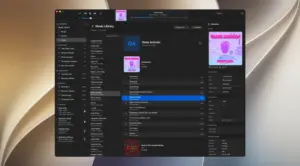
A native macOS music and device tool for people who still use iPods (and other Finder-mounted players): browse a local library, fix tags and artwork, convert unsupported formats, then sync with a clear preview of what will transfer.
How the Mac workflow works
You point PodCenter at one or more music folders; it scans and lets you browse by songs, albums, or artists with search and filtering. Metadata editing covers titles, artists, albums, genres, and artwork—including batch edits—so you can clean tags before a sync rather than fighting incomplete Finder transfers. Playlists can be built or managed in-app and sent to the device. When you connect hardware, the app shows model/storage context and aims to surface what needs conversion, what will be skipped, and what is already on the device before you commit.
Automatic conversion handles formats classic iPods cannot play natively (such as FLAC or OGG) into AAC or MP3 using per-device quality rules. Passthrough mode can leave capable players untouched. Beyond classic direct iPod sync, PodCenter also prepares music for other mounted targets (USB sticks, DAPs, phones via Finder-oriented paths) when you define supported formats. Optional Spotify/Apple Music playlist linking matches streaming lists against your local files. Later releases in the 1.x line added Last.fm/ListenBrainz scrobbling, Rockbox dual-mode support, Sound Check gain editing, and gapless playback improvements.
Licensing, requirements, and 1.2.3
Licensing is a one-time purchase (commonly $19.99) for up to two personal Macs, with a free trial capped at 50 syncs and 50 track edits. Updates are included for the major version purchased, per the vendor terms. Current requirements are macOS 15 Sequoia or later on Intel and Apple Silicon; native SwiftUI. Version 1.2.3 (20 July 2026, build 81) is a maintenance release focused on audio encoding for surround/multichannel sources (downmix to stereo before encode), iPod Classic artwork distortion and inspector artwork add/remove reliability, album grouping when different artists share album titles, and stability around large right-click selections and false rescan warnings. It suits collectors keeping click-wheel iPods alive—not users who only need Apple Music cloud libraries.