
PhotoSweeper 5.5.5 for Mac

PhotoSweeper X
Name:PhotoSweeper X 5.5.5 [TNT].dmg.torrent (56MB)
Hash:63de7d87498ef12bd4bb7a72598a96b829a2a15f
Review by:
Downloads 197
Rating
4.2 12 Click to rate
Checked
   Download Torrent Download Now

PhotoSweeper

A native macOS duplicate-photo utility from Overmacs that scans large libraries, groups exact copies and near-matches, and lets you review removals before anything is permanently deleted.

Typical Mac workflow

You point PhotoSweeper at a source: an Apple Photos library, Adobe Lightroom Classic catalog, Capture One session, a folder on disk, or an external drive. The app compares image content rather than filenames alone, so rotated exports, resized edits, and burst-series shots can surface in the same review groups. Choose a search mode for duplicates, similar photos, or timed series of shots, then adjust similarity thresholds until the results match how strict you want to be.

Results appear in side-by-side review layouts with Quick Look, EXIF details, and marking tools. Auto Mark applies customizable rules— including an AI quality score introduced in the 5.4 line—to keep the sharper or higher-rated image in each group, while locked photos stay protected from deletion. When you confirm cleanup, files typically go to the system Trash, rejected items in Lightroom, or a dedicated album in Photos, so recovery remains possible if you change your mind.

Formats, libraries, and version 5.5.5

The engine supports common still formats such as JPEG, HEIC, PNG, TIFF, and RAW types including DNG, plus PDF and WebP according to the vendor. It also handles several video formats beyond native macOS support. Builds are optimized for Apple Silicon and multicore Intel Macs and require macOS 10.15 or later. PhotoSweeper sells for $14.99 on the Mac App Store with Family Sharing; a trial build is available from the developer site. Version 5.5.5 is the current App Store release; the vendor’s public changelog groups changes under the 5.5 line rather than publishing separate per-build notes for 5.5.5.
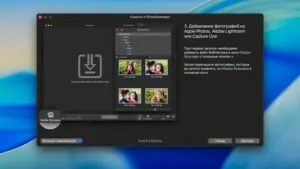

PhotoSweeper 5.5.5 — Duplicate Photo Finder for Mac

Pros & Cons Show details

✅ PROS

  • Deep integration with Apple Photos, Lightroom Classic, and Capture One lets you clean managed libraries without manually exporting everything to folders first.
  • Content-based matching catches duplicates, edited variants, and similar burst shots that filename-only tools would miss.
  • Auto Mark, AI quality scoring, and lock rules speed review in large libraries while keeping manual override available.
  • Safe removal paths—Trash, Lightroom Rejected, or a Photos album—reduce the risk of accidental permanent data loss.
  • Native Apple Silicon support and multicore optimization help the app stay responsive on libraries with tens or hundreds of thousands of files.

❌ CONS

  • Version 5.5.5 carries no dedicated build changelog on the vendor site; App Store notes repeat the broader 5.5.x line, so exact patch-level changes are unclear.
  • The app is Mac-only and sold as a one-time Mac App Store purchase, which may not suit teams that want cross-platform or volume licensing outside Apple’s store.
  • Lightroom and Capture One workflows mark or trash files rather than deleting inside the catalog instantly, which adds an extra cleanup step some users may find indirect.
  • AI quality scoring and flexible rules add learning overhead compared with a simple exact-duplicate finder.
  • Scanning huge NAS volumes or multi-catalog setups can still take considerable time and disk I/O even with performance tuning in recent releases.
✅ What's New in 5.5.5 Show details
  1. XMP sidecar metadata — PhotoSweeper can read metadata from XMP sidecar files, improving comparison context for edited or exported RAW workflows.
  2. Adobe DNG handling — Improved reading of Adobe DNG images helps duplicate detection stay accurate with common camera RAW exports.
  3. Lightroom previews — Preview handling in Adobe Lightroom Classic was refined for smoother library scans and review.
  4. Hidden and rejected import filters — New import options let you ignore hidden photos in Apple Photos and rejected items in Adobe Lightroom during scans.
  5. Bug fixes and performance — The 5.5.x line includes user-feedback-driven stability and speed improvements carried into the 5.5.5 App Store build.
  6. Build 5.5.5 on Mac App Store — Apple lists 5.5.5 as the current Mac App Store version while the vendor changelog still documents features under PhotoSweeper 5.5.

Older Versions

Version Publication date
PhotoSweeper v5.5.5 Latest Current
PhotoSweeper v5.5.4
PhotoSweeper X v5.5.3
PhotoSweeper X v5.5.0
PhotoSweeper X v5.4.1
PhotoSweeper X v5.4.0
PhotoSweeper X v5.3.1
PhotoSweeper X v5.3.0
PhotoSweeper X v5.2.0
PhotoSweeper X v5.1.2
PhotoSweeper X v5.1.1
PhotoSweeper X v5.1.0
PhotoSweeper X v5.0.4
PhotoSweeper X v5.0.3
PhotoSweeper X v5.0.2
PhotoSweeper X v5.0.1
PhotoSweeper X v5.0.0
PhotoSweeper X v4.9.5
PhotoSweeper X v4.9.4
PhotoSweeper X v4.9.3
PhotoSweeper X v4.9.2
PhotoSweeper X v4.9.0
PhotoSweeper X v4.8.5
PhotoSweeper X v4.8.4
PhotoSweeper X v4.8.3
PhotoSweeper X v4.8.1
PhotoSweeper X v4.8.0
PhotoSweeper X v4.7.0
PhotoSweeper X v4.6.0
PhotoSweeper X v4.5.0
PhotoSweeper X v4.3.0
PhotoSweeper X v4.2.0
PhotoSweeper X v4.1.0
PhotoSweeper X v4.0.1
PhotoSweeper X v4.0.0
PhotoSweeper X v3.9.3
PhotoSweeper X v3.9.2
PhotoSweeper X v3.9.1
PhotoSweeper X v3.9.0
PhotoSweeper X v3.8.2
PhotoSweeper X v3.8.1
PhotoSweeper X v3.8.0
PhotoSweeper X v3.7.0
PhotoSweeper X v3.6.1
PhotoSweeper X v3.6.0

Installation & Troubleshooting FAQ

8 questions

Common issues when installing macOS apps

Alternatives

Join the Conversation

Your email address will not be published. Required fields are marked *