
Paste 6.6.2 for Mac

Paste - Clipboard Manager
Name: Paste v6.6.2 macOS.dmg.torrent (28.59MB)
Version: 6.6.2
Operating System: macOS
Program license: Free
Developer: Dmitry Obukhov
Interface language: English
Review by:
Downloads 339
Rating
4.7 14 Click to rate
Checked
   Download Torrent Download Now

Paste

A clipboard manager for macOS that stores everything you copy—text, links, images, and files—in a searchable timeline instead of letting the system clipboard hold only the last item.

Everyday Mac workflow

Paste runs in the background and captures copies as you work. Open it with a keyboard shortcut from any app, scroll a visual history with source-app labels, and paste the item you need—or use ⌘1–9 for recent entries. Paste Stack lets you queue multiple clips and insert them in order, which helps with forms, code snippets, and repetitive data entry. You can paste with original formatting or as plain text, edit copied text inside Paste, and pause capture when handling passwords or sensitive content via custom rules.

Pinboards keep long-lived snippets, templates, and assets separate from transient history; shared pinboards support team or family collaboration with view/edit permissions. iCloud sync mirrors history and pinboards across Mac, iPhone, and iPad, alongside Universal Clipboard when you move between devices mid-task.

Search, privacy, and integrations

Search spans your full history with filters by app, date, device, or content type, including text inside screenshots according to the vendor. Privacy options include excluding sensitive apps, hiding Paste from screen sharing, and keeping data on-device plus private iCloud rather than vendor servers. On Mac, built-in MCP support can connect clipboard history to AI assistants such as Claude and Cursor; Apple Intelligence Writing Tools integrate for polishing copied text.

Licensing and version 6.6.2

Paste requires macOS 14.0 or later on Mac and is sold via Mac App Store subscription (monthly or annual), Family plan, or lifetime purchase, with a one-week trial. The 6.x line introduced a Liquid Glass–style redesign aligned with Apple’s OS 26 family UI, shared pinboards, Advanced Pause Paste, and MCP hooks. Version 6.6.2 (June 13, 2026) is a polish release: automatic search-index rebuild when results go empty, stable website license activation, full-height editing, reliable ⇧⌘E Writing Tools shortcut, clearer preview info bar, dark-mode layout fixes, and launch crash self-recovery.
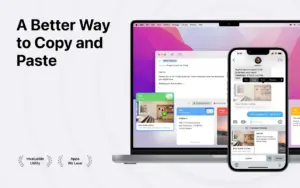

Paste 6.6.2 for Mac — Clipboard Manager

Pros & Cons Show details

✅ PROS

  • Unlimited clipboard history with visual previews and source-app labels reduces lost copies during development, design, and support workflows on Mac.
  • iCloud sync and pinboards keep snippets consistent across Mac, iPhone, and iPad without maintaining a separate notes file for every reuse case.
  • Custom exclusion rules and pause capture help avoid storing passwords or sensitive clipboard content from banking or password-manager apps.
  • Paste Stack and ⌘1–9 shortcuts speed up multi-field forms and repetitive paste sequences without leaving the active application.
  • Mac MCP integration lets AI coding assistants access clipboard context locally, which can streamline prompt and snippet handoff in tools like Cursor.

❌ CONS

  • Core features sit behind a subscription or an $89.99 lifetime unlock, while macOS includes basic Universal Clipboard at no extra cost.
  • Always-on clipboard monitoring requires accessibility or similar permissions and may feel heavy for users who copy rarely or prefer minimal background apps.
  • MCP and some Apple Intelligence Writing Tools features depend on current macOS and Apple platform versions, so older Macs on macOS 14 may miss newer integrations.
  • Shared pinboards and multi-device sync assume iCloud; teams or users avoiding Apple cloud services lose a major collaboration path.
  • Version 6.6.2 addresses search-index and launch-crash edge cases, suggesting prior builds could still frustrate users with empty search or rare startup failures.
✅ What's New in 6.6.2 Show details
  1. [Search index rebuild] — Detects a cleared search index and rebuilds it automatically when search returns no results.
  2. [Website license fix] — Licenses activated from pasteapp.io no longer drop and prompt unnecessary re-activation.
  3. [Full-height editing] — Long copied text scrolls with full editor height instead of being cropped by the formatting bar.
  4. [Writing Tools shortcut] — ⇧⌘E reliably opens Apple Intelligence Writing Tools with the cursor ready to edit.
  5. [Preview info bar] — Preview header text is easier to read at a glance when reviewing saved clips.
  6. [Dark mode polish] — Backgrounds and layouts in dark mode no longer crop or hide UI elements.
  7. [Launch crash recovery] — Self-recovers from a rare startup error that could previously crash the app at launch.

Older Versions

Version Publication date
Paste v6.6.2 Latest Current
Paste v6.3.11
Paste v6.3.3
Paste v6.3.2
Paste v6.1.0
Paste v6.0.3
Paste v2.5.6
Paste v2.4.4
Paste v2.4.2
Paste v2.1.0

Installation & Troubleshooting FAQ

8 questions

Common issues when installing macOS apps

Alternatives

Important

Run the downloaded image and drag the app to the Applications folder shortcut.

After copying is complete, you can launch the app from Launchpad.

iCloud sync is unavailable.

Join the Conversation

Your email address will not be published. Required fields are marked *