
Live Home 3D Pro 4.12.1 for Mac

Live Home 3D Pro
Name:Live Home 3D Pro 4.12.1 [TNT].dmg.torrent (619.83MB)
Hash:0ce84e87d43dc682142a514bc837058effea8713
Review by:
Downloads 202
Rating
4.6 26 Click to rate
Checked
   Download Torrent Download Now

Live Home 3D Pro

A cross-platform home, interior, and landscape design application from Belight Software that lets Mac users draft floor plans in 2D, furnish spaces in 3D, and produce renders without switching to a separate CAD suite.

Typical Mac workflow

You start with a 2D plan: draw walls, set room dimensions, add doors and windows, then switch to a 3D walkthrough to place furniture, materials, and lighting. The catalog includes thousands of supplied objects and materials, and you can import models from Trimble 3D Warehouse or common 3D formats. Ray-traced stills and videos use offline engines such as AMD Radeon ProRender or Cycles, with geolocation-based sun and adjustable fixtures for more realistic exterior and interior shots.

Pro unlocks tools aimed at serious layouts: terrain editing for gardens and driveways, a material editor, 2D elevation views for wall openings, freely shaped roofs, a building-block tool for structural elements, extended camera controls, and exports to USDZ, glTF, FBX, OBJ, and other formats at higher resolutions. Projects can sync across Mac, iOS, iPadOS, visionOS, and Windows according to the vendor, though Mac App Store purchases do not transfer to other platforms.

Licensing and version 4.12.1

The base Mac app is free with watermarks, a one-project limit, and a two-floor cap until you buy Standard or Pro features via in-app purchase or a license from the developer site. On the Mac App Store, Pro is offered as subscriptions (about $14.99/month or $39.99/year) or a $99.99 lifetime unlock, with Standard tiers below that. Version 4.12 raised the minimum OS to macOS 11 on Apple silicon or Intel; 4.12.1 adds Polish UI localization, expanded Help translations, improved Collada import, roofing-material fixes, and general stability work.
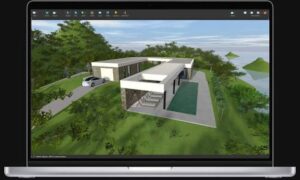

Live Home 3D Pro 4.12.1 — Home Design for Mac

Pros & Cons Show details

✅ PROS

  • Combines 2D planning, 3D furnishing, terrain editing, and offline ray-traced rendering in one Mac app instead of juggling separate CAD and render tools.
  • A large built-in library plus Trimble 3D Warehouse and common 3D import formats make it practical for custom furniture and exterior objects.
  • Pro adds professional extras such as custom roofs, material and light editors, elevation views, and high-resolution or USDZ exports for presentations and AR workflows.
  • Cross-device project sharing across Mac, iOS, iPadOS, visionOS, and Windows suits homeowners who sketch on iPad and finish on Mac.
  • A free tier lets you evaluate layouts before paying for Standard or Pro, with lifetime and subscription options on the Mac App Store.

❌ CONS

  • Pro features sit behind in-app purchases or a separate license; the free edition watermarks exports and limits projects to one file and two floors.
  • Mac App Store purchases do not carry over to iPhone, iPad, Vision, or Windows builds, so multi-device users may need duplicate licensing.
  • Version 4.12 dropped support below macOS 11, which blocks older Macs that still ran earlier 4.x releases on macOS 10.15.
  • Ray-traced rendering and large imported libraries can demand significant GPU time and storage on modest Mac hardware.
  • Version 4.12.1 is a modest maintenance update focused on localization, import fixes, and materials rather than major new design tools.
✅ What's New in 4.12.1 Show details
  1. Polish interface translation — Version 4.12.1 adds Polish localization for the application UI per official Mac release notes.
  2. Help documentation translations — Help content is now available in Japanese, Portuguese, Russian, Ukrainian, Polish, and Chinese in this release.
  3. Collada import — Import of Collada (.dae) models was improved for more reliable use of third-party 3D assets.
  4. Roofing materials — The vendor fixed issues affecting some roofing materials in 4.12.1.
  5. Stability improvements — The update includes additional bug fixes and general stability work beyond the listed feature changes.
  6. Build 4.12.1 — Apple lists 4.12.1 as the current Mac App Store version, aligned with the vendor’s macOS release notes.

Older Versions

Version Publication date
Live Home 3D Pro v4.12.1 Latest Current
Live Home 3D Pro v4.11.2
Live Home 3D Pro v4.11.1
Live Home 3D Pro v4.11.0
Live Home 3D Pro v4.10.4
Live Home 3D Pro v4.10.3
Live Home 3D Pro v4.10.2
Live Home 3D Pro v4.10.1
Live Home 3D Pro v4.10.0
Live Home 3D Pro v4.9.9
Live Home 3D Pro v4.9.8
Live Home 3D Pro v4.9.7
Live Home 3D Pro v4.9.6
Live Home 3D Pro v4.9.5
Live Home 3D Pro v4.9.2
Live Home 3D Pro v4.9.1
Live Home 3D Pro v4.9.0
Live Home 3D Pro v4.8.4
Live Home 3D Pro v4.8.3
Live Home 3D Pro v4.8.1
Live Home 3D Pro v4.8
Live Home 3D Pro v4.7.3
Live Home 3D Pro v4.5
Live Home 3D Pro v3.8
Live Home 3D Pro v3.7.2
Live Home 3D Pro v3.7.0
Live Home 3D Pro v3.6.1
Live Home 3D Pro v3.5.5

Installation & Troubleshooting FAQ

8 questions

Common issues when installing macOS apps

Alternatives

Join the Conversation

Your email address will not be published. Required fields are marked *