Iridient Developer 5.5.0 for Mac

Iridient Developer
Name:RawDeveloper 5.5 [TNT].dmg.torrent (42.98MB)
Hash:c791fd0ca75fdb989399a376d84dab5cf27eb664
Review by:
Downloads 164
Rating
4.7 9 Click to rate
Checked
   Download Torrent Download Now

Iridient Developer on Mac

Iridient Developer is a Mac-only RAW conversion app that turns camera files into high-bit-depth TIFF, JPEG, PNG, or JPEG XL output with its own demosaic pipeline rather than relying on Lightroom or Apple Photos alone.

Who it is for

  • Photographers who want maximum detail from Fujifilm X-Trans, Sony, Canon, Nikon, and other RAW formats.
  • Users who export to Photoshop or Lightroom after conversion instead of editing entirely inside one catalog app.
  • Anyone batch-processing folders of RAW files with consistent sharpening, noise reduction, and color profiles.

Typical workflow

  1. Open a RAW file or drag a folder into Iridient Developer for batch conversion.
  2. Choose demosaic mode (HiFi detail, soft look, or Apple RAW library option where supported).
  3. Adjust exposure, curves, white balance, sharpening, and noise reduction on a 16-bit preview.
  4. Export to TIFF, JPEG, PNG, JPEG XL, or other formats with IPTC and EXIF metadata intact.

Core strengths

The app supports 800+ camera models with a processing stack built in-house: six sharpening methods including Iridient Reveal, advanced noise reduction, lens correction, flexible ICC and DNG profile handling, and monochrome tools with RAW plane access. Version 5 introduced HiFi Bayer demosaic for color and monochrome, up to 30% faster processing than v4, and JPEG XL export. Processing runs on background threads with Apple Silicon and Intel optimization.

Version 5.5.0

Build 5.5 (June 3, 2026) adds RAW support for Sony A7R VI and A7 V, Canon EOS R6 Mark III, Nikon ZR, Fujifilm X-T30 III, Ricoh GR IV Monochrome, Leica M EV1 and Q3 Monochrom, and more. HiFi demosaic is refined for 40+ megapixel sensors without anti-aliasing filters, and backend libraries (Adobe DNG SDK, libraw, libtiff, libjpeg-turbo) are updated. Bug fixes address Fujifilm GFX speckle noise at high ISO and monochrome demosaic edge artifacts.

Licensing

The demo is unlimited but watermarks exports until you buy a license for $119.99 with 18 months of free upgrades. Purchases after December 1, 2024 get 5.5 as a free upgrade. Requires macOS 11 Big Sur through macOS 26 Tahoe on Apple Silicon or Intel Macs with AVX support.
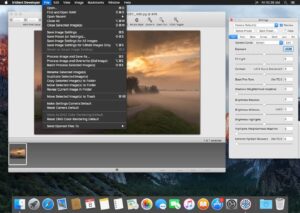
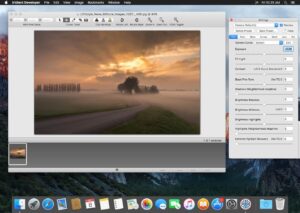
Iridient Developer 5.5.0 for Mac: HiFi RAW Iridient Developer 5.5.0 — RAW Converter for Mac

Pros & Cons Show details

✅ PROS

  • Custom HiFi demosaic algorithms often produce sharper, more natural detail than generic converters, especially on Fujifilm X-Trans files.
  • Six sharpening methods and 16-bit/32-bit processing give fine control over micro-contrast without leaving the conversion app.
  • Batch drag-and-drop export with flexible naming suits studio workflows that process hundreds of RAW files overnight.
  • Version 5.5.0 adds day-one support for current bodies such as Sony A7R VI, Canon R6 Mark III, and Nikon ZR.
  • Native universal binary optimized for Apple Silicon and multi-core Macs keeps previews responsive during background exports.
  • One-time license around $120 with 18 months of included updates is cheaper long-term than perpetual Adobe Photography Plan for RAW-only needs.

❌ CONS

  • Iridient Developer is a converter, not a full DAM or library tool, so you still need Lightroom, Capture One, or Photo Mechanic for cataloging.
  • macOS-only with no Windows version limits mixed-platform studios.
  • Demo mode watermarks every export permanently until purchase, so you cannot evaluate final print quality without buying.
  • Version 5.5.0 does not yet support some new lossy RAW modes on Sony A7R VI, A7 V, and Nikon ZR per the release notes.
  • The interface and documentation feel dated compared with modern Adobe or Capture One UIs, with a steeper learning curve for beginners.
  • Major version upgrades after the included 18-month window may require a paid upgrade or 40% discount coupon for older license holders.
✅ What's New in 5.5.0 Show details
  1. [Sony A7R VI and A7 V] — RAW support added for Sony ILCE-7M5 and A7R VI (lossy lightweight RAW modes not yet supported).
  2. [Canon EOS R6 Mark III] — New Canon EOS R6 Mark III and EOS C50 RAW files open in 5.5.
  3. [Nikon ZR] — Support for Nikon ZR RAW with lossy High Efficiency modes still pending.
  4. [More camera bodies] — Added Fujifilm X-T30 III, Ricoh GR IV Monochrome, Leica M EV1, Q3 Monochrom, and Panasonic Lumix DC-L10 and DC-ZS300.
  5. [HiFi demosaic refinement] — Improved HiFi processing for 40+ megapixel sensors with weak or no anti-aliasing filter.
  6. [Library updates] — Adobe DNG SDK 1.7.1, libraw 2026-05-14, libtiff 4.7.1, libjpeg-turbo 3.1.4.1, and Little CMS 2.19.1 ship in this build.
  7. [Fujifilm GFX noise fix] — Fixed HiFi demosaic speckle noise on Fujifilm GFX models above ISO 6400.
  8. [Monochrome demosaic fixes] — Corrected false-color borders and disabled conflicting lens CA correction when HiFi monochrome demosaic is active.
  9. [JPEG XL monochrome DNG] — Monochrome DNG files with JPEG XL compression from Iridient Transformer now load correctly.

Older Versions

Version Publication date
Iridient Developer v5.5.0 Latest Current
Iridient Developer v5.0.0
Iridient Developer v4.5.0
Iridient Developer v4.3.2
Iridient Developer v4.3.1
Iridient Developer v4.3.0
Iridient Developer v4.2.1
Iridient Developer v4.2.0
Iridient Developer v4.1.0
Iridient Developer v4.0.0
Iridient Developer v3.9
Iridient Developer v3.7.1
Iridient Developer v3.7
Iridient Developer v3.6.4
Iridient Developer v3.6.3
Iridient Developer v3.6.2
Iridient Developer v3.6.1
Iridient Developer v3.6
Iridient Developer v3.5.1
Iridient Developer v3.5
Iridient Developer v3.4.1
Iridient Developer v3.3.13
Iridient Developer v3.3.12
Iridient Developer v3.3.11
Iridient Developer v3.3.10

Installation & Troubleshooting FAQ

8 questions

Common issues when installing macOS apps

Alternatives

Important

Compatibility
macOS 10.13 and later

Architecture
x86 (64-bit)

Join the Conversation

Your email address will not be published. Required fields are marked *