

HazeOver 1.9.7 for Mac
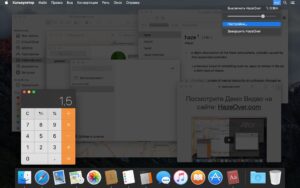
HazeOver is a focus utility for macOS that automatically dims background windows and highlights the one you are actively using. It reduces visual noise, helps you stay on task, and makes long work sessions feel calmer.
Instead of manually hiding apps, you keep your workspace visible while attention stays on the front window. This is especially useful for writing, coding, design reviews, and any workflow with many open windows.
Why users install HazeOver
Instant focus boost: inactive windows fade out, so your eyes and attention stay on the active task.
Cleaner desktop feel: less visual clutter without closing apps or changing your workflow.
Custom dimming level: tune intensity to your preference, from subtle background shading to strong isolation.
Works across apps: useful with text editors, browsers, creative tools, and multi-window productivity setups.
Low-friction usage: lightweight behavior that runs quietly in the background once configured.
Version details
- App: HazeOver
- Version: 1.9.7 fix
- Platform: macOS
For exact compatibility and release notes, check the official HazeOver page or Mac App Store listing.





As I said in my removed message, the image is corrupted; therefore, it will not mount.
Hence your instructions are useless.
I checked the dev’s website and this version requires macOS 12+ so it won’t run on my system anyway. I would have discovered that after mounting the dmg, but that wasn’t possible.
Open the downloaded disk image and drag the application to the Applications folder shortcut.
After copying is complete, you can launch the app from Launchpad.