

cyberWriter 3.0 for Mac

Name:cyberWriter 3.0.iso.torrent (25.36MB)
Review by:
Downloads 283
Rating
4.8 31 Click to rate
Checked
   Download Torrent Download Now    Download Link

cyberWriter 3.0 for Mac

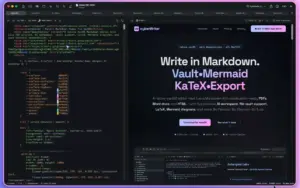
cyberWriter is a native SwiftUI Markdown editor and knowledge vault for macOS. It targets writers, researchers, and technical authors who want Obsidian-style linking, live preview, and PDF or Word export without Pandoc, Electron, or plugin stacks that need broad system access.

Vault and graph

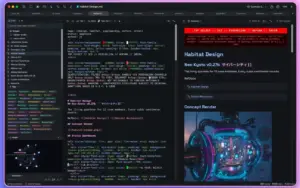
Open any folder of Markdown files as a vault—compatible with existing Obsidian libraries. Use wikilinks, backlinks, tags, callouts, and image embeds. A force-directed knowledge graph shows how notes connect; version 3.0 adds a one-click Vault Stats dashboard that writes a linked Map of Content to Vault Stats.md at the vault root.

  • Quick switcher and drag-to-link from the sidebar
  • Full-text search with concept-style “Related Ideas” when embeddings are built
  • Example vault on first launch

Writing, math, and diagrams

Edit in split or preview-only modes with 15+ syntax themes, outline sidebar, focus mode, and a command palette with 90+ actions. KaTeX renders math; Mermaid covers 16 diagram types; inline HTML and CSS preview as written. Hex color codes show inline swatches with Option-click editing.

  1. Live PDF preview with document map and page-break control
  2. Native DOCX and standalone HTML export—no external converters
  3. Slides and flash cards from the same document (SM-2 spaced repetition)
  4. Voice notes, dictation, and on-device transcription

AI workspace

On macOS 26+, Apple Intelligence can run on-device with no API keys. You can also attach Ollama, LM Studio, MLX, Claude, OpenRouter, or other OpenAI-compatible endpoints. Chat with your vault uses local embeddings and RAG; quick actions (⌘J) rewrite or summarize selection, and stream-to-editor mode types at the cursor.

Licensing and version 3.0

cyberWriter ships as a lifetime license (about $14.99 on the Mac App Store; direct builds via GitHub and Lemon Squeezy). A 7-day full-feature trial applies on official channels. Requires macOS 15.0 (Sequoia) or later. Version 3.0 (May 2026) focuses on app
Pros & Cons Show details

✅ PROS

  • All-in-one workflow: vault, graph, AI, Mermaid, LaTeX, voice, slides, and export live in one sandboxed app without Pandoc or LaTeX installs.
  • Obsidian-compatible vaults lower migration friction; wikilinks, backlinks, and tags work on existing folders.
  • Apple Intelligence and local LLM support suit privacy-sensitive users; vault RAG and embeddings can stay on-device.
  • Native PDF, DOCX, and HTML generation keeps preview and export aligned—strong for reports, docs, and handoffs to Word.
  • Lifetime license and no subscription contrast with many AI writing tools; Family Sharing is supported on the App Store listing.

❌ CONS

  • macOS 15+ only—no support for older Macs; several AI features expect macOS 26 (Tahoe) for Apple Intelligence and embedding workflows.
  • Commercial, closed-source product: the GitHub repo distributes builds and docs, not full source—tinkerers cannot audit or fork the editor itself.
  • Heavy feature set has a learning curve (vault, graph, AI panel, export themes, slides); the interactive tour helps but power features take time to discover.
  • App Store price and direct licensing differ in update path; users must choose Store vs Sparkle/direct for fastest patches.
  • English-first App Store listing; multilingual UI coverage is not highlighted on official pages.
✅ What's New in 3.0 Show details
  1. [App Appearance (3.0)] — Toolbar and Settings picker: Cyber (original dark identity), System Light, or System Dark; document themes stay separate from window chrome.
  2. [System preview theme] — Follows macOS appearance automatically (Synthetic Editorial in dark, Modern in light).
  3. [Vault Stats Dashboard] — One-click overview: counts, top tags, linked files, orphans, recents; writes regeneratable Vault Stats.md with wikilinks.
  4. [AI chat reliability] — Assistant Markdown renders consistently; vault search jumps to the matching line; tag pills color by hash (toggle in Settings).
  5. [macOS 26 compatibility] — Restored File menu export/save actions; About window CPU leak fixed.
  6. [Polish bundle] — Line numbers off by default; resizable sidebar with per-window persistence; hover previews render full Markdown; embedding loop, IME, and AI focus fixes plus accessibility and scroll-sync refinements.

Installation & Troubleshooting FAQ

8 questions

Common issues when installing macOS apps

Join the Conversation

Your email address will not be published. Required fields are marked *