ClickClack – Typing Trainer 4.1.0 for Mac

ClickClack
Name:ClickClack 4.1.0.dmg.torrent (13.06MB)
Hash:4aa78ac0c9119c824dd5c2414ecd13c941a1ffc7
Review by:
Downloads 304
Rating
4.5 31 Click to rate
Checked
   Download Torrent Download Now

ClickClack is a native typing trainer for macOS, iPhone, and iPad by Alfian Losari that combines timed speed tests, structured lessons, accuracy analytics, VS CPU races, and Game Center multiplayer in a minimal SwiftUI interface.

How Mac users practice

You pick a mode—speed test by time or word count, guided lessons from home row through symbols, N-Gram Word Focus Lab drills for sticky key sequences, or competitive 60-second matches against 2–4 players. The app tracks net and gross WPM, accuracy, consistency, mistyped keys, and bigram/trigram heatmaps. Customize fonts, themes, keymap overlay, hand-guide opacity, and mechanical-style sound packs. Stats sync across Apple devices through iCloud; Game Center handles achievements and leaderboards.

Free vs Pro and privacy

The base app is free on the Mac App Store. A one-time Pro unlock ($7.99 USD) adds advanced stats, unlimited custom text, extra N-Gram drill strategies, and deeper AI insights. Apple Intelligence features—on-device text generation and result analysis—require macOS 26 with Apple Intelligence enabled. The developer states AI processing runs locally with no data collection; typing results store in your private iCloud/CloudKit database.

Version 4.1.0

Released 26 May 2026, build 4.1.0 introduces Liquid Glass animated gradient themes on macOS 26, with fluid color profiles and adaptive UI tinting across controls. It builds on recent 4.x additions such as Dynamic N-Gram Word Focus Lab, on-device AI practice text, custom sound packs, and history filtering. Requires macOS 14.5 or later.
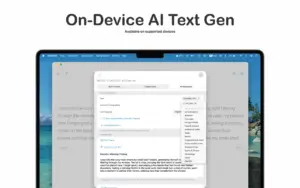
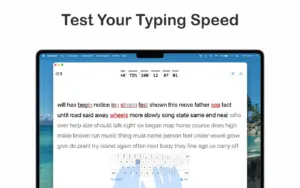
ClickClack 4.1.0 on Mac: typing testsClickClack Typing Trainer 4.1.0 for Mac — Typing App

Pros & Cons Show details

✅ PROS

  • ClickClack packs speed tests, lessons, N-Gram accuracy drills, VS CPU, and real-time multiplayer into one lightweight native Mac app under 8 MB.
  • On-device Apple Intelligence text generation and typing insights keep practice content and analysis local when macOS 26 and Apple Intelligence are available.
  • iCloud sync unifies WPM history across Mac, iPhone, and iPad so progress follows you between desk and mobile practice.
  • Deep analytics—mistyped-key heatmaps, N-Gram tracking, WPM graphs, and XP levels—help Mac users target accuracy gaps instead of chasing raw speed alone.
  • A free base tier plus a $7.99 lifetime Pro unlock avoids recurring subscriptions common among typing SaaS platforms.

❌ CONS

  • Liquid Glass animated themes and AI features require macOS 26 with Apple Intelligence, leaving many Macs on Sonoma or Sequoia without the headline 4.1.0 visuals.
  • Advanced N-Gram strategies, deeper AI insights, unlimited custom text, and some analytics sit behind the $7.99 Pro IAP.
  • Multiplayer matches use English text only, which limits competitive mode for non-English typists on Mac.
  • The lesson library is smaller than long-established web trainers like Keybr or TypingClub, so advanced users may outgrow structured content quickly.
  • Game Center dependency means multiplayer and achievements fail or feel empty if you disable Game Center or use a managed Mac without it.
✅ What's New in 4.1.0 Show details
  1. [Liquid Glass animated themes] — macOS 26 users get fluid, animated gradient color profiles that update the typing environment with premium visual depth.
  2. [Dynamic adaptive UI] — Selected themes now tint buttons and controls across the app for a cohesive look instead of isolated background changes.
  3. [Animated gradient collection] — New gorgeous moving color profiles aim to keep long practice sessions visually engaging on Mac.
  4. [On-device AI text generation] — Apple Intelligence can generate unlimited local practice passages on macOS 26 without sending text to a server.
  5. [AI result insights] — Post-session on-device analysis covers speed, accuracy, and consistency, with deeper breakdowns in Pro.
  6. [Dynamic N-Gram Word Focus Lab] — Targeted drills for mistake-prone character sequences remain a core accuracy feature highlighted in the 4.1.0 release notes bundle.
  7. [General fixes] — Bug fixes and UI improvements ship alongside the theme update per the App Store changelog.

Installation & Troubleshooting FAQ

8 questions

Common issues when installing macOS apps

Alternatives

1 Comment

  1. Run the downloaded image and drag the application to the Applications folder shortcut.

    Once the copy is complete, you can launch the application from Launchpad.

    Compatibility
    macOS 14.5 and later

    Architecture
    ARM, x86 (64-bit)

Join the Conversation

Your email address will not be published. Required fields are marked *