Capture One Pro 16.8.0.32 for Mac

Capture One
Name:Capture_One_Pro_16.8.0.32_[TNT].dmg.torrent (1.89GB)
Hash:857473d1ae822fe4a04d7391c768b4e3709bb0dd
Review by:
Downloads 941
Rating
4.7 31 Click to rate
Checked
   Download Torrent Download Now

What Capture One Pro does on Mac

Capture One Pro is a professional RAW photo editor and tethering tool used by studio, fashion, and commercial photographers who need precise color control, fast culling, and reliable on-set capture workflows.

On Mac you work in Sessions or Catalogs, import RAW files from most major camera brands, and edit with layers, masks, styles, and the Color Editor. The app supports wired and wireless tethering, Live View, and tools such as AI masking and retouching that many studios rely on during shoots. Edits are non-destructive, and export paths cover print, web, and handoff to Photoshop or client review via Capture One Live.

Typical Mac workflow

A common setup starts with a tethered Session on set: each capture lands in the Browser, gets a quick grade through Next Capture Adjustments, and is culled with star ratings, color tags, or Smart Albums. Back at the desk you refine exposure, skin tones, and local corrections on layers, then export variants or deliver through Actions on Studio plans. Apple Silicon Macs run Capture One natively with Metal acceleration; Intel Macs are still supported on macOS 14 or later.

Version 16.8.0.32 highlights

Build 16.8.0.32 ships the Capture One 16.8 feature line released May 28, 2026. Major additions include Enhanced Denoise for high-ISO Bayer RAW files, 2nd Gen Wireless Tethering for supported Canon bodies (EOS R5 Mark II and R1), and Assisted Review (beta) to flag closed eyes, missed focus, and exposure problems. Tethering also gains When Preview Is Ready, which shows a graded preview immediately while heavier AI adjustments finish in the background.

Licensing and requirements

Capture One Pro is a paid product with subscription and perpetual options; Studio for Teams and Enterprise add Actions and a web admin portal. You need macOS 14+, 8 GB RAM (16 GB recommended), 10 GB free disk space, and internet for activation and Capture One Live. Sessions and Catalogs from 16.7 or earlier must be upgraded to open in 16.8 and cannot return to older versions without a backup restore.

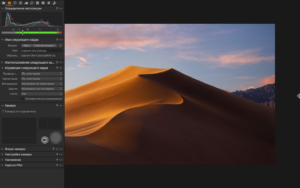
Capture One Pro 16.8 adds Enhanced Denoise Capture One Pro 16.8.0.32 for Mac — RAW Editor

Pros & Cons Show details

✅ PROS

  • Native Apple Silicon support with Metal acceleration makes RAW editing and tethering practical on M-series Macs without Rosetta overhead.
  • Enhanced Denoise targets high-ISO Bayer RAW files while preserving skin tone and texture, with background processing that does not block culling or editing.
  • 2nd Gen Wireless Tethering for supported Canon cameras delivers editable small RAW previews quickly while full-resolution files transfer in the background.
  • Assisted Review (beta) automates technical culling flags such as closed eyes and missed focus, which speeds portrait and event selection workflows.
  • Expanded AppleScript Color Editor access and improved ReTether with progress indicators suit studios that automate grading or recover shots after card or connection issues.

❌ CONS

  • Capture One Pro requires a paid license or subscription, and enterprise features such as Actions and the Admin Portal are limited to higher Studio tiers.
  • Enhanced Denoise currently supports Bayer-pattern RAW only; Fujifilm X-Trans, monochrome, linear RGB, and JPEG files are excluded until a future update.
  • Assisted Review ships as beta, so detection accuracy and workflow polish may change and should not fully replace manual culling yet.
  • 2nd Gen Wireless Tethering works only with select Canon bodies (R5 Mark II and R1), so most other brands still depend on slower wireless or wired tethering.
  • Upgrading Sessions or Catalogs to 16.8 is one-way without a backup, which complicates mixed-version teams still on 16.7.x workstations.
✅ What's New in 16.8.0.32 Show details
  1. [Build note] — Official release notes cover Capture One 16.8 (May 28, 2026); build 16.8.0.32 is part of that line without a separate public changelog.
  2. [Enhanced Denoise] — New noise reduction extension for high-ISO Bayer RAW files preserves skin tones and texture while processing results in the background.
  3. [2nd Gen Wireless Tethering for Canon] — Supported Canon R5 Mark II and R1 bodies send a small editable RAW preview over Wi-Fi while full-resolution files reconcile automatically.
  4. [Assisted Review (beta)] — AI flags closed eyes, missed focus, and exposure problems so portrait culling can focus on keepers instead of manual technical sorting.
  5. [When Preview Is Ready] — Tethered captures appear color-graded in the Viewer immediately while slower AI adjustments from Next Capture Adjustments finish afterward.
  6. [Improved ReTether] — Wireless ReTether support for Canon, toolbar toggle, transfer progress bars, and fewer duplicate files when two memory cards are present.

Older Versions

Version Publication date
Capture One Pro v16.8.0.32 Latest Current
Capture One Pro v16.7.8.16
Capture One Pro v16.7.5.7
Capture One Pro v16.7.4.24
Capture One Pro v16.7.3.31
Capture One Pro v16.7.1.11
Capture One Pro v16.7.0.50
Capture One Pro v16.6.6.9
Capture One Pro v16.6.5.17
Capture One Pro v16.6.4.6
Capture One Pro v16.6.3.6
Capture One Pro v16.6.2.8
Capture One Pro v16.6.1.21
Capture One Pro v16.6.0.24
Capture One Pro v16.5.11.15
Capture One Pro v16.5.10.13
Capture One Pro v16.5.9.7
Capture One Pro v16.5.8.4
Capture One Pro v16.5.7.8
Capture One Pro v16.5.6.22
Capture One Pro v16.5.5.7
Capture One Pro v16.5.4.26
Capture One Pro v16.5.3.1
Capture One Pro v16.5.1.14
Capture One Pro v16.5.0.29
Capture One Pro v16.4.5.29
Capture One Pro v16.4.4.24
Capture One Pro v16.4.3.15
Capture One Pro v16.4.2.1
Capture One Pro v16.4.0.48
Capture One Pro v16.3.8.23
Capture One Pro v16.3.7.10
Capture One Pro v16.3.6.6
Capture One Pro v16.3.5.10
Capture One Pro v16.3.2.32
Capture One Pro v16.3.1.23
Capture One Pro v12.1.3.9
Capture One Pro v12.1.2.38
Capture One Pro v10.1.1.5

Installation & Troubleshooting FAQ

8 questions

Common issues when installing macOS apps

Alternatives

Join the Conversation

Your email address will not be published. Required fields are marked *