
Boxy SVG 4.111.0 for Mac

Boxy SVG
Name: Boxy SVG 4.111.0 MAS [TNT].dmg.torrent (221.62MB)
Version: 4.111.0
Operating System: macOS
Program license: Free
Developer: Jarosław Foksa
Interface language: English
Review by:
Downloads 212
Rating
4.3 30 Click to rate
Checked
   Download Torrent Download Now

Boxy SVG

A Mac vector editor built around the SVG format itself—so icons, UI assets, and web illustrations stay editable as real SVG rather than locked proprietary files.

Jarosław Foksa’s Boxy SVG aims at designers and front-end developers who want something between a browser demo and a full Adobe suite. The interface borrows familiar patterns from Inkscape, Sketch, and Illustrator: on-canvas geometry and transform handles, paint controls, manual and smart guides, grids, path boolean ops (unite, intersect, subtract, exclude), and arrangement tools for align, rotate, flip, order, and group. You save SVG or compressed SVGZ and export PNG, JPEG, WebP, PDF, or HTML5. Pixabay integration supplies stock photos and vectors; Google Fonts covers typography without hunting local font files. Over a hundred commands can be rebound to custom shortcuts.

Why developers keep it on the Mac

Rendering runs on a Chromium-based engine, so what you see is close to Chrome’s SVG behavior. An inspector similar to browser DevTools exposes SVG and CSS for selected nodes. Output tends to preserve IDs, classes, titles, and other metadata instead of aggressively rewriting the markup—useful when the file will land in a codebase or sprite sheet. Sprite editing is a first-class workflow. The Mac App Store edition is a one-time $19.99 purchase with Family Sharing for up to six members; the privacy label states that no data is collected. Requirements are macOS 12.0 or later; the store build is about 155 MB and ships in English plus twenty other languages. A free online demo on the project site lets you evaluate before buying.

It is not a replacement for Illustrator’s print pipelines or Affinity’s multi-format document model. Complex brand systems, CMYK print packaging, or heavy bitmap compositing still belong elsewhere. For web icons, logo cleanup, SVG sprites, and quick path surgery on Mac, Boxy stays lightweight and SVG-honest.

Version 4.111.0

Release 4.111.0 adds the OpenMoji emoji library for quicker iconography drafts, a Color space option when exporting PNG or JPEG (including linear sRGB among the choices in the export UI), and a fix for the Join paths command that previously failed. Cross-platform notes for the same version also fix Export-panel preview and export of documents that use Google Fonts on Firefox—relevant if you share projects across desktop and web builds of Boxy. Install 4.111.0 if you need OpenMoji in the library pane or color-managed raster exports from SVG artwork.
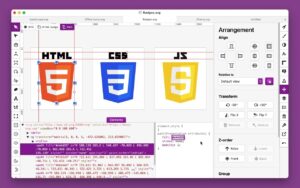

Boxy SVG 4.111.0 for Mac — Native SVG Editor

Pros & Cons Show details

✅ PROS

  • Native SVG/SVGZ workflow keeps IDs, classes, and metadata usable for web and sprite pipelines.
  • Chromium rendering plus a DevTools-like inspector matches browser preview better than many desktop vector apps.
  • Path booleans, guides, Google Fonts, and Pixabay cover everyday icon and UI asset work without a subscription.
  • One-time $19.99 Mac App Store price with Family Sharing undercuts Illustrator for SVG-focused tasks.
  • OpenMoji in 4.111.0 speeds emoji-style icon drafts without hunting external SVG packs.
  • Color space control on PNG/JPEG export helps when handoff targets linear sRGB or other raster needs.

❌ CONS

  • Not a full print DTP suite—limited compared with Illustrator or Affinity for CMYK and multi-page brand books.
  • Chromium-based desktop shell means a larger install (~155 MB) than ultra-light native-only tools.
  • Free trial is awkward on the Mac App Store; evaluation often means the web demo instead.
  • Join paths was broken before 4.111.0—users on older 4.110.x builds should update before relying on that command.
  • Requires macOS 12 or later, excluding older Monterey-era point releases below 12.0.
  • Collaboration/cloud features are thinner than Figma; Boxy is primarily a local SVG editor.
✅ What's New in 4.111.0 Show details
  1. [OpenMoji library] — Built-in OpenMoji assets for faster emoji-style icons and illustrations.
  2. [Color space export option] — PNG/JPEG export can set color space (e.g. linear sRGB) for more predictable rasters.
  3. [Join paths fix] — The Join paths command works again after failing in prior builds.
  4. [Google Fonts export preview (Firefox)] — Export panel preview renders Google Fonts correctly on Firefox builds of the app.
  5. [Google Fonts file export (Firefox)] — Documents that embed Google Fonts export successfully on Firefox again.
  6. [Incremental 4.x release] — Focused library and export polish rather than a new major editing paradigm.
  7. [Requirements unchanged] — macOS 12.0 or later and $19.99 one-time Mac pricing remain the store baseline.

Older Versions

Version Publication date
Boxy SVG v4.111.0 Latest Current
Boxy SVG v4.107.0
Boxy SVG v4.105
Boxy SVG v4.104.1
Boxy SVG v4.103
Boxy SVG v4.102
Boxy SVG v4.101.1
Boxy SVG v4.101.0
Boxy SVG v4.100.0
Boxy SVG v4.98.4
Boxy SVG v4.93.0
Boxy SVG v4.90.0
Boxy SVG v4.89.0
Boxy SVG v4.88.1
Boxy SVG v4.88.0
Boxy SVG v4.87.0
Boxy SVG v4.85.0
Boxy SVG v4.84.0
Boxy SVG v4.83.0
Boxy SVG v4.79.1
Boxy SVG v4.79.0
Boxy SVG v4.75.2
Boxy SVG v4.74.0
Boxy SVG v4.73.0
Boxy SVG v4.72.3
Boxy SVG v4.71.6
Boxy SVG v4.71.1
Boxy SVG v4.70.0
Boxy SVG v4.69.2
Boxy SVG v4.69.0
Boxy SVG v4.65.0
Boxy SVG v4.64.1
Boxy SVG v4.64.0
Boxy SVG v4.62.2
Boxy SVG v4.59.1
Boxy SVG v4.57.6
Boxy SVG v4.56
Boxy SVG v4.55
Boxy SVG v4.53
Boxy SVG v4.49.1
Boxy SVG v4.45.0
Boxy SVG v4.42.0
Boxy SVG v4.41.6
Boxy SVG v4.41.2
Boxy SVG v4.36.2
Boxy SVG v4.35.0
Boxy SVG v4.34.2
Boxy SVG v4.34.1
Boxy SVG v4.34
Boxy SVG v4.32.2
Boxy SVG v4.32.0
Boxy SVG v4.29.0
Boxy SVG v4.23.5
Boxy SVG v4.23.3
Boxy SVG v4.23.2
Boxy SVG v4.21.1
Boxy SVG v4.21.0
Boxy SVG v4.20.0
Boxy SVG v4.18.0
Boxy SVG v4.17.0
Boxy SVG v4.16.0
Boxy SVG v4.14.2
Boxy SVG v4.12.2
Boxy SVG v4.11.1
Boxy SVG v4.6.1
Boxy SVG v4.5.1
Boxy SVG v4.2.3
Boxy SVG v4.0.3
Boxy SVG v4.0.1
Boxy SVG v4.0.0
Boxy SVG v3.96
Boxy SVG v3.95
Boxy SVG v3.92
Boxy SVG v3.89.7
Boxy SVG v3.89
Boxy SVG v3.87.1
Boxy SVG v3.87.0
Boxy SVG v3.86.5
Boxy SVG v3.84.0
Boxy SVG v3.81.0
Boxy SVG v3.78.2
Boxy SVG v3.78.0
Boxy SVG v3.75.1
Boxy SVG v3.75.0
Boxy SVG v3.74.1
Boxy SVG v3.74.0
Boxy SVG v3.72.0
Boxy SVG v3.71.0
Boxy SVG v3.70.2
Boxy SVG v3.70
Boxy SVG v3.61.0
Boxy SVG v3.60.1
Boxy SVG v3.59.5
Boxy SVG v3.59.0
Boxy SVG v3.58.0
Boxy SVG v3.55.0
Boxy SVG v3.53.0
Boxy SVG v3.49.6
Boxy SVG v3.49.5
Boxy SVG v3.49.0
Boxy SVG v3.48.0
Boxy SVG v3.46.1
Boxy SVG v3.46
Boxy SVG v3.42.2
Boxy SVG v3.41
Boxy SVG v3.38.5
Boxy SVG v3.38.1
Boxy SVG v3.38
Boxy SVG v3.33.4
Boxy SVG v3.33.2
Boxy SVG v3.33.1
Boxy SVG v3.28.2
Boxy SVG v3.27
Boxy SVG v3.26

Installation & Troubleshooting FAQ

8 questions

Common issues when installing macOS apps

Alternatives

Join the Conversation

Your email address will not be published. Required fields are marked *