

PhotoSweeper v5.5.3 for Mac
PhotoSweeper is a fast duplicate-and-similar-photo cleaner for macOS. It scans folders, external drives, and popular photo libraries to group exact duplicates and visually similar shots so you can reclaim disk space without guessing which file is which.
The app is optimized for Apple Silicon and multicore workflows, and is positioned for large libraries where manual cleanup is not realistic.
Where PhotoSweeper works
Files & folders: scan local disks and removable storage; removed items go to the Trash for easy recovery.
Apple Photos: browse the library hierarchy with details; removals are handled via Photos workflows (including a dedicated album flow per vendor documentation).
Adobe Lightroom Classic: integrates with catalog workflows; removals can mark items as Rejected and route them to a dedicated collection.
Capture One: integrated browsing; files move to Trash rather than being erased immediately.
Why photographers and teams use it
Duplicates vs similar vs bursts: switch modes to find exact duplicates, adjustable “similar” clusters, and series of shots using time-gap rules.
Auto Mark: rule-based selection of what to keep inside each duplicate group—less clicking, fewer mistakes.
Auto Lock: protect already-reviewed assets from accidental deletion while still using them for comparisons.
Videos & edits: supports many video formats (including some non-native containers) and can surface edited/resized variants.
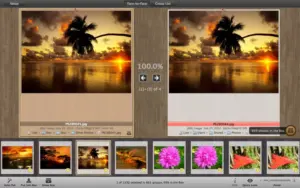
Strong browsing tools: EXIF panel, previews, Quick Look, path bar, and flexible result layouts (“One by One”, “Face-to-Face”, “All in One”).
Formats: RAW, HEIC, WebP, DNG, PDF reads, and broad image coverage.
Version
- Version: 5.5.3
- Developer: Overmacs Team
- Release notes: PhotoSweeper — What’s new





Mount the image and launch Open Gatekeeper Friendly.
Press Enter to bypass Gatekeeper in the Terminal window.
Drag the application to the Applications folder.
The application is ready to use.