PopClip 2026.7.1 fix for Mac

PopClip
Name: PopClip-2026.7.1.dmg.torrent (6.5MB)
Version: 2026 7.1
Operating System: macOS
Program license: Free
Developer: Pilotmoon Software
Interface language: English
Review by:
Downloads 110
Rating
4.2 20 Click to rate
Checked
Download Now

PopClip

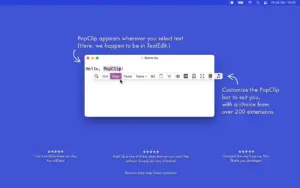
A macOS utility that pops up a compact action bar when you highlight text, giving one-click access to copy, search, translate, formatting, and hundreds of extension-driven workflows without leaving the app you are in.

How it works on Mac

After you grant Accessibility access so PopClip can read selected text, it appears near your selection in supported apps. Built-in actions cover copy, cut, paste, search, spelling, and similar basics; the Extensions Directory adds translation, AI prompts, note capture, URL tools, and app-specific shortcuts. You configure which actions appear, their order, icons, and per-action settings from a dedicated settings window rather than a menu-bar-only panel.

PopClip runs as a standalone download from the developer site or through Setapp. It is not distributed on the Mac App Store for current builds; legacy App Store customers can migrate to the standalone edition for updates. The trial includes all features for 250 action uses until you register a license key.

What changed in the 2026 line

Version 2026.7.1 is a major release after the 2025.9 UI overhaul. iCloud sync keeps installed extensions, action layout, and action settings aligned across Macs, with per-action secrets stored in iCloud Keychain. The actions list now supports unlimited entries, multiple instances of the same extension, folders as submenus, separators, custom icons via Iconify or uploaded SVG/PNG, drag-and-drop arrangement with undo, and ⌘F search within the list.

Extension management adds auto-updates from the directory, info and manage sheets, and a View Source command. Smaller polish includes a wider PopClip bar, clipboard restoration after paste-over actions, deletable built-in actions, preset search engines in Search, and Option-wrapped quoted searches. Minimum macOS rises to 13.5 Ventura; initial macOS 27 Golden Gate beta support is included.

Licensing note

This is the first paid update for customers who bought PopClip in 2018 or earlier; those users enter trial mode with 250 uses and can upgrade at a discounted lifetime offer. Lifetime license holders, Standard licenses still in their free-updates period, and App Store buyers from 2019 onward receive 2026.7.1 as a free update per the vendor.

Build 2026.7.1 (5997) also fixes Ecosia browser recognition and the Messages extension on macOS 27 beta.

PopClip 2026.7.1 for Mac — Text Action Bar

Pros & Cons Show details

✅ PROS

  • Appears instantly on text selection across apps, turning repetitive copy-search-paste loops into one-click actions.
  • A large extension library plus unlimited action instances, folders, and custom icons lets you tailor the bar to writing, research, coding, or translation workflows.
  • iCloud sync of extensions, layout, settings, and Keychain-stored secrets keeps multiple Macs aligned without a vendor cloud account for clip content.
  • Native macOS design with Accessibility-based selection reading, menu-bar control, and optional keyboard triggers fits standard Mac utility expectations.
  • One-time licensing with a generous trial and Setapp availability avoids subscription lock-in for a long-running, actively maintained tool.

❌ CONS

  • Requires Accessibility permission, which some users and managed Mac policies restrict for text-reading utilities.
  • macOS 13.5 minimum and dropping older macOS support leaves users on Big Sur or Monterey without an upgrade path on current builds.
  • Latest versions are standalone-only; Mac App Store installs stuck on 2023.9 must migrate manually to receive 2026.7.1.
  • Pre-2019 license holders face the first paid upgrade in PopClip’s history, with trial limits until they purchase the discounted lifetime offer.
  • iCloud sync merges action lists across Macs asynchronously, so conflicting layouts may take time to converge and need careful initial setup.
✅ What's New in 2026 7.1 Show details
  1. [iCloud Sync] — Syncs installed extensions, actions layout, and action settings across Macs; per-action secrets sync via iCloud Keychain with an on/off Tools menu toggle.
  2. [Actions list overhaul] — Removes action limits, adds multiple extension instances, folders, separators, custom icons, drag-and-drop arrangement with undo, and ⌘F search in the list.
  3. [Extension management] — Directory extensions can auto-update; new Extension Info, Manage Extensions, and View Source sheets show origin, version, and source code.
  4. [Search and clipboard polish] — Built-in Search offers preset engines plus custom URL; Option wraps terms in quotes; clipboard contents restore after actions paste over selected text.
  5. [Messages extension fix] — Fixes the Messages extension on macOS 27 Golden Gate beta so share-to-Messages actions work again on the beta OS.
  6. [Ecosia browser fix] — Ecosia is now recognized as a known browser for browser-aware extension behavior.
  7. [Compatibility] — Minimum macOS is now 13.5 Ventura; initial support for macOS 27 Golden Gate beta is included in this build.

Older Versions

Version Publication date
PopClip 2026.7.1 fix v2026 7.1 Latest Current
PopClip v2025 9.2
PopClip 2025.9.1 fix v2025 9.1
PopClip v2025 9.1
PopClip 2025.9 fix v2025 9
PopClip v2025 9
PopClip v2024 12
PopClip v2024 5.2
PopClip v2024 5.1
PopClip v2024 5
PopClip v2024 3.2
PopClip v2024 3.1
PopClip v2024 3
PopClip v2023 7
PopClip v2022 12
PopClip v2021 10
PopClip v2021 9
PopClip v2021 4
PopClip v2020 12
PopClip v2020 10
PopClip v2019 beta 56
PopClip v2019 9.1
PopClip v2019 9

Installation & Troubleshooting FAQ

8 questions

Common issues when installing macOS apps

Alternatives

Important

Run the downloaded image and drag the app to the Applications folder shortcut.

Once the copy is complete, you can launch the app from Launchpad.

To activate the license, double-click the “Legacy_OS_User.popcliplicense” file.

Compatibility
macOS 13.5 and later

Architecture
ARM, x86 (64-bit)

Join the Conversation

Your email address will not be published. Required fields are marked *