extraDock 4.3.2 for Mac

extradock
Name: extraDock 4.3.2.dmg.torrent (15MB)
Version: 4.3.2
Operating System: macOS
Program license: Free
Review by:
Downloads 106
Rating
4.4 15 Click to rate
Checked
   Download Torrent Download Now

ExtraDock

A lightweight macOS utility that adds extra floating docks you can pin to any screen edge or position, so multi-monitor setups no longer depend on a single system Dock that jumps between displays.

Why an extra dock helps on Mac

Apple’s Dock lives on one active screen at a time. On a laptop plus external monitor, or a three-display desk, that means either keeping launchers on the main display or chasing the Dock as the cursor moves. ExtraDock sidesteps that limit by letting you create as many independent docks as you need, each with its own apps, folders, layout, and behavior.

You can run it alongside the native Dock or hide Apple’s Dock and rely on ExtraDock entirely. Live Dock mirrors your system Dock on another screen; Dock Awareness shows only apps running in the current Space. Either approach keeps frequently used tools within reach without crowding one bar.

Typical multi-monitor workflow

After install, you create a dock, drag apps and folders into it, and place it where it fits your workflow — a chat stack on a side monitor, dev tools on center, utilities floating near the edge. Docks can auto-hide, collapse on hover, hide in full-screen apps, and attach to a specific display so they disappear when that monitor disconnects.

Customization goes beyond placement: size, opacity, blur, borders, effects, and per-app icons. Folder stacks keep many directories behind one icon; a temporary shelf holds files while you switch windows. Drag-and-drop into dock folders works for everyday file moves.

Widgets and system fit

Recent builds expand docks with widgets such as CPU, memory, battery, clock, and timer readouts — useful for at-a-glance monitoring without opening Activity Monitor. The vendor targets low overhead and smooth animations, and the app does not require broad system permissions to add docks.

ExtraDock supports macOS 12 Monterey and later, including current releases through macOS 26 Tahoe, on both Apple Silicon and Intel Macs. Licensing is a one-time purchase from the developer (also available via Homebrew cask); activation is required after install. DisplayLink and some docking-station setups may inconsistently identify screens after sleep, which can affect per-display dock behavior.

Version 4.3.2 continues the widget and polish line with GPU usage monitoring, Clock weekday options, and several dock layout and timer fixes documented in the official Sparkle release notes.
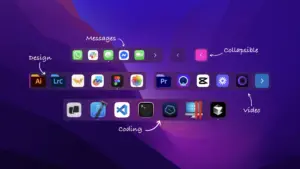

ExtraDock 4.3.2 for Mac — Multiple Floating Docks

Pros & Cons Show details

✅ PROS

  • You can place multiple lightweight docks on different monitors without modifying or breaking the native macOS Dock.
  • Each dock supports its own apps, folders, auto-hide rules, full-screen awareness, and per-display pinning when a monitor connects or disconnects.
  • Visual tuning (opacity, blur, borders, custom icons) and utilities like folder stacks, collapse-on-hover, and a file shelf suit real daily workflows rather than cosmetic-only themes.
  • Live Dock and Dock Awareness widgets bridge ExtraDock with Apple’s Dock and Spaces, so mirrored or space-aware app lists stay current.
  • One-time licensing with ongoing updates and a stated money-back window is straightforward compared with subscription dock alternatives.

❌ CONS

  • It is paid software with required activation, so there is no free tier beyond the vendor’s refund policy for trying it.
  • Notification badges are only partial because macOS does not expose badge data for Apple apps such as Mail and Messages.
  • Docks tied to specific displays can misbehave on DisplayLink or daisy-chained docking setups when macOS re-enumerates monitors after sleep.
  • The app is not distributed on the Mac App Store, so updates rely on Sparkle, the vendor site, or Homebrew rather than App Store purchase restore.
  • Power users who want a single all-in-one launcher with deep scripting may still prefer heavier dock replacements or Spotlight/Raycast alongside minimal docks.
✅ What's New in 4.3.2 Show details
  1. [GPU Usage Widget] — Adds a System Stats gauge for live graphics load on Apple Silicon and Intel Macs, color-shifting from green to red under heavy workloads.
  2. [Clock weekday] — The Clock widget can show the day of week alone or next to the date via Custom layout, included in the Full preset.
  3. [Collapsed dock placement] — Reopening a collapsed floating dock near a screen edge now expands on-screen in the correct direction instead of partly off the display.
  4. [Clock seconds at small sizes] — Show Seconds and date or timezone settings now remain visible at smaller dock icon sizes when enabled.
  5. [Timer instant updates] — Changes to timer duration, color, label, or text size apply immediately without restarting the dock.
  6. [Dock space on all screens] — With Show dock on all screens enabled, ExtraDock now reserves space on secondary displays so windows no longer slide under the dock.
  7. [Accessibility and modernization] — Improved collapse-button accessibility labels and cleanup of deprecated icon and file-picker APIs for better forward compatibility.

Installation & Troubleshooting FAQ

8 questions

Common issues when installing macOS apps

Alternatives

Join the Conversation

Your email address will not be published. Required fields are marked *