Meta
A native macOS music tag editor for cleaning messy metadata, writing consistent tags across many tracks at once, and organizing ripped or downloaded libraries without leaving a Mac-native workflow.
Batch tagging as the default workflow
Meta is built around multi-file editing. Select a folder or a set of tracks, and the sidebar becomes a shared editor: changes to title, artist, album, genre, and other fields apply across the selection immediately, with no separate save step for each file. That model fits DJs, collectors, and podcasters who fix hundreds of tracks after a vinyl rip, Bandcamp dump, or store download. Specialized controls help with awkward fields—BPM, ISO 8601 dates, and multiline lyrics or comments—so you are not fighting free-text formatting rules by hand.
Artwork follows the same batch idea. Drag covers onto a selection, then crop, scale, or compress images so embedded art stays usable without bloating file size. Custom sidebar layouts let you keep only the fields you need for classical, publishing, podcasts, or everyday albums and switch layouts without rebuilding the panel each session.
Cleanup, rename, and online lookup
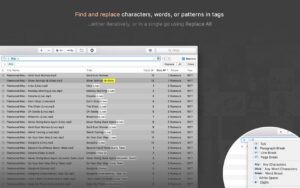
Beyond field edits, Meta can rename files from tag patterns, build folder trees from metadata tokens, extract tags from filenames or paths, renumber tracks after you drag them into order, and run find-and-replace across tags with plain text or regular expressions. Tag Finder can pull release data and high-quality covers from Discogs, with filters such as media type so vinyl and CD matches stay easier to browse. Preferences control which metadata formats are written—including ID3v1 and ID3v2.3/v2.4—which matters when you need UTF-8 or UTF-16 for non-Latin text.
Formats, libraries, and who it suits
Supported audio includes MP3, MP4/M4A/M4B/M4V, FLAC, Ogg/Opus/Speex, AIFF, WAV, DSF, and DSDIFF, with ID3, MP4 atoms, Vorbis comments, RIFF INFO, and APE where relevant. Writes go through TagLib. Changes can stay in sync with Apple Music / iTunes and Doppler when those libraries are in use. The app targets macOS 10.13 or later on Apple Silicon and Intel, ships in seven languages, and is sold as a one-time purchase with a short trial from the vendor site or the Mac App Store. It is not a DAW or a streamer: if you need stem separation or live decks, look elsewhere; if your problem is inconsistent tags and folder chaos, Meta is aimed squarely at that.
Version 2.5.0 adds a Mixed Editor for viewing and editing tag values per group, a text-transforms menu for global casing and similar changes, cleaner Tag Finder data (trailing disambiguation numbers stripped), plus fixes for multi-monitor token menus, duplicated tag configurations at startup, and a recursive-lock crash.