
Nova 14 for Mac

nova
Name: Nova 14 [EDiSO].dmg.torrent (56.36MB)
Version: 14
Operating System: macOS
Program license: Free
Developer: Panic Inc.
Interface language: English
Review by:
Downloads 190
Rating
4.2 13 Click to rate
Checked
   Download Torrent Download Now

Nova

A fully native macOS code editor from Panic that combines editing, Git, terminal, debugging, and remote file work in one Mac-first workspace—without an Electron shell.

Everyday Mac workflow

You open a local project (or connect to a remote server), edit in a fast native editor with multiple cursors, minimap, and syntax highlighting powered by Tree-sitter grammars, then use sidebars for files, Git, issues, and debugging as needed. Built-in terminal tabs keep shell work beside the code. Tasks can run build, run, and clean steps from the toolbar or shortcuts. For web work, live previews and HTML/SVG preview panes support a tight edit-and-check loop. Remote browsing and publishing (FTP/SFTP and related workflows rooted in Panic’s file-transfer heritage) let you edit and deploy without jumping to a separate client for every upload.

Extensions are written in JavaScript and can add languages, themes, sidebar tools, and validation. Compared with VS Code, the extension catalog is smaller, but the trade-off is a coherent native UI, lower typical memory overhead for many Mac users, and tools that feel designed together rather than bolted on.

What changes in version 14

The headline of Nova 14 is language-server integration managed inside the app. In Settings → Languages you can detect servers already on the system, install many tools in one click, pin versions, and let Nova handle updates. Language servers bring diagnostics, hovers, and richer autocomplete for languages you care about. The same release line adds built-in syntax and debugging support for C, C++, Swift, and Rust (with integration paths such as clangd, SourceKit-LSP, and rust-analyzer), plus per-language editor settings for indentation and display. Tree-sitter and built-in grammars were updated; minimap, invisibles, and line wrap can be toggled per document without changing global preferences. Official download notes list macOS 15.6 or later for the current build.

Licensing and fit

Licensing is a hybrid model: purchase from Panic (commonly cited at $99 USD) and keep the version you bought indefinitely, with one year of updates included; renewals for further updates are optional (commonly $49/year). A 30-day trial is available. Nova suits Mac developers who want a native all-in-one editor—especially web, PHP, and now stronger native-language tooling—and who prefer owning a Mac-only app over a free cross-platform Electron IDE. It is less ideal if you need a massive plugin ecosystem, Windows/Linux parity, or AI features that other editors market aggressively. Public version history still documents the 14 line under the 14b track with iterative fixes; treat feature claims as vendor-documented for Nova 14 rather than inventing a separate minor build changelog.
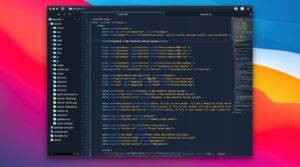

Nova 14 for Mac — Native Code Editor

Pros & Cons Show details

✅ PROS

  • Native macOS frameworks keep the editor responsive with a Mac-like workspace that includes Git, terminal, debugging, and remote files in one place.
  • Nova 14’s built-in language-server management reduces manual LSP setup by detecting, installing, and updating many servers from Settings → Languages.
  • Built-in Swift, Rust, and C/C++ syntax and debugging support expands Nova beyond a web-only niche without requiring a separate IDE for basic native work.
  • The hybrid license lets you keep the version you purchased after the included update year, which is clearer than a pure subscription lock-in for many indie Mac buyers.

❌ CONS

  • Nova is Mac-only, so mixed Windows/Linux teams cannot standardize on the same editor binary.
  • The extension ecosystem is smaller than VS Code’s, which can matter for niche languages and specialized tooling.
  • After the first year of updates, staying current requires an optional paid renewal even though older licensed builds keep working.
  • Current downloads list macOS 15.6 or later, so machines stuck on older system releases cannot run the newest Nova 14 build.
✅ What's New in 14 Show details
  1. [Language server management] — Detect installed LSPs or install servers from Settings → Languages with updates and pinned versions handled in-app.
  2. [C, C++, Swift, and Rust] — Built-in syntax and debugging support, including paths such as clangd, SourceKit-LSP, and rust-analyzer.
  3. [Per-language editor settings] — Configure indentation and display options per syntax in the Languages settings panel.
  4. [Tree-sitter and grammars] — Updated parsing engine and refreshed built-in language grammars from upstream projects.
  5. [Per-document view toggles] — Minimap, invisibles, and line wrap can be toggled per document without changing global defaults.
  6. [Tahoe UI polish] — Improved UI metrics and appearance for newer macOS releases (with a noted trade-off removing older custom Dock icon support).
  7. [Beta stability fixes] — Later 14b builds address LSP crashes, publishing path bugs, Format Document with certain servers, and related editor reliability issues.

Older Versions

Version Publication date
Nova v14 Latest Current
Nova v13.4
Nova v13.3
Nova v13.2
Nova v13.1
Nova v13.0
Nova v12.4
Nova v12.3
Nova v12.2
Nova v11.10
Nova v11.9
Nova v11.8
Nova v11.6
Nova v11.5
Nova v11.4
Nova v11.2
Nova v10.6
Nova v10.5
Nova v10.4
Nova v10.3
Nova v10.2
Nova v10.1
Nova v10
Nova v9.6
Nova v9.5
Nova v9.3
Nova v9.2
Nova v9.1
Nova v9.0
Nova v8.4
Nova v8.3
Nova v8.2
Nova v8.1
Nova v8.0
Nova v7.5
Nova v7.4
Nova v7.3
Nova v7.2
Nova v7.1
Nova v7.0
Nova v6.2
Nova v6.1
Nova v6.0
Nova v5.1
Nova v5.0
Nova v4.3
Nova v4.2
Nova v4.1
Nova v4.0
Nova v3.1
Nova v3.0
Nova v2.1
Nova v2
Nova v1.2

Installation & Troubleshooting FAQ

7 questions

Common issues when installing macOS apps

Alternatives

Join the Conversation

Your email address will not be published. Required fields are marked *