Ulysses
A native macOS writing environment built around a library of sheets, light markup, and export that can go from draft to PDF, Word, HTML, or eBook without leaving the app.
How writing works day to day
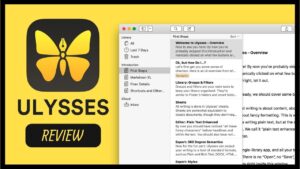
Instead of juggling loose files in Finder, you keep projects, groups, and individual sheets inside one library. On Mac that usually means opening the sheet list, drafting in a focused editor, and using markup for headings, emphasis, links, footnotes, and images rather than fighting a heavyweight page layout while you write. Goals and statistics help you track progress on longer work; filters and organization tools keep research notes, chapters, and blog drafts from collapsing into one endless document.
Because the same library can sync across Mac, iPhone, and iPad via iCloud (with a subscription that unlocks the suite), a typical workflow is drafting on the desktop, reviewing on iPad, and polishing export styles when the manuscript is ready. Publishing panels for WordPress, Ghost, and similar services are part of the product’s publishing side; copy-paste paths exist for other platforms. Built-in proofreading covers many languages and common style issues, which matters when you revise in place rather than bouncing to a separate grammar tool every paragraph.
Export, styles, and Mac fit
Export is where Ulysses separates from a plain text editor: styles (including the Ulysses Style Sheet language) shape PDF and DOCX output with headers, footers, capitalization options, table-of-contents control, and related layout details. Equations can export as native Word (OMML) equations according to the vendor. Editor search supports options such as whole words and “begins with,” and image loading in the editor has been improved in the recent 40 line. The Mac build is aimed at writers who want keyboard-driven markup, a clean three-pane layout, and reliable handoff to publishers or clients—not desktop publishing for print design.
Licensing is subscription-based through the Mac App Store (monthly or yearly plans with a trial), with Setapp as another official distribution path. Current requirements include macOS 14 or later; the app is maintained as a modern Apple-platform product. Version 40.2 is a maintenance release focused on stability after the larger 40 feature set, not a redesign of the writing model.
Who it suits
It fits novelists, journalists, students, and bloggers who prefer a library-first Mac app over Microsoft Word for drafting, then export when they need a formatted deliverable. It is less ideal if you need free perpetual licensing, deep page-layout control, or an open plain-text folder as the sole source of truth. Expect to learn the markup and library conventions once; after that, daily use is mostly drafting, organizing sheets, and exporting with a chosen style.