WhatCable Pro
A menu-bar utility for Apple Silicon Macs that reads USB-C e-marker data and explains—in plain English—what each cable can actually do and which part of the chain is limiting speed or power.
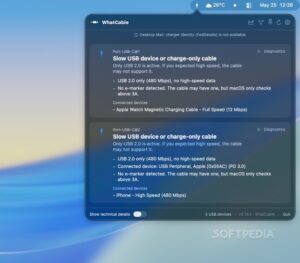
USB-C cables look identical while ratings differ wildly: 5 Gbps vs 40 Gbps, 60 W vs 240 W, passive vs active. WhatCable (Darryl Morley, MIT-licensed free app) sits in the menu bar, watches ports via IOKit, and shows cable type, vendor/product identity when available, and negotiated power or Thunderbolt link info. Plug a cable directly into a Mac port—hubs and docks often hide e-markers from the host. The free tier already answers “what is this cable?”; Pro unlocks history, live metering, and negotiation breakdowns for docks, displays, and flaky SSDs.
How Pro fits a Mac workflow
Name a cable once; Pro recognizes its e-marker fingerprint later and builds a timeline of negotiated speeds and faults. Negotiation Diagnostics compare Mac port, cable, and device capabilities against what actually linked, highlighting the weak link—including cables that under-report versus the Thunderbolt controller. Display Diagnostics compare a monitor’s top mode with the live DisplayPort link (including DSC and adapters). Live power metering updates watts, amps, and volts about every two seconds; PD contract details, port health counters, liquid-detection status, and a terminal dashboard (whatcable --dashboard) serve power users. Pro windows can detach while you swap cables.
Pro is a one-time £9.99 purchase for up to two Macs, with free updates while the product is in active development, email licence delivery, and a 30-day offline grace period. The free app stays free (GitHub and Homebrew). Not on the Mac App Store: sandbox would block the IOKit reads required. Requirements are macOS 14 Sonoma or later on Apple Silicon only—Intel Macs lack the exposed controller data. Optional diagnostic probes can send anonymized hardware samples; the consent sheet in 1.2.1 documents what is sent.
Version 1.2.1
Release 1.2.1 (20 July 2026) is a reliability patch. MagSafe charging with a third-party adapter no longer freezes wattage at “3W” when a second USB-C device (for example a display) is also connected. Intel Macs get an explicit “why this Mac can’t work” message instead of an empty ports list. Power Monitor explains a plugged-in charger that is not the active power source instead of spinning forever. Window mode brings the UI forward on reopen; the updater gives clearer guidance if the app was left in Downloads. Diagnostic probes are bounded, CLI hardware text is sanitized, and Traditional Chinese and Italian translations are updated. Pro licence terms are unchanged—install if you charge over MagSafe while driving a USB-C display.