
Dropzone 5 5.1.0 for Mac

Dropzone 4 Pro
Name:Dropzone 5 5.1.0 MAS [TNT].dmg.torrent (69.08MB)
Hash:c3d4b77baf9b296936fec7a1622c03407cb25315
Review by:
Downloads 215
Rating
4.4 32 Click to rate
Checked
   Download Torrent Download Now

Dropzone 5 — drag-and-drop productivity grid for Mac

A menu-bar utility that turns drag-and-drop into a customizable grid of apps, folders, and actions so you can move, convert, upload, or stash files without hunting through Finder dialogs.

Aptonic’s Dropzone sits in the menu bar and opens a grid when you need it. Drop files onto tiles to copy or move them into folders, open them in apps, resize or convert images, shorten URLs, AirDrop to nearby Macs, or upload to Imgur. Drop Bar acts as a temporary shelf: park files on a tile until you are ready to drag them elsewhere, and pop the shelf out as a floating overlay that stays on top. Version 5 redesigns the UI for macOS Tahoe with Liquid Glass materials, a updated header toolbar, and multi-grid support—separate grids for work, personal, and project setups, each with its own categories and Drop Bar.

Actions, Pro features, and installation choices

Built-in and add-on actions cover everyday file chores: image format conversion, resize presets, TinyURL shortening, and AirDrop. Dropzone Pro unlocks Amazon S3 and SFTP uploads, macOS service integration, action keyboard shortcuts, ongoing action updates, and major version updates. On the Mac App Store, Pro is offered as a 14-day free trial then about $4.99/month (regional pricing varies); Aptonic’s site also sells a lifetime Pro license (launch pricing around $25, list about $35) and lists Dropzone on Setapp. The App Store build is sandboxed and cannot write to arbitrary directories or run AppleScript; the free direct download from aptonic.com is unsandboxed for those advanced actions. A dz command-line tool scripts grids, Drop Bar, and running actions for power users.

Requirements are macOS 13 or later. The store listing is about 56.5 MB, with localizations including English, French, German, Italian, Japanese, Korean, Polish, Simplified Chinese, and Thai. Privacy labeling states that no data is collected from the app. Upgrading from Dropzone 4 migrates existing actions and preferences automatically according to the vendor.

Version 5.1.0

Release 5.1.0 focuses on Drop Bar automation: a dedicated Drop Bar section in Settings, options to auto-add new screenshots to Drop Bar, run a chosen action on new screenshots, and auto-close the popped-out Drop Bar when the last item is removed. Fixes address a lingering filename tooltip during right-click menus and Edit/Remove buttons that were wrongly enabled before a grid was selected in Settings. It is a practical update if you screenshot often and want captures to land in Drop Bar without manual drops.
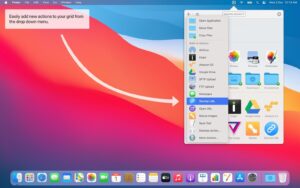

Dropzone 5 5.1.0 for Mac — Drag-and-Drop Grid

Pros & Cons Show details

✅ PROS

  • Multi-grid layouts keep separate sets of apps, folders, and actions one click away from the menu bar.
  • Drop Bar plus a floating pop-out shelf reduces Finder round-trips when staging files between apps.
  • Tahoe Liquid Glass UI and custom folder icons (colors, symbols, emoji) make grids easier to scan.
  • Built-in image, AirDrop, URL, and upload actions cover common file chores without separate tools.
  • Direct (unsandboxed) download supports AppleScript and arbitrary-folder writes that the App Store build cannot.
  • Lifetime Pro (~$25–$35), monthly subscription, or Setapp gives flexible licensing; privacy label reports no data collection.

❌ CONS

  • Advanced actions (S3, SFTP, shortcuts, service integration) require Dropzone Pro after the trial.
  • Mac App Store sandbox blocks AppleScript and arbitrary directory writes—power users need the site build.
  • Requires macOS 13 or later, so older Ventura-era Macs below that floor are unsupported.
  • Learning grids, categories, and action scripting takes setup time before the workflow feels natural.
  • Subscription cancellation removes Pro actions and advanced features until you resubscribe.
  • Overlaps with shelf apps like Yoink for simple holding; value depends on using actions, not only Drop Bar.
✅ What's New in 5.1.0 Show details
  1. [Drop Bar Settings section] — A dedicated Settings area for Drop Bar options keeps shelf preferences separate from grid layout.
  2. [Auto-add screenshots to Drop Bar] — New screenshots can land in Drop Bar automatically for quicker sharing or filing.
  3. [Run action on new screenshots] — Choose an action that runs when a screenshot appears, reducing manual drops.
  4. [Auto-close empty Drop Bar] — The popped-out Drop Bar can close itself when the last item is removed.
  5. [Drop Bar tooltip fix] — Filename tooltips no longer stick on screen while a right-click menu is open.
  6. [Settings button state fix] — Edit and Remove stay disabled until a grid is selected, avoiding empty-state mistakes.
  7. [macOS 13+ unchanged] — Compatibility remains macOS 13 or later for this release line.

Older Versions

Version Publication date
Dropzone 5 v5.1.0 Latest Current
Dropzone 5 v5.0.9
Dropzone 4 Pro v4.80.75
Dropzone 4 Pro v4.80.73
Dropzone 4 Pro v4.80.72
Dropzone 4 Pro v4.80.70
Dropzone 4 Pro v4.80.69
Dropzone 4 Pro v4.80.68
Dropzone 4 Pro v4.80.67
Dropzone 4 Pro v4.80.66
Dropzone 4 Pro v4.80.65
Dropzone 4 Pro v4.80.64
Dropzone 4 Pro v4.80.63
Dropzone 4 Pro v4.80.62
Dropzone 4 Pro v4.80.61
Dropzone 4 Pro v4.80.60
Dropzone 4 Pro v4.80.59
Dropzone 4 Pro v4.80.58
Dropzone 4 Pro v4.80.57
Dropzone 4 Pro v4.80.56
Dropzone 4 Pro v4.80.55.2
Dropzone 4 Pro v4.80.55
Dropzone 4 Pro v4.80.54
Dropzone 4 Pro v4.80.53
Dropzone 4 Pro v4.80.52
Dropzone 4 Pro v4.80.51
Dropzone 4 Pro v4.80.50
Dropzone 4 Pro v4.80.49
Dropzone 4 Pro v4.80.48
Dropzone 4 Pro v4.80.47
Dropzone 4 Pro v4.80.46
Dropzone 4 Pro v4.80.45
Dropzone 4 Pro v4.80.44
Dropzone 4 Pro v4.80.42
Dropzone 4 Pro v4.80.40
Dropzone 4 Pro v4.80.39
Dropzone 4 Pro v4.80.37
Dropzone 4 Pro v4.80.26
Dropzone 4 Pro v4.80.25
Dropzone 4 Pro v4.80.24
Dropzone 4 Pro v4.80.23
Dropzone 4 Pro v4.80.22
Dropzone 4 Pro v4.80.21
Dropzone 4 Pro v4.80.20
Dropzone 4 Pro v4.80.19
Dropzone 4 Pro v4.80.18
Dropzone 4 Pro v4.80.17
Dropzone 4 Pro v4.80.16
Dropzone 4 Pro v4.80.15
Dropzone 4 Pro v4.80.14
Dropzone 4 Pro v4.80.13
Dropzone 4 Pro v4.80.12
Dropzone 4 Pro v4.80.8
Dropzone 4 Pro v4.80.7
Dropzone 4 Pro v4.80.5
Dropzone 4 Pro v4.80.2
Dropzone 4 Pro v4.80.1
Dropzone 4 Pro v4.80.0
Dropzone 4 Pro v4.7.9
Dropzone 4 Pro v4.7.3
Dropzone 4 Pro v4.7.2
Dropzone 4 Pro v4.7.1
Dropzone 4 Pro v4.6.9
Dropzone 4 Pro v4.6.1
Dropzone 4 Pro v4.5.7

Installation & Troubleshooting FAQ

8 questions

Common issues when installing macOS apps

Alternatives

1 Comment

Join the Conversation

Your email address will not be published. Required fields are marked *