Swift Publisher 5.7.7 for Mac

Swift Publisher
Name:Swift Publisher 5 5.7.7 [TNT].dmg.torrent (493.98MB)
Hash:ae068a3bf18ceb7f45ccd3c5a95181bc5125beed
Review by:
Downloads 332
Rating
4.6 8 Click to rate
Checked
   Download Torrent Download Now

Swift Publisher 5 — desktop publishing for Mac

A consumer-friendly page-layout app from BeLight Software for designing and printing flyers, newsletters, business cards, labels, envelopes, CD/DVD packages, and other everyday documents without a steep InDesign learning curve.

You start from blank pages or the Template Gallery, then place text boxes, images, Smart Shapes, and heading styles on a canvas with grids, guides, layers, and optional two-page spreads. Master pages keep multi-page jobs consistent; flowing multi-column text, styles, and wrap-around pictures handle long copy. Mail merge and dynamic fields pull addresses from Apple Contacts or data files for personalized labels and envelopes. Built-in barcode tools generate QR, UPC, Code 39, EAN, ISBN, and similar codes—handy for menus, shipping labels, and inventory stickers.

Templates, paper stocks, and print/export

The library includes hundreds of pre-designed layouts plus over 2,000 clipart images (Extras Pack / in-app purchase adds tens of thousands more images and fonts). Label and card stocks from Avery and other vendors map to common print sheets; direct-to-disc printing works with supported Canon, Epson, HP, and specialty label printers (DYMO, Brother, Zebra, Primera, and others documented by BeLight). Export goes to PDF, TIFF, JPEG, and EPS with bleed and DPI controls; text can convert to curves for print-shop handoff. Depositphotos integration offers stock art search when you need more photos than the local library.

Licensing is a one-time $19.99 purchase from BeLight or the Mac App Store (Family Pack and upgrade paths from older BeLight titles exist on the vendor store). A free trial is available via Check for Updates / direct download. The App Store privacy label states that no data is collected. Requirements are macOS 10.12 or later on Intel and Apple Silicon; the store build is about 448 MB. Languages include English, French, German, Italian, Japanese, and Spanish.

Version 5.7.7

Release 5.7.7 expands day-to-day design stock and barcode polish: new flyers, menus, posters, and business cards in the Template Gallery; additional Avery and Brother label papers; customizable colors for QR codes and other barcodes; improved import of audio and video track lists for disc projects; plus general stability fixes. It follows maintenance work in 5.7.6 (Touch Bar hang) and Tahoe-related fixes earlier in the 5.7 line—worth installing if you print colored QR/menu assets or need the newest label stocks on current macOS.
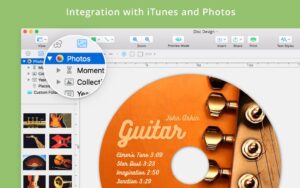
Swift Publisher 5.7.7 for Mac — Desktop Publishing

Pros & Cons Show details

✅ PROS

  • Covers flyers, multi-page layouts, business cards, labels, envelopes, and CD/DVD packages in one relatively simple Mac app.
  • Avery and vendor paper templates reduce guesswork when printing at home on standard label sheets.
  • QR and barcode generation with mail merge suit contactless menus, shipping, and inventory stickers.
  • One-time $19.99 pricing undercuts Affinity/InDesign for casual and small-business print jobs.
  • Master pages, layers, spreads, and text-box linking support more than single-page flyer work.
  • Runs on macOS 10.12+ with Apple Silicon support and no data collection per the App Store privacy label.

❌ CONS

  • Not a full professional DTP suite—complex brand systems and advanced typography still favor Affinity Publisher or InDesign.
  • Large install (~450 MB) and optional multi-gigabyte Extras Pack if you want the full clipart library.
  • Depositphotos and some advanced media features assume network access and possible extra cost.
  • Template and clipart aesthetics can look consumer/template-driven compared with custom agency design.
  • iPhone/iPad companion mentioned as forthcoming; Mac remains the only full publishing surface for now.
  • Feature depth varies by project type—label users gain most; magazine-scale workflows hit the tool’s ceiling sooner.
✅ What's New in 5.7.7 Show details
  1. [New Template Gallery designs] — Additional flyers, menus, posters, and business cards for quicker project starts.
  2. [Avery and Brother label papers] — Newly supported label stocks broaden home and small-office print layouts.
  3. [Customizable barcode colors] — QR codes and other barcodes can use custom colors to match brand palettes.
  4. [Audio and video track import] — Importing track lists for disc and media projects is more reliable.
  5. [Stability improvements] — General bug fixes improve everyday reliability beyond the listed features.
  6. [Follows Touch Bar hang fix] — Builds on 5.7.6’s fix for hangs on MacBooks with a Touch Bar.
  7. [Requirements unchanged] — macOS 10.12 or later and ~$19.99 one-time licensing remain the product baseline.

Older Versions

Version Publication date
Swift Publisher v5.7.7 Latest Current
Swift Publisher v5.7.6
Swift Publisher v5.7.5
Swift Publisher v5.7.4
Swift Publisher v5.7.2
Swift Publisher v5.7.0
Swift Publisher v5.6.9
Swift Publisher v5.6.8
Swift Publisher v5.6.6
Swift Publisher v5.6.5
Swift Publisher v5.6.4
Swift Publisher v5.6.3
Swift Publisher v5.5.11
Swift Publisher v5.5.10
Swift Publisher v5.5.7
Swift Publisher v5.5.6
Swift Publisher v5.5
Swift Publisher v5.0.11
Swift Publisher v5.0.10
Swift Publisher v5.0.9

Installation & Troubleshooting FAQ

8 questions

Common issues when installing macOS apps

Alternatives

Join the Conversation

Your email address will not be published. Required fields are marked *